
We all wish we could have the latest and most powerful laptops and PCs, but the reality is that they are costly, and we all have budgets to stick to. Luckily, I can often find great deals in the used market. Some power users and serious gamers upgrade to the latest models annually, often selling their capable older PCs at fantastic prices to offset costs.
I can also find many refurbished PCs on the market from reputable brands. These are often older models that still work well and include a warranty for peace of mind about their durability. It's still worth diligently inspecting the PC to see how it runs. I always do these five things when buying a used PC to ensure it's working perfectly before parting with my cash.

5 steps I took for a successful in-place upgrade of my 6-year-old PC from Windows 10 to 11
Doing an in-place upgrade from Windows 10 to 11 isn't risky if you follow these pre-install steps.
5 Physically inspect the inside and outside
Check for damage, rust, and moisture build-up
When buying a used PC, I first physically inspect the inside and outside the case. I look for scratches, cracks, and dents on the case to determine whether it was taken care of or dropped. I do the same with the monitor, checking the display for cracks and other signs of damage.
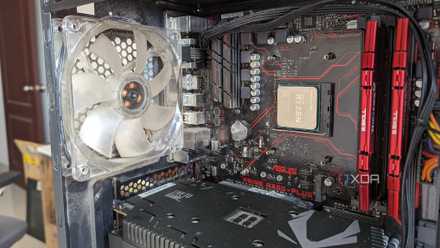
I also inspect the internal components for signs of damage, like rust, oxide build-up, or blown components. Then, I check for loose connections and ensure that the RAM and other components are seated correctly in their slots. I get put off by excessively dusty and dirty PCs, so I blow them out to check that everything is in order. It's also worth checking that all the buttons on the mouse and keyboard are working and inspecting the cables to ensure they aren't loose or broken.

4 reasons pre-built gaming PCs are more relevant than ever
A pre-built gaming rig might be the better choice for this market
4 Check the specs
Everything should check out
I've seen many used PCs advertised with specs that don't match the actual machine. That's why I check the device manager and system information to ensure that the GPU, RAM, CPU, and other components match the description of what I'm buying. The device manager is also suitable for finding basic issues like outdated drivers or hardware that isn't installed correctly.
Another reason to check the specs is to ensure that the PC is upgradable in the future and that spare parts are readily available if something breaks. I don't think it's worth buying a used PC older than three or four years old because it won't offer long-term performance and is harder to upgrade.
6 reasons to stay away from cheap pre-built gaming PCs
Cheap pre-built gaming PCs might look attractive, but there's a lot of shady stuff going on under the hood
3 Run Diagnostic Software
Look for hardware and software errors
Even if the components look good, I run diagnostic software like AIDA64 and CrystalDiskInfo to ensure perfect functionality. I usually run benchmark tools for the CPU, RAM, and GPU to check their performance and walk away if I detect any issues. It's also worth running the event viewer tool to see if software errors affect the system.
CrystalDiskInfo is one of the best tools for testing SSDs. I run it to inspect the drive for errors and the read and write speeds. I also checked the drive's health status and history to see how much data had been written on it.

Maximizing your PC’s longevity: 7 maintenance tips for every user
Maximizing the longevity of your PC doesn't have to be scary. These tips will have you on your way to increasing your PC's lifespan in no time.
2 Test the ports
They should all be functional
If the used PC passes the previous steps, I test all the ports to see if they work. By this stage, you'll know if the monitor, mouse, and keyboard are working. It's also worth testing the spare USB-A and USB-C ports because you'll need them to attach other devices.
My port tests extend to SD card readers, audio ports, and anything else used to connect devices. I also individually tested each HDMI and DisplayPort on the motherboard and the ones on the GPU for functionality. I'm fussy and won't buy a used PC if anything isn't working correctly.

These 7 bad habits shorten your PC's lifespan
If you want your PC to last, be sure to avoid these 7 cardinal PC sins.
1 Format and reload Windows
A fresh start to avoid issues
Once I'm happy that the used PC is functioning perfectly, it's time to format the drive and reinstall Windows. I do this because I don't know what the previous user was doing and would rather start on a fresh slate without any potential system errors or viruses lurking in the background.
It's also better to have a fresh copy of Windows and the apps I want instead of uninstalling the previous user’s programs or re-registering them in my name. I’m also paranoid about sensitive data, and reloading Windows means I don't need to worry about any illegal information or backdoors into the system that can be used against me later.
What other things do I do when buying a used PC?
It's not always possible, but I try to get the original sales receipt from the person selling the PC. This ensures that it was bought legitimately and gives me access to any remaining warranty. I also try to shop around for the best deal and usually look at a few options before deciding on the one I want.
8 trends that will sound the death knell for gaming PCs
The road ahead for PC hardware is dark and full of terrors