
Thanks to its support for cool accessories and different operating systems, the Raspberry Pi 5 is easily the most versatile device in my home lab. While it bears a pint-sized footprint and barely consumes any power, the Single-Board Computer can run a handful of cool projects – ranging from simple emulation platforms and NVR utilities to full-fledged container-hosting hubs and file sharing servers.
That said, even the uber-popular Raspberry Pi family remains left out of the home lab game, as anything more demanding than a containerization platform becomes too much of a hassle to run on these Arm SBCs – both in terms of compatibility and performance. Or so I believed, until I had a random thought about running Canonical MicroCloud on my Raspberry Pi, and that led me to deploying Canonical’s underrated server platform on the SBC. And guess what? The Raspberry Pi managed to deliver amazing results when running LXD-based virtual guests – to the point where I’m contemplating if I should pivot to MicroCloud for minor server workloads.
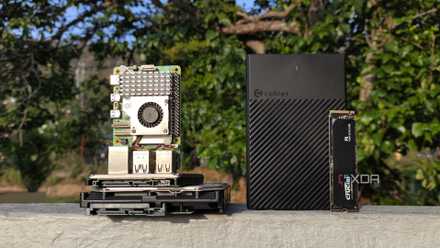
You can use a Raspberry Pi as a decent home server
Despite their cute appearance, Raspberry Pi SBCs double as reliable server nodes
MicroCloud can run both VMs and LXCs
Unlike Proxmox, it works well on the Raspberry Pi
As someone who has multiple PVE nodes active in my home lab, I consider Proxmox the ideal virtualization platform for anything remotely related to servers. And while it does have the lowest minimum requirements out of the key home server platforms, even the all-powerful Proxmox doesn’t support Arm systems. Well, you could try to run it on a Raspberry Pi using a couple of workarounds, but the compatibility and performance issues you’ll encounter by doing so make it hard to recommend this project. Yeah, I speak from experience.
MicroCloud, on the other hand, works exceedingly well on the Raspberry Pi… provided you go for Ubuntu Server. I tried setting it up on the Raspberry Pi before writing this article, but the distro kept throwing the sudo: microcloud: command not found error even after I forced my snap-hating self to set up the Snap Store and all the MicroCloud, MicroCeph, and MicroOVN dependencies. Switching to Ubuntu Server, however, allowed me to install MicroCloud using the same commands I executed on my x86 machines:
sudo snap install lxd --cohort="+"
sudo snap install microceph --cohort="+"
sudo snap install microovn --cohort="+"
sudo snap install microcloud --cohort="+"
The best part? Since MicroCloud relies on LXD, it can run both virtual machines and containers – and even offers pre-configured templates to make my life easier (and I’ll go over them in a bit). Being able to spin up containers is a neat facility for something as lightweight as a Raspberry Pi, and I can always deploy a VM or two if I require more isolation for my projects.
The Arm version of MicroCloud includes all essential features
When you’re trying to run a server-tier OS on Arm devices, its non-x86 image may only include a fraction of the features as its conventional counterpart. Canonical’s MicroCloud is an exception, as it supports most facilities you’d find if you configure it on a typical x86 system – be it the minimalist web UI, ACL rules, or the clustering provisions. While we’re on that subject, cluster environments work even better on budget-friendly Arm SBCs like the Raspberry Pi family, as you don’t have to spend thousands of dollars on spare nodes. Alas, there’s one noticeable difference between the x86 and Arm variants of MicroCloud…
Unfortunately, it supports a smaller image pool on the Raspberry Pi
You can grab the official templates for common distros, though
I always appreciate server platforms that ship with templates for other distros and services. MicroCloud takes this feature to the next level, as (unlike Proxmox) it includes virtual machine templates in addition to images for LXD containers. But when you’re using the Arm version of the tool, you might find the list quite short compared to the massive list on a typical x86 system.
That’s because the Raspberry Pi can only run Armhf and Arm64 images, leading to a smaller pool of templates. Nevertheless, the normal and minimal Ubuntu images can be deployed as VMs or containers, depending on your tinkering needs. Meanwhile, the templates based on Debian, Arch, Fedora, and other distros only support LXD containers. That’s not really an issue, as you probably won’t be able to run tons of virtual machines on the Raspberry Pi, anyway.
But you shouldn’t expect this setup to run tons of VMs
Containers, on the other hand, are fair game
Considering the low horsepower of the Raspberry Pi, it shouldn’t come as a surprise that the SBC can’t run multiple virtual machines simultaneously. I’ve managed to run two CLI VMs alongside a handful of containers on the 8GB model of the RPi 5, and this setup worked pretty well thanks to the lightweight nature of Ubuntu Server and the terrific performance of LXD-based virtual guests. Containers, in particular, work really well on the SBC, and I’ve currently got some Docker environments up and running inside one of the VMs.
Would I use it as a replacement for my home lab? Heck no. But the real strength of the MicroCloud and Raspberry Pi combo lies in its low power consumption and cheap price. With a high-availability cluster, I can turn it into a 24/7 monitoring hub for the rest of my home lab, and even run a handful of experiments on the spare MicroCloud nodes while I’m at it.

I built a Kubernetes cluster with my Raspberry Pi's - here's how you can, too
A robust container orchestration server - built with a bunch of Raspberry Pi's and boundless patience