
I've been trying to unify my smart home over the last year, which hasn't been the most straightforward task, since the devices in my household include a mix of Google Home, HomeKit, and Alexa, with a few smaller ecosystems along the way. That isn't how the smart home was sold to me all those years ago, and it never sat right with me that I needed either careful purchasing or multiple apps to make things work.
I've been able to (mostly) achieve this by running Home Assistant on a mini PC, which supports a much wider range of devices and can handle major ecosystems, down to custom-made devices running on ESP32s.
I no longer have to juggle apps to control Google Home devices alongside the rest of my ecosystem, I still have smart displays to use, and I've even managed to remove the need for Google Assistant with local voice control. The thing is, it wasn't even that hard, but it did take a fair bit of effort and reading documentation along the way.

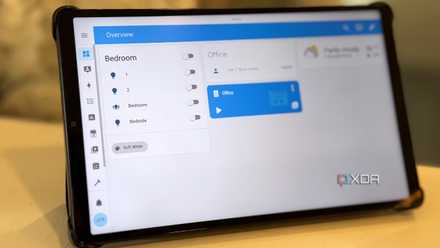
I replaced my Google Home Hub with an old tablet and a custom Home Assistant dashboard
Home Assistant is still my smart home companion of choice.
Home Assistant runs my smart home with local control
I've replaced (almost) all my dependence on the cloud
When I first set up Home Assistant, I was amazed at how much I could integrate into a single dashboard. It didn't matter whether the devices were Alexa-enabled, HomeKit, Google Home, or manufacturer-specific. I could find an add-on or integration and link them into one unified controller.
It also didn't matter whether they used Thread, Zigbee, Z-Wave, 433 MHz, Bluetooth, MQTT, Wi-Fi, Ethernet, Modbus, or IR/RF; if you can find a USB connector for that communication protocol, Home Assistant can use it. It's unshackled my smart home from manufacturer lock-in, but that's not the only thing it's enabled.
Everything in my smart home is now under local control, so that if I lose internet access for whatever reason, I can still control my smart devices. That wasn't always the case, which is frustrating when you have lights set up not to need physical switches, and the only way to control them is via the app.
And I can now build complex automations across any devices, with Home Assistant as the only link, opening a whole new world of automated control without additional hardware.
My smart home keeps running even when my internet doesn't
Cloud-based convenience only goes so far
Almost any mini PC will do
I started out using Home Assistant in Docker on my NAS, but soon realized its limitations. It's now running as Home Assistant OS in a virtual machine on a Proxmox host on a much more powerful mini PC, but it wasn't always on there either. The first mini PC I had it running on was powered by an Intel N150, a power-efficient processor that gave me all the computing power I needed for most tasks.
It wasn't until I started integrating local LLMs into Home Assistant for private, local voice control that I needed a more powerful mini PC. Still, I kept the same setup of running HAOS in a VM in Proxmox, because it was easy to transfer across to the new device, and I know I'll be able to transfer it again if I outgrow this device. Plus, it gives me the option to run a Proxmox cluster for high availability, because the last thing I want now is for Home Assistant to go down due to hardware issues.
Replacing every Google device took a little longer
But now I have local voice control and smart displays to make control easier
I know that Home Assistant has a good Google Assistant integration, which lets you pass HA entities to Google Assistant control so that you can use existing smart speakers (and even with local-first control). It either needs the Home Assistant Cloud subscription or setting up a testing app in Google Cloud, both of which I'd rather not explore. My smart home is blocked from internet access most of the time, with Tailscale providing remote access for Home Assistant control, and I'd rather keep all security under my control.
That doesn't mean I don't have voice control, though. With ESPHome and some ReSpeaker devices hooked up to a local LLM, I've got open-source smart speakers that work exactly how I want them to, including changing the voice to that of beloved video game characters or forother amusements, without another subscription.
And I don't miss out on smart displays either. I've got a couple of E-Ink tablets running the Home Assistant app in the main areas of my home, so I can pick them up for deeper control if I don't want to use voice commands. If I wanted to make things more DIY, there are plenty of ESP32 displays that could be customized for HA use, and I could conceivably have one on the wall in every room.
Home Assistant Voice Preview Edition makes the switch easier
I've had issues with my Nest Mini smart speakers, which isn't that surprising considering how long ago I acquired them. One of the issues is a more recent development, with Google Gemini's AI taking over from Google Assistant. I don't find it anywhere near as responsive or accurate as the older Assistant was, and it irritates me that I can't go back.
Home Assistant has its own Voice smart speaker which is currently in Preview Edition, but it still works well. It integrates with your existing Home Assistant installation and gives accurate voice detection, which is the most important thing for any voice assistant. Every command is processed locally with the Whisper and Piper add-ons, and because it works with every Home Assistant entity, it has far more utility than the limited voice commands that Google Assistant or other voice assistants could manage with some of the things I have connected, like Jellyfin.
Home Assistant
- OS
- Windows, macOS, Linux
- iOS compatible
- Yes
Switching from Google Home to Home Assistant was a long process, but very rewarding
I'm enjoying having local-first control of my smart home that relies on no ecosystem other than the one I've built in Home Assistant. While I recognize that not everyone will want to de-Googlify their smart home this way, I no longer have to worry about whether integrations will work with Alexa or iOS, because everything works through the Home Assistant app and the DIY smart speakers I've put together.
-
Beelink ME mini 6-Slot Home Storage NAS
-
Bosgame M5 AI Mini Desktop
- RAM
- 128GB LPDDR5X DDR5-8000
- CPU Speed
- Base 3GHz, Boost up to 5.1GHz