
Setting up a home office goes beyond just sticking a desk in a corner. Such an arrangement leads to chaos and a lack of productivity. The key is to create an environment that balances focus, creativity, and efficiency. In this post, I will share essential tips to transform any corner of your home into a productivity powerhouse, helping you get work done and achieve a work-life balance in no time.
From optimizing your space and eliminating clutter, to developing a routine, here are the top secrets to a home office that works with you, not against you.

6 reasons you need a docking station for your home office setup
Upgrade your home office with a docking station: gain extra ports, multi-monitor support, and better ergonomics to boost your productivity.
7 Design a workspace with minute details
Your home office is more than just a place to park your laptop or monitor. You need to have a dedicated room or space to separate it from your leisure areas visually. You shouldn’t simply use the living room or dining table to get work done. If you are dealing with a small space, get creative with vertical storage, floating shelves, and multi-functional furniture.
A dedicated workspace, no matter how small, is a crucial step in creating an effective and productive home office. I would also advise establishing a clear start and end time for your workday, just like a traditional office. It will help maintain a healthy work-life balance.
6 Optimize your home office setup
Once you pin down a space for your home office setup, it’s time to take care of ergonomics. Firstly, allocate a considerable budget for your chair and desk. Invest in an ergonomic chair that supports your back and delivers good posture. You should also ensure correct desk height where your elbows are bent at a 90-degree angle when typing.
If you have a good budget, opt for an ergonomic keyboard and mouse to reduce wrist strain during long work hours. These might appear to be minor adjustments, but they significantly contribute to forming a productive environment.
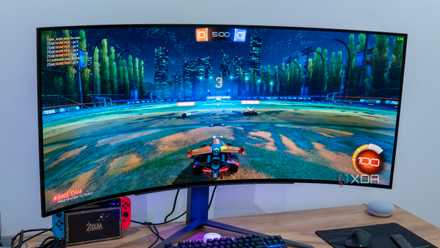
5 best visual upgrades you can make to your PC setup
The desktop PC experience is a highly visual one. Here are the 5 biggest upgrades you can make to enhance the beauty of your setup.
5 Eliminate clutter
Physical clutter on your desk or home office is a productivity killer. You need to schedule regular decluttering (on weekends, maybe) to remove unnecessary items, papers, and anything that doesn’t serve a purpose in your workspace. You can also buy strategic storage solutions like drawers, shelves, file organizers, and boxes to keep your essentials organized and easily accessible.
As your home office grows with different devices, it quickly creates cable clutter on your desk. Make sure to tuck those unnecessary cables behind a monitor or desk, and keep your desk and surrounding surfaces as clear as possible.
You should also factor in digital decluttering by organizing your files and cloud storage accounts, prioritizing important messages, and deleting unnecessary apps. Whether you prefer OneDrive, Google Drive, or Dropbox, organize your files, documents, and media library in relevant folders so that they are easy to find and retrieve. I personally prefer a minimalist approach to keep my desk clear and reduce visual clutter.
4 Block out distractions and bring nature in
Frequent interruptions like household chores, noisy neighbors, or traffic can significantly impact your productivity when working from home. You need to invest in ANC headphones to block out distractions. You should also utilize DND mode and use time management techniques like Pomodoro to maintain concentration.
I also recommend incorporating natural elements like wood, stone, or water features to create a claiming atmosphere. You can position your desk near a window to take advantage of natural light and even buy some easy-to-maintain plants.

These 5 apps will help you track your time to stay on top of your productivity
From boosting productivity to mastering your daily routine, these apps will help you make the most of every minute
3 Develop a routine
There are several productivity hacks for an efficient home workspace. Some follow the Eisenhower matrix to break down their tasks into priorities, while others use a time-blocking technique to allocate specific time for different tasks. Whichever technique you prefer, make sure to stick to it and don’t over-schedule yourself. Since you are working from home, you should always factor in some time for unexpected tasks and breaks.
Overall, establishing consistent routines and habits is crucial for creating a productive and sustainable work-from-home experience.
2 Invest in tech and tools
You need to select and utilize the right technology and tools to optimize your home office. For example, if you are a programmer, video editor, or creative professional, invest in a dual monitor setup for better multitasking. Those with a considerable budget can also get a standing desk to alternate between sitting and standing throughout the day to reduce back pain.
That’s the hardware aspect. On the software front, you need to use task and project management apps to stay on schedule. You can also use solutions like Toggl Track to keep track of your time, Notion to create a personal Wiki, Obsidian to manage your knowledge repo, and more.

9 products you need to improve your home office productivity
Essential gadgets to master the art of home office productivity
1 Embrace flexibility
There is no ‘one-size-fits-all’ home office setup. You shouldn’t try to copy anyone’s home office setup. Your working style and preferences are unique, and you should feel free to experiment with different techniques, organizational systems, and work styles to discover what works best for you.
Additionally, be open to adopting new hardware or tools to enhance your workflow and improve comfort. After all, new projects, different roles, and even shifting priorities require adjustments in your home office.
Supercharge your workday
In the end, you should also prioritize well-being with mental health breaks, ensure hydration with sufficient water, consume healthy snacks, and incorporate movement breaks throughout the day to boost energy levels. Follow the tips above, curate your home office space, establish boundaries, eliminate distractions, and embrace the flexibility of remote work with high efficiency.
While you are at it, make sure to use some of the top home office software for collaboration and productivity.