
Summary
- Comfort is key in a gaming headset - adjustable headband, swivel earcups, and well-padded design are essential for long gameplay sessions.
- Wired vs. wireless options - wired offers lowest latency but modern wireless headsets like Steelseries Arctis Nova Pro come with multiple removable batteries.
- A crisp microphone for reliable communication - look for a boom mic with noise rejection and physical mute button for clear voice quality.
While you can game using any pair of good headphones, the best gaming headsets often come with added features that will make your gaming experience better. From being able to hear footsteps and other sound effects with pinpoint accuracy in online shooters, to immersive soundtracks in single-player experiences, audio underpins the virtual world you're exploring.
A good gaming headset is one of the things that will make any game played on a new GPU come alive. I don't mean with faked surround sound but with positional audio from a good pair of drivers. You could go wired or enjoy the freedom of a wireless headset with low-latency connectivity. Either way, you're getting the best playback of the in-game audio, and that's important for your immersion. The thing is, there are plenty of features you can consider when buying a gaming headset, but I truly believe that most of them are nice to have and not dealbreakers. I always look for these five things in a gaming headset, and you should, too.
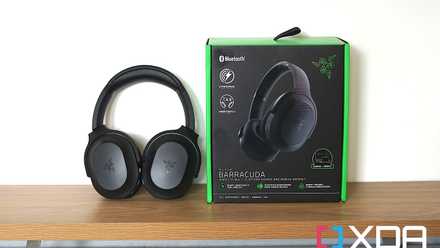
Razer Barracuda headset review: Mixing gaming and premium wireless headphones
The Razer Barracuda is the company's newest wireless headset and it takes a few cues from Razer's Opus headphones. Check out our full review.
5 Comfort
Ear and head fit are essential
The best gaming headset is the one you can wear for long gaming sessions, and that means it needs to be comfortable. The most important features to look for are an adjustable headband and earcups that can swivel to adjust to the dimensions of your head. If the headset doesn't have these features, chances are you won't want to wear it for long. Those with larger ears will also want to take particular note of the size of the earcups. Speaking from experience, there is nothing worse than having a headset clamped onto your earlobes while you play a game. It's not comfortable, and it will hurt long after you stop playing. Any well-fitting headset should rest on the skin around your ears, not on them. Weight is also important to consider, but a well-designed headset will spread that weight around your head so you don't get pressure points.

Razer BlackShark V2 Pro (2023) review: Critical improvements make this a great headset
The Razer BlackShark V2 Pro (2023) brings critical upgrades over its predecessor like an improved mic, Bluetooth connectivity, and improved battery
The earcups should also be comfortable and well-padded. If you're a glasses wearer, look for ones that mention memory foam or that they're designed for glasses use. I've found that headsets from Turtle Beach or Razer are good for when I'm wearing blue-light-blocking glasses. It's also important to think about the material on the earcups. I vastly prefer fabric earcups, which are usually breathable mesh, so my ears don't get too warm. Leather or pleather earcups are also often used, and these provide more sound isolation but at the cost of increased heat, as the air can't move around. That might work for you if you live in a cooler climate or if you prefer the A/C cranked.
4 Wired or wireless connectivity
Not all options are equal
The most hardcore gamers are most likely to suggest using a wired headset for your audio source. That's likely down to two things. Wires have the lowest latency possible and even the best batteries will need recharging eventually. When playing competitive games like online shooters, latency in hearing your opponent could mean the difference between who survives the firefight. And even with fast charging, batteries take a while to fully charge. But for most people modern wireless headsets have improved substantially, and that's what I suggest you look at first.

Before you buy a gaming headset, consider getting IEMs instead
IEMs are massively popular in the audiophile community, but they deserve some praise for gaming as well.
Good wireless headsets like the Steelseries Arctis Nova Pro come with multiple removable batteries, so you can use one and charge the other in the base station. When the battery runs down, it's a simple job to switch the batteries, and you're back gaming within seconds. With most headsets notifying you when the battery is getting low, that gives you enough time to get through your match, so you can swap the battery in the relative safety of the lobby. Even if you can't swap the battery, good headsets have 20 to 30 hours of battery life before they need charging, so you can just plug in while you sleep.
Latency is mostly a thing of the past as well, as the best gaming headsets use 2.4GHz wireless, with a dongle or base unit that plugs into your computer or gaming console and transmits the audio to your headset. Some headsets also have different operating modes for either low latency or distance. I'm not quite sure why you'd want to be sitting that far away from your screen, but maybe especially large living rooms would warrant the switch.
3 A crisp, clear microphone
You're going to want your teammates to hear you
If you're a fan of team-based games, you already know the importance of reliable communication. Nobody wants to sound like they're underwater, or shouting down a hallway, or to have a crackly, robotic voice. Short of buying a dedicated microphone, a good gaming headset will have a boom mic so it can get the mic capsule closer to your mouth. It should also have some level of background noise rejection and, most importantly, some way to mute it. This should be a physical method, like a button or a switch, as you really shouldn't have to open up any software package just to mute yourself.

Logitech Yeti Orb review: A great budget-friendly compact microphone
Replacing the mighty Blue Snowball.
I've had good personal experiences with most major gaming headset brands, and I prefer those that swivel the boom mic upwards to mute them. That gives you an extra reminder about whether you're muted or not and stops the chance of accidental audio. Maybe that's less important when you're gaming with your friends, but if the mic on your headset is good, you'll want to use it for video conferencing as well, since it will outshine any webcam mic. Some also have removable mics, which is handy if you only use them occasionally and don't want the mic in your face all the time.
2 Great sound quality
This should be a given
I've often said that good audio is also good gaming audio, because the same things that make your music sound great are also the same things that make in-game audio sound great. You don't need virtual surround sound; most games that would benefit from it have their own positional audio system, and all you really need is a good pair of headphone drivers. I'm quite partial to planar magnetic drivers, which use a different system to make the sound waves that go into your ear, but this is limited to a few pairs of headphones from Audeze and Sony PlayStation at the moment. The majority of gaming headsets use dynamic drivers, and what you want are ones that have good imaging for hearing the sounds accurately represented in the 3D space that you're moving around in.

Always answer these 6 questions before choosing a prebuilt gaming PC
Choosing your ideal prebuilt gaming PC isn't hard at all if you can answer these 6 questions honestly
Unless you want to use your gaming headset to listen to music as well, you probably don't want a pair that has bloated bass. That will mask sound cues in the rest of the frequency bands, reducing any competitive advantage in multiplayer games. It will also make the sounds of your own weapon louder and can make them clip or distort. Active noise-canceling is a bonus, especially if you game in a loud environment or hate hearing the fans on your PC spin up while your system is under load. You don't always need it, though, as the best gaming headsets have some level of passive noise cancelation to isolate you from your surroundings and keep you immersed in the game.
1 Device compatibility
Multiplatform gamers, represent!
It's also important to consider what platform(s) you're going to be using your gaming headset on. Wired gaming headsets are going to have an advantage here, as almost every computer or games console has a 3.5mm audio jack. And Bluetooth headsets are a good bet for multiplatform gaming, as long as you get Bluetooth 5.0 and above. Even the Nintendo Switch can use Bluetooth headphones now, although that wasn't always the case.
The waters get murkier when you get into wireless or USB-connected headsets. I can't think of any USB-based gaming headsets that aren't compatible with PCs, but the situation on consoles is different. Xbox and PlayStation use different audio systems, so while you can get Xbox+PC or PlayStation+PC headsets, there are very few headsets that will work with all platforms.

7 things a console does better than a gaming PC
There are things to like about console and PC gaming, but the former has a lot going for it
Don't get distracted by shiny features when shopping for a gaming headset
Choosing the best gaming headset should prioritize sound quality and comfort above all else. The rest of the features are about personal preference and what fits with how you game. If you sit near your computer to play, you can probably pick up a wired headset and be happy with your choice. Do you prefer the ability to move around? Then, a wireless option is for you. And if you already have a standalone microphone, you might not even need a headset at all, as the best headphones for music listening will also serve you well on the digital battlefield. Also, software-based features sound nice in theory, but often glitch or cause other issues that distract you from your gaming time.
If you can, go into a retail outlet and try on a few different styles of gaming headsets. Again, comfort is paramount, and what works for one person might not work for you. You might find you prefer cloth pads or leather or want a lighter weight from your gaming headset. It might take a while, but once you find the right gaming headset for you, it makes all of your gaming experiences better.