
I installed Home Assistant as a convenient hub. I use it for morning and night routines, manage smart lights and smart TVs, and automate small parts of my home. Since I like tinkering, I didn’t mind spending hours setting up and tweaking Home Assistant to suit my needs. Though it felt like a time-intensive hobby that only made sense to me, I’m glad I got into it. The Home Assistant managed to interest my family in everyday usage. It also taught me that I can build a smart home on a budget.
To keep costs low, I built a few ESP32-based sensors and smart home devices to work with Home Assistant and assumed everything, including automation, worked. Once everything was set up, the near-instant control over the smart lights, smart TVs, and appliances felt incredibly satisfying. Like many, I set things up and forget about them, trusting Home Assistant to handle the integrations and devices. What I didn’t anticipate was that the Home Assistant would provide me with insights and lessons about my own home and habits.
5 useful Home Assistant automations I wish I had in my life sooner
From energy tracking to turning off devices when not in use, Home Assistant helps improve my life by automating my smart home.
Measuring the device reliability
Seeing beyond function
After deploying Home Assistant, I spent considerable time setting up and integrating apps, services, and devices. Following that, I had assumed those smart devices “just work,” but their real-world experience told a different story. Digging into the Home Assistant’s logs revealed why smart plugs lagged, smart lights failed to turn on, or cloud-dependent devices suffered noticeable latency. Most automation failures were caused by slow or unresponsive devices, while others pointed to subtle network issues. These problems weren’t caused by power outages, and the network appeared stable.
So I took a deeper look at my network setup, adjusted the Wi-Fi channels, extended coverage, and recalibrated the USB-based Zigbee coordinator. Those tweaks made devices work reliably with automation. Additionally, the logs revealed patterns of devices struggling to work during peak network usage or degrading over time. That shifted my focus from a pure performance point to long-term reliability. Home Assistant made me stop blindly trusting my automation and design them more mindfully.
Managing each room was dramatically different
Dynamic, independent zones
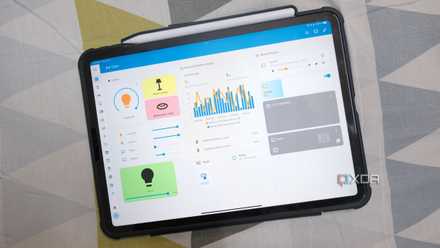
With the Home Assistant operating as the core, I realized how every room behaved differently. Building room-wise dashboards to log temperature and humidity data made it easy for me to quantify why my room always had a fan running, because direct sunlight during the day heats it up. The living room still has a fan because my family prefers natural airflow over the air conditioner.
So I built room-wise Home Assistant dashboards to track temperature and humidity trends. That helped me switch on the AC in my room only after the fan turned on, circulating warm air and reducing the heat. Similarly, the living room was only used during specific hours in the day, and automations were designed to work only for morning routines.
While I no longer blast the AC in my room, I finally understand why other rooms felt relatively pleasant despite being in the same house: each was like an independent zone, working differently.
Presence mattered more than the schedule
Reason automations worked better
Several automations made me realize that I wasn’t using Home Assistant any differently than I would with its proprietary counterparts. Initially, most of my automations were based on assumptions, including time-based ones for the morning and night schedules. Once I combined motion sensors with phone-based presence detection, those automations became more contextual. Of course, while my family members don’t carry their phones everywhere in the house, I relied on Bluetooth presence detection from their wearables and Wi-Fi interference.
My family members no longer get spooked since the lights or devices in my room no longer turn on randomly in the evenings. They have gotten comfortable with the occupancy-based routines, even though it took them several weeks. Luckily, no one manually flicks the switches unless automation fails. Rather than relying on a schedule, the lighting and security automations dynamically adjust to match our occupancy and help reduce energy waste.
Curbing the energy waste anomalies
Keeping a check on the power bills
I had a vague idea of monthly power consumption by correlating bills with the seasons of the year. With Home Assistant, the real-time, granular data about energy consumption has been quite transformative for how my home consumes electricity. With the help of smart plugs and energy monitoring, I finally witnessed the always-on devices and phantom loads that everyone talks about, which would otherwise go unnoticed.
The smart TVs, PCs, consoles, and chargers, when left idle or in standby mode, still consume some energy, only to provide the convenience of instant-on. That’s where my automation to turn off such devices helped save energy waste, even in a minor proportion. The biggest revelation was the regular AC usage cycle: it's an on/off cycle to manage cooking, which eats up more energy than an inverter AC.

6 "just-enough" Home Assistant automations that keep my smart home ticking
It's smarter to keep things simple.
Turning the house into an understandable system
The Home Assistant showed me that my house is far from predictable. I assumed most of the smart devices just work to automate the way I intended and are reliable enough to trust. But the data from the logs proved otherwise. Visualizing data and diving through logs helped me improve my smart home to prevent energy waste, prepare for device failures, and optimize automations so that they don’t seem silly. Instead of a collection of smart gadgets, it became a system that I can fine-tune and improve.
Home Assistant
- OS
- Windows, macOS, Linux
- iOS compatible
- Yes
- Android compatible
- Yes