
HP is currently leading the way when it comes to the best consumer PCs, with the Spectre x360 14 (2024) topping the list of our favorite laptops. The 14-inch convertible is a fine piece of hardware, but as usual, HP offers a larger sibling with extra screen real estate, optional discrete graphics card (GPU), and some other high-end perks.
HP last changed the Spectre x360 16's design in 2022, with a performance refresh for 13th Gen Intel chips arriving in 2023. Comparing the 16-inch Spectre x360 to its recent predecessors, there are some notable changes to the design, including the keyboard, touchpad, speakers, and webcam.

HP Spectre x360 14 (2024) review: The new best laptop
The HP Spectre x360 never fails to win
It's a big convertible laptop that I've enjoyed using for all sorts of tasks for the last couple of weeks. The display is big enough to split windows, it has plenty of performance for photo editing, heavy web browsing, and even some light gaming, and the keyboard and touchpad are really the best that HP has ever produced.
About this review: HP supplied XDA with a review unit of its HP Spectre x360 16 for 2024. It had no input on the content of this article.

HP Spectre x360 16 (2024)
- Operating System
- Windows 11 Home or Pro
- CPU
- Intel Core Ultra 7 155H
- GPU
- Intel Arc (integrated), Nvidia RTX 4050 Laptop GPU
HP's Spectre x360 16 (2024) is a great alternative to the more mainstream 14-inch model. It offers better graphics performance thanks to a discrete GPU, and the long list of high-end features makes for a great user experience. HP did a great job with this major refresh of a classic laptop.
- 2.8K OLED touch display at 120Hz
- 9MP webcam with IR, human presence detection, privacy alert
- Outstanding keyboard and massive haptic touchpad
- Solid performance from the available hardware
- Palm rejection while inking could be better
- 16-inch size isn't ideal if you're aiming primarily at tablet use
- Multiple power profiles can be annoying when trying to dial in performance
- Battery life when pushing performance isn't great
HP Spectre x360 16 (2024): Pricing, availability, and specs
HP unveiled its refreshed Spectre x360 laptops at CES 2024, with the new models going live at HP's storefront at the same time. The 16-inch Spectre x360 is available in a number of different configurations at HP's website; this is also where you can build you own model from a decent selection of hardware options.
Prices usually start at $1,600, but HP has already discounted the new models by a flat $350 at the time of writing. For $1,250, you can pick up a laptop with Intel Core Ultra 7 155H CPU, integrated Intel Arc graphics, 16GB of LPDDR5-7467MHz RAM, 512GB M.2 PCIe 4.0 NVMe SSD, and 2560x1600 (QHD+) touch display.
The same $350 applies as you spec up, so a unit with a discrete Nvidia RTX 4050 Laptop GPU, 32GB of RAM, 2.8K OLED display, and 2TB SSD costs about $1,980 (regularly $2,330). Best Buy seems to be the only major third-party retailer also listing the Spectre x360 16. A couple of preconfigured models are available, with prices starting at about $1,750.
Here's a look at the specs available in the Spectre x360 16 (2024).
Specifications
- Operating System
- Windows 11 Home or Pro
- CPU
- Intel Core Ultra 7 155H
- GPU
- Intel Arc (integrated), Nvidia RTX 4050 Laptop GPU
- RAM
- 16GB, 32GB LPDDR5x-7467MHz
- Storage
- 512GB, 1TB, 2TB M.2 PCIe 4.0 NVMe SSD
- Battery
- 83Wh
- Display (Size, Resolution)
- 16 inches, touch, 48-120Hz, 400 nits, 2880x1800 OLED with True Black HDR 400 or 2560x1600 IPS
- Camera
- 9MP with IR
- Speakers
- Quad speakers, Poly Studio, DTS:X Ultra, HP Audio Boost
- Colors
- Nightfall Black or Slate Blue
- Ports
- Two Thunderbolt 4, USB-A 3.2 (Gen 2), HDMI 2.1, 3.5mm audio
- Network
- Wi-Fi 6E, Wi-Fi 7, Bluetooth 5.3 or 5.4
- Dimensions
- 14.05 x 9.67 x 0.78 inches
- Weight
- 4.3 pounds
Design and features
No more angled edges, plenty of upgraded features
The most notable design change at first glance is the move from angled edges to a more squared chassis. The corners still have that gem-cut look — and HP makes good use of the space by adding a port to each rear corner — but the rest of the body is now more comfortable to hold. The lid's hinges, rounded in the previous generation, are now flat. One has an engraved Spectre logo for some extra style points.
Nightfall Black with Pale Brass accenting or Slate Blue with Sky Blue accenting along the edges are your two color options. I have the latter option, and I'd stick with it if I bought this laptop for personal use. It hides fingerprints quite well, and it overall looks very sharp.
Laptops in the 16-inch range generally have a more generous selection of ports than their smaller siblings, and that holds true here. The right side of Spectre x360 has a Thunderbolt 4 port on the angled rear edge, as well as HDMI 2.1 and a second Thunderbolt 4. The left side offers USB-A 3.2 on the edge and a 3.5mm audio jack on the angled corner.
Using the corners like this isn't new to the Spectre x360, but I'm glad HP continues to go with this design. I can charge the laptop or plug in a Thunderbolt 4 dock and have the cable out of the way of my right hand when using an external mouse.
HP switched from Bang & Olufsen to Poly Studio tuning, which makes sense considering HP acquired Poly in 2022. While the top of the laptop still has a tweeter flanking the keyboard on either side, the woofers have been moved to the front edge of the base. You can't really see them unless you flip the laptop over (or use it in a convertible mode), but their presence is made known especially when you're listening to music.
The myHP app has a section for audio tuning, with presets for music, movie, and voice. There's also an equalizer you can use to tune audio to your liking. Even with the stock music preset, I was blown away by the quality. Laptop speakers are getting so good, and HP is one of the companies leading the way, at least in its premium laptops.
Another area where HP is leading the way for consumer laptops is webcam technology.
Another area where HP is leading the way for consumer laptops is webcam technology. Just a couple of years ago, manufacturers were scrambling to upgrade to 1080p cameras as more people moved to a hybrid work lifestyle. Dell only moved from 720p to 1080p this year with its new XPS 13, 14, and 16 laptops, and even many high-end business laptops like the X1 Carbon (Gen 12) are still sitting at 1080p.

Lenovo ThinkPad X1 Carbon (Gen 12) review: More power and improved features in a smaller body
Lenovo continues to find ways to improve on a what is already the best business laptop on the market.
The Spectre x360 16, like its 14-inch counterpart, has bumped the camera resolution up to 9MP, which is equivalent to about a 3.4K resolution. The top bezel isn't even any larger to fit the upgraded components, which include hardware-level low-light adjustability, a separate IR camera and sensor for Windows Hello, and a new AI chip to handle the lighting adjustments in real time. There's even a physical privacy shutter controlled by a dedicated key.
Camera quality is the best I've seen in a laptop. Add in Windows Studio Effects, human presence detection, and a privacy alert (it can blur your screen if it notices someone looking over your shoulder), all helped along by the Core Ultra CPU's Neural Processing Unit (NPU), and you should find almost no reason to buy a separate camera. It'll even shoot 4K video.
Keyboard and touchpad
Massive haptic pointer and larger keycaps
The laptop is just a tad narrower (about 1.2mm to be exact) than the old model, but it remains just as thin at 0.78 inches (19.8mm). HP moved the keyboard up a bit higher on the base, removing some of the unutilized space between keys and lid hinges. With more space to work with below the keyboard, the touchpad is now massive.
It measures 6.2 inches (160mm) by 3.9 inches (100mm), which is about 60% larger than previous hardware. And it uses haptics instead of having any moving parts. I really had no issues using it for my daily workflow.
Like most haptic touchpads, you can configure the touch sensitivity and force given as feedback. But HP also allows you to set up controls for screen brightness and speaker volume along the edges. It reminds me of my e-reader's screen (and it's about the same size) in that it's easy to make quick changes.
HP's typing experience in its premium laptops was already among the best on the market, but the keyboard also received some meaningful tweaks. The font is a bit brighter for easier legibility, and the keycaps have been enlarged by about 12%. I typed about 15,000 words on the keyboard without issue, and it's up there with the ThinkPad keyboard in terms of comfort.
Some might not like the lack of dedicated navigation keys. The likes of Pg Up, Pg Dn, End, Home, and Insert are doubled up with other keys, meaning you'll need to hit Fn to reach them. If you often use these keys, you might want to find a different setup that works better for you.
I do like that the fingerprint reader is now doubled up with the power button. It just makes a lot more sense for anyone not using Windows Hello and human presence detection (which can automatically lock and unlock your PC when you depart or approach). The built-in LED bar on the key is aesthetically pleasing.
Display
2.8K OLED is optional ... and impressive
The pictures I've provided here of the Spectre x360's 16-inch OLED display with 2.8K resolution really don't do it justice. Running down the specs, it has a 16:10 aspect ratio, variable refresh rate between 48Hz and 120Hz, beyond 500 nits brightness with HDR enabled (or about 374 nits in SDR as tested), and IMAX Enhanced certification for improved picture and audio in HDR.
Bezels are pleasantly thin, especially for a convertible laptop, with a 90% screen-to-body ratio. The size allows for window splitting — something I regularly use to boost productivity — and it offers a high-end inking experience.
The pen that HP includes uses the MPP 2.0 standard and has tilt support. Along with accurate pressure sensitivity, you can use it for sketching and shading just as easily as for taking notes. The only downside I noticed was occasionally iffy palm rejection.
Testing color reproduction with a SpyderX Pro colorimeter, I got back 100% sRGB, 95% AdobeRGB, and 100% DCI-P3. These results aren't unexpected, and anyone who needs a color-accurate display for sensitive work will feel right at home. The high refresh rate makes it easy on the eyes, and even for casual work the OLED panel's color and contrast are a real treat.
Using the PC as a tablet is a bit unwieldy due to its size. I wouldn't buy the laptop if I was planning on using it primarily as a tablet; the Spectre x360 14 (2024) would be a better choice, among many other great convertible laptops. Still, the versatility afforded by the 360-degree hinges provides better ways to watch TV and movies, and I do love being able to quickly make sketches or diagrams with the pen.
The pen itself has a sliding cover for the USB-C charging port, as well as a halo LED along the top to show the charging status. It comes with a couple of extra nibs, and it attaches to the side of the laptop magnetically.
Performance and battery
Discrete RTX 4050 Laptop GPU makes a difference
👁 HP Spectre x360 16 (2024) with pen open for charging
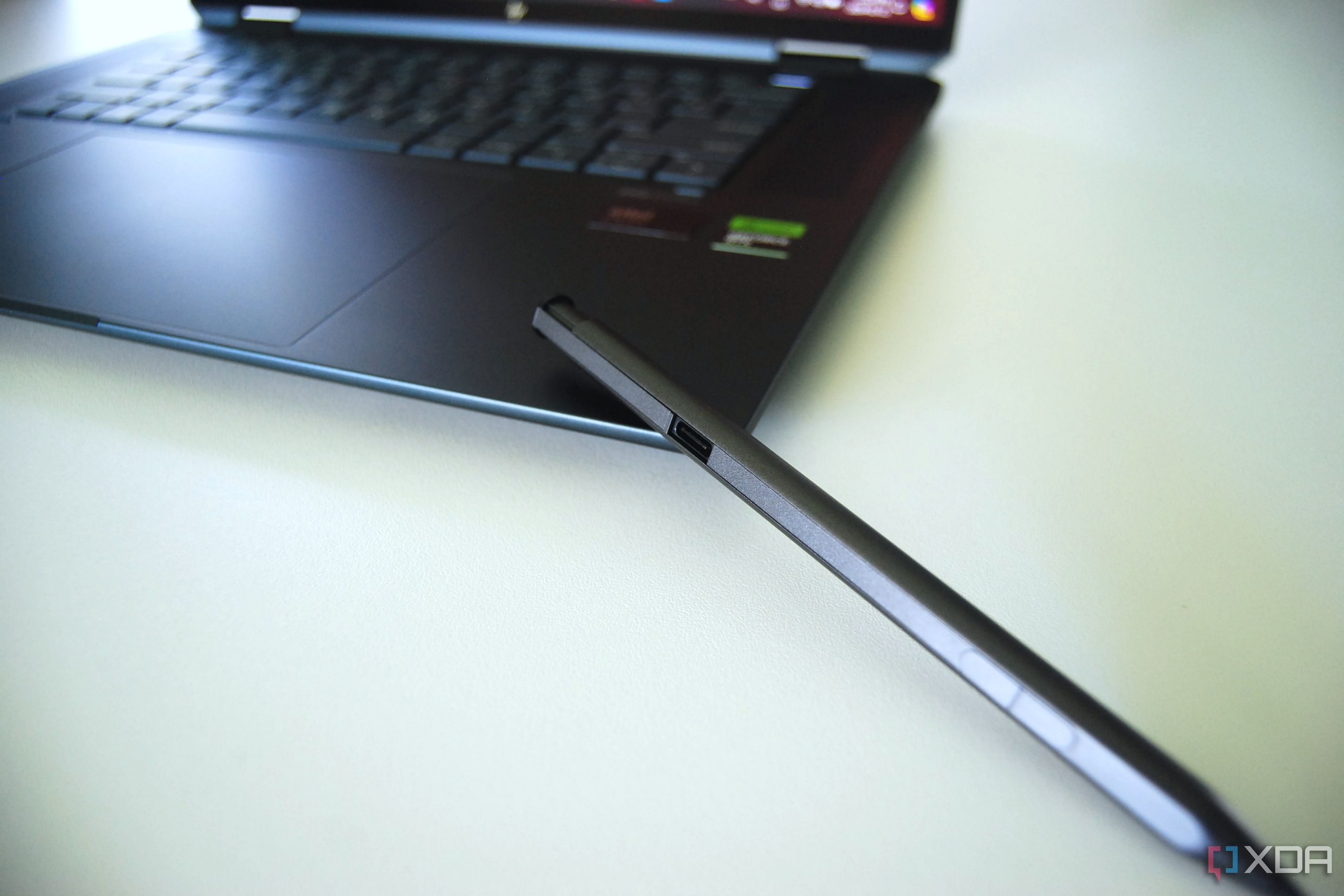
The Spectre x360 16 (2024) that I'm reviewing includes an Intel Core Ultra 7 155H CPU, discrete Nvidia RTX 4050 Laptop GPU, 16GB of LPDDR5 RAM, and a 1TB M.2 PCIe 4.0 NVMe SSD. This boosts performance significantly compared to the last Spectre x360 16 (2022) model we tested, which was still running an 11th Gen Intel Core i7-11390H chip and RTX 3050 Laptop GPU.
Aside from raw CPU power, I mentioned that the Core Ultra chip adds a Neural Processing Unit (NPU) to aid with AI-based tasks, including Windows Studio Effects and privacy features for the webcam. The new CPU also significantly boosts the integrated GPU performance, which is ideal if you purchase a model without the discrete Nvidia RTX 4050 Laptop GPU.
This laptop, thanks to the color-accurate display and performance, should work well for anyone involved in more casual photo or video editing, as well as light design and development tasks.
This laptop, thanks to the color-accurate display and performance, should work well for anyone involved in more casual photo or video editing, as well as light design and development tasks. And while it can handle some light gaming, it shouldn't be purchased for use primarily as a gaming laptop. In the same vein, you can find something with better cooling and features if you're leaning more into a specialized workflow.
As you can see in the chart below, the Spectre x360 16 (2024) keeps up with other modern laptops we've recently reviewed with the same CPU. I tossed the 2022 Spectre x360 16 in there as well as a clear comparison on how far Intel's mobile CPU technology has come in just a few generations.
|
Benchmark (Higher is better) |
HP Spectre x360 16 (2024), Core Ultra 7 155H, RTX 4050 |
HP Spectre x360 16 (2022), Core i7-11390H, RTX 3050 |
HP Spectre x360 14 (2024), Core Ultra 7 155H |
Dell XPS 16 (2024), Core Ultra 7 155H, RTX 4070 |
Asus Zenbook 14 OLED (2024), Core Ultra 7 155H |
|---|---|---|---|---|---|
|
PCMark 10 |
6,668 |
5,254 |
6,844 |
6,830 |
6,555 |
|
Geekbench 6 (Single/Multi) |
2,398 / 12,704 |
N/A |
2,417 / 12,852 |
2,424 / 13,814 |
2,355 / 12,202 |
|
Geekbench 5 (Single/Multi) |
1,753 / 11,067 |
1,604 / 5,208 |
N/A |
N/A |
N/A |
|
Cinebench R23 |
1,792 / 14,562 |
1,570 / 5,098 |
1,760 / 12,737 |
1,742 / 17,581 |
1,749 / 10,468 |
|
Cinebench 2024 |
104 / 649 |
N/A |
100 / 745 |
104 / 983 |
101 / 547 |
|
3DMark Time Spy |
6,979 |
3,604 |
3,727 |
9,187 |
3,601 |
The Dell XPS 16 (2024) we recently reviewed, with Core Ultra 7 155H and RTX 4070 Laptop GPU, hit higher scores in CPU tests despite having the same chip as the Spectre x360. That's no doubt partly thanks to the non-convertible design with more room for cooling hardware, but Dell might just be tuning things a bit differently. You ultimately lose some power on the top end but gain versatility from the Spectre's convertible design.

Dell XPS 16 (2024) review: The MacBook Pro of Windows
The Dell XPS 16 is like nothing you've seen before.
Battery life is better than I was expecting, at least when the power profiles are set correctly. HP has its own list of profiles in the myHP app, with the system set to "Smart Sense" by default. This profile automatically tunes the system depending on the task at hand, and it's what I used at all times except when testing some battery runtimes. The system sometimes seemed just a bit slow to keep up when I was launching apps, but the lag was minimal. The issue went away when I chose a dedicated power profile.
Testing with PCMark 10's Modern Office rundown, the 83Wh battery lasted just four hours and 22 minutes with the system set to the HP and Windows "Performance" profiles. That's going to deliver the most power if you're using demanding apps, so it makes sense that battery life isn't spectacular.
Lenovo ThinkPad X1 Carbon (Gen 12) review: More power and improved features in a smaller body
Lenovo continues to find ways to improve on a what is already the best business laptop on the market.
Moving to the "Smart Sense" HP setting and the "Balanced" Windows profile, the system ran for exactly 11 hours in the same test. That's very close to what the ThinkPad X1 Carbon (Gen 12) hit in my testing. It's better than I was expecting from a laptop with 2.8K OLED touch display and Nvidia RTX 4050 Laptop GPU. A configuration without discrete graphics and the QHD+ IPS display would no doubt bump that runtime even higher.
Real-world use, in my case of heavy web browsing, word processing, and photo editing, results in having to plug in for at least a half hour to get through a full workday.
Should you buy the HP Spectre x360 16 (2024)?
You should buy the HP Spectre x360 16 (2024) if:
- You want a 16-inch laptop with the added versatility of a convertible design.
- You'd like to experience a color-accurate and high-res OLED display with inking abilities.
- You type a lot and can appreciate the comfy keyboard and oversized haptic touchpad.
You should NOT buy the HP Spectre x360 16 (2024) if:
- You plan on using your laptop more as a tablet than as a notebook.
- You want to maximize performance from your premium 16-inch device (check out something like Dell's XPS 16).
- You want a laptop primarily for PC gaming use.
The Spectre x360 16 for 2024 is easily one of the best HP laptops on the market today. It's a great counterpart to the 14-inch sibling, offering additional GPU performance and a larger screen for multitaskers and anyone who dabbles in more specialized work (like photo and video editing).
HP did a great job with the redesign, eliminating the gem-cut sides for a more comfortable squared look. The keyboard's larger keycaps and enhanced font contrast make typing very comfortable, and the haptic touchpad is almost comically large (but don't make it any smaller!). Speakers still flank the keys, but the woofers have been moved to the front edge of the chassis; audio quality is impressive no matter how you're using the laptop.
The Spectre x360 16 for 2024 is easily one of the best HP laptops on the market today.
Above the screen is a 9MP camera, upgraded without making the top bezel any larger. It features an IR sensor for Windows Hello, going well beyond the basic facial recognition to bring human presence detection and privacy alert (with auto-blur display). The screen itself is stunning; I tested the OLED version with 2.8K resolution and variable 120Hz refresh rate. It's a pleasure to look at no matter the task, and it makes movies and TV really pop, especially with HDR enabled.
As long as you're not concerned about maximizing performance or primarily using your device as a tablet, the Spectre x360 16 (2024) should prove to be a versatile PC that truly delivers a top-shelf user experience.
HP Spectre x360 16 (2024)
- Operating System
- Windows 11 Home or Pro
- CPU
- Intel Core Ultra 7 155H
- GPU
- Intel Arc (integrated), Nvidia RTX 4050 Laptop GPU
The HP Spectre x360 16 (2024) aims to deliver one of the best overall user experiences ever from a convertible laptop. The webcam, speakers, keyboard, touchpad, and display are all impressive, and the chassis redesign makes it more comfortable after years with a gem-cut build.