
Despite making (and writing about) dozens of projects with the Raspberry Pi, it’s not really something I can recommend to most folks today. Besides the Zero sub-series, the Raspberry Pi single-board computers aren’t powerful enough to justify their steep price tags. That’s not to say that the Raspberry Pi is bad or anything; it’s just that it has been outclassed on practically every front by its competitors, with cheap x86 thin clients and mini-PCs annihilating it for home lab tasks.
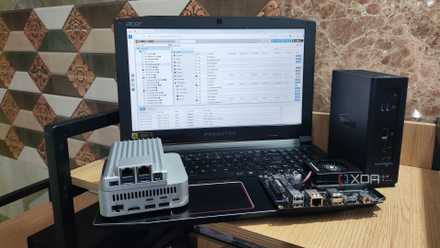
In fact, I’d been using my spare Raspberry Pi 5 (one that I’d bought long before the advent of the RAM apocalypse) as a secondary container-hosting workstation until a few months ago. Although it worked decently for lighter tasks, I eventually had to move on to an N100 mini-PC as my library of essential FOSS tools began to grow. While it siphons slightly more energy than my Raspberry Pi, I have no regrets about switching to the N100. If anything, I wish I’d transitioned to it sooner.

The 2026 home lab starter pack looks nothing like it did five years ago
Building an experimentation lab in 2026 is a lot different than it used to be
An N100 can run Proxmox (and even NAS distros) like a champ
While a Raspberry Pi involves far too many workarounds
Let me make this clear: the Raspberry Pi can run dozens of containers, especially if you pair a high RAM model with something as lightweight as DietPi. I’d been using mine to self-host Gotify, Pulse, Nginx Proxy Manager, and a bunch of other home server tools, and it worked pretty well as long as I didn’t branch out further. However, I had a couple of issues with my Raspberry Pi server.
For one, I had to use web-based container management tools to avoid relying on a pure CLI setup, and as much as I adore Dockhand and the LXD-based Canonical MicroCloud, I’d rather use something I’m really familiar with for a server that’s meant to run all my essential services. To be more specific, I wanted to switch to Proxmox, partly since it’s the virtualization platform I’ve been using for the last couple of years, and also because it has a boatload of container and VM (more on that in a bit) management tools. But considering that it doesn’t have an ARM image yet, the Raspberry Pi isn’t a feasible host for Proxmox. And no, the workarounds involving community packages don’t count, because they have tons of broken features.
Then there’s the performance part of the equation. Sure, my Raspberry Pi can crush simple containerized apps. But when it comes to running demanding tools, it starts to quiver under the extra load. For example, attempting to run a Code Server instance loaded with extensions, Nextcloud (even the Pi version), and Jellyfin alongside the rest of my home lab tools is way more than my Raspberry Pi can handle. Speaking of Jellyfin, the N100 has superior transcoding provisions than the Raspberry Pi, and it can easily handle three 4K streams (provided there’s no AV1 decoding involved) like a champ. Sure, the Raspberry Pi 5 consumes roughly 4W when it’s idle, which is quite low compared to the 9W my N100 node sips most of the time. But considering the latter’s superior firepower, I don’t mind paying a few extra bucks every year.
5 lightweight operating systems you can use for your next home server
With the right OS, even your low-end SBC can turn into a reliable server
Switching to an N100 node made virtual machines a viable option
It ain’t super powerful, but it’s better than an RPi for VM-heavy projects
While we’re on the subject of performance, the N100 is surprisingly decent at handling virtual machines. In fact, I usually keep a Debian CLI VM running alongside the rest of my essential app stack, and the N100 has no issues keeping up with my light tinkering demands. However, I also keep some virtual machines, including another Debian instance (with a KDE desktop environment), in a stopped state, as I can spin them up if I need them for specific projects.
Meanwhile, OpenMediaVault (with the right plugin) and Ubuntu MicroCloud are the only platforms that can run VMs on the Raspberry Pi, barring a barebones KVM setup, of course. But unlike containers, my Raspberry Pi just can’t handle more than two VMs, and it has even more trouble running virtualized environments with demanding GUI elements. While it’s true that the N100 isn’t as powerful as, say, my old Xeon workstation, being able to deploy light VMs without turning off all containers or worrying about my self-hosting rig running out of resources makes it a better home server node than my Raspberry Pi.
But a Raspberry Pi still has some utility for home server projects
It’s a solid low-power QDevice for cheap high-availability clusters
There’s no denying that the Raspberry Pi 5 has served me well when I needed a low-power device just to run a few monitoring tools for the rest of my server paraphernalia. But like I’ve said before, the non-Zero Raspberry Pi SBCs are too pricey for home labs and N100 units are actually pretty close to RPi boards in terms of pricing, if not slightly cheaper once you factor the extra accessories into the equation.
That said, if you’ve got spare Raspberry Pi boards in your home lab as I do, there are still a few ways you can put them to good use besides hosting FOSS tools. I built a high-availability cluster with an N100-powered NAS and my old PC last year, and my Raspberry Pi served as a QDevice in the setup. A Raspberry Pi Zero, in particular, is amazing for this task, as it neither siphons too much energy nor costs an arm and a leg. Likewise, a mainline Raspberry Pi is too weak for a dedicated NAS setup. But you can repurpose an old Raspberry Pi as a secondary backup server – one that’s stationed in a remote location and receives snapshots from your primary NAS.