
Although AI tools are a godsend for tedious tasks, I must admit that I’m not the biggest fan of cloud-based LLM providers. Sure, their automation and productivity features are pretty handy, but between their lack of privacy and premium API plans, the prospect of relying on cloud platforms never sat well with me.
Fortunately, I came across Ollama around the same time I started looking into FOSS self-hosted apps, and after experimenting with a multitude of LLMs across different graphics cards, my local language models are significantly more useful than their cloud counterparts – to the point where I don’t need to spend money on ChatGPT, Perplexity, Gemini, Claude, or any other AI providers.
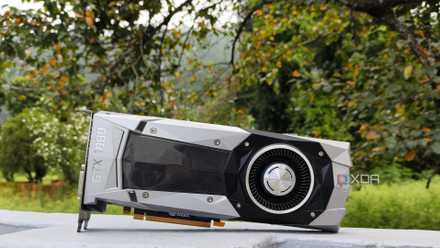
Nvidia stopped supporting my GPU, so I started self-hosting LLMs with it
I self-support my gpu now because Nvidia won't
I’d rather not share private info with cloud platforms
And I get to save money, too
When I talk about AI tools, I don’t mean simple conversational models. What I really need are the reasoning capabilities of LLMs, as they can tackle a variety of annoying tasks that would take hours of monotonous work. For example, manually tweaking the optical character recognition for document scanners would be a pain, and the same holds true for analyzing thousands of Docker logs to locate erroneous apps and bulk-editing tags for my bookmarks.
However, most of the data I want to feed to LLMs is private information involving everything from my self-coded scripts and notes to financial documents and server logs. While certain LLM providers claim they don’t store customer data or use it to train their models, I’ve been a part of the computing ecosystem long enough to realize that I should never upload anything even remotely private to cloud servers. Meanwhile, the models residing in my Ollama and llama.cpp instances rely on the computational prowess of my own hardware. Since neither the prompts nor my documents leave my server nodes, I don’t have to worry about random companies gaining access to my data.
Then there’s the monetary part of the problem. My automation-centric tasks require APIs, not a chatbot frontend where I can query everything for free. LLM providers either impose rate limits on their offerings or have flat usage-based prices for the smallest models – and these costs can add up if I want to tinker with different platforms.
On paper, buying new graphics cards and server rigs just to run LLMs sounds pretty expensive, especially when you factor the energy siphoned by these systems into the equation. However, I utilize my old GPUs and my MacBook for these tasks, so the upfront cost was essentially zero dollars. Leveraging these LLMs doesn’t consume a lot of electricity, either, as my server nodes remain idle most of the time. And when I do use them, it’s mostly for quick inference tasks instead of extended processing workloads. Couple that with the somewhat cheap rates in my backwater town, and my private LLMs are cheaper than paying flat API rates or sacrificing my wallet every month on subscriptions.
Ollama models work perfectly fine for my home lab tasks
I don’t need ChatGPT as my Home Assistant companion
I started pairing LLMs with self-hosted applications two years ago, and since then, I've encountered both AI-centric tools and standalone services that can harness these models to provide extra quality-of-life features. The most obvious example of the second category is Home Assistant, which lets me bolster the built-in assistant’s reasoning capabilities with my LLMs.
I’ve got a bunch of HACS integrations that connect my self-hosted tools and random devices with Home Assistant, and my LLM-powered smart home hub answers all my queries about my living space. Likewise, these LLMs can keep tabs on my security camera footage, and with some text-to-speech doohickery, even answer me with AI-generated voices.
Self-hosted LLMs mesh well with my media management utilities
Besides HASS, I extensively use LLMs with my FOSS application stack, especially tools designed to organize my files. There’s Paperless-ngx – a document management utility that’s single-handedly the reason I never lost my invoices, tax filings, uni marksheets, and receipts. On its own, Paperless-ngx has decent OCR provisions, but they’re far from ideal for documents with tables and random letter placement. That’s why I’ve paired it with the Paperless-GPT container, which can not only identify the text with solid accuracy, but also generate correspondents, dates, and summaries for my invoices. Likewise, I use Paperless AI, which is yet another companion app, to automatically generate tags for my documents and search for them using natural language queries.

I use my local LLMs with this self-hosted tool to manage documents in Paperless-ngx
It's a powerful companion utility for my Paperless-ngx container
I also rely on Karakeep to bookmark cool web pages, videos, and conventional PDF files inside a private idea board, with my Ollama LLMs responsible for generating summaries and tags for my newly-added pins. Heck, even good ol’ Nextcloud supports LLMs using certain integrations from the app store to summarize spreadsheets, presentation slides, and text documents. With Navidrome adding plugin support, I’ve deployed an AudioMuse-AI container that uses my LLMs to generate playlists using simple prompts.
I also use local LLMs to replace conventional AI-powered cloud tools
Quick notes, research tasks, code analysis; everything’s fair game for my LLMs
As if home lab services weren’t enough, LLMs mesh just as well with the FOSS alternatives to everyday apps. Take Grammarly, for example. Rather than paying for a premium subscription to Grammarly, I use a Blinko instance that’s hooked up to my Ollama models to create notes for my articles (including the one you’re reading right now).
I also recently got into Open Notebook, which is an open-source NotebookLM with (admittedly) fewer features. But since my primary use case for NotebookLM involves aggregating documentation for my DevOps and sysadmin studies, the Open Notebook + Deepseek R1 combo is a solid alternative. Although I’m not fond of generating code with AI, I don’t mind using local LLMs to scan my code (after I’ve double-checked it, of course) for errors using the Continue.Dev plugin on VS Code.
I don't even need the latest and greatest GPUs for these tasks
If you’re wondering about my current setup, I’ve got two GPUs and a MacBook Air M4 serving as my LLM hubs. Most of the lightweight tasks run on a nearly 10-year-old GTX 1080 without any hiccups. For Continue.Dev, Open Notebook, and other demanding services, I use the RTX 3080 Ti on my gaming machine to run Ollama models, and it can easily handle 12B (and slightly higher parameter) LLMs with ease. With some tweaks, my MacBook and the 3080 Ti can tackle bulkier LLMs without getting turned into a stuttering mess.