
My Network-Attached Storage servers are an essential part of my home lab, as they house important project files, VM data, OS images, actual images, ebooks, ROM files, and everything in between. As my collection of hoarded files grew, I had to start upgrading my NAS' capacity or risk leaving my private data vulnerable to hardware failures and (admittedly) my own botched experiments.
After downsizing my VM collection last week, I began skimming through my SMB and NFS share directories. Upon closer inspection, I realized that the majority of these files included backup data generated by Kopia, Proxmox, and a handful of other tools, with duplicate files and useless VM backups hogging hundreds of gigabytes – data that wouldn’t impact me in the slightest if I couldn't recover it. So, it was time to re-evaluate my backup strategy.

My home lab runs better after I stopped relying on 80% of my virtual machines
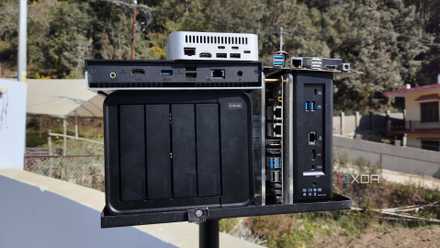
Although my home server looks rather empty now, it works better than ever
Duplicate files and unnecessary executables were starting to choke my NAS
My storage servers were starting to get over-encumbered
When I started my descent into the NAS rabbit hole during my uni days, I had an old system and some spare hard drives on me. Since the electricity rates in my backwater town are pretty low, I was able to build a private storage server with more than enough storage capacity to put online-only, privacy-intrusive clouds in their place. Considering that I’d spent most of my teenage years dealing with the extremely low storage capacities of cloud platforms, I was always stingy about the number of files I’d back up.
By the time I upgraded to a 3-2-1 backup server, I had multiple terabytes of storage in my local and remote NAS. So, you can see how my lizard brain got rewired into backing up anything I considered even remotely useful to my storage server. For example, I’d created Windows Task Scheduler scripts for my Pictures folder, even though my images and screenshots were already getting synced with an Immich instance.
Likewise, my AppData backups often included useless folders that did nothing but hog a few gigabytes on my NAS drives. Since I have a habit of taking apart old systems, I’d save the essential folders on their HDDs and SSDs on my storage servers. However, I’d accidentally created more than one directory for it on my NAS, causing the same system to store the data in two separate folders. And the situation only got worse when I went through my home lab backup tasks.
My backup schedules often included disposable VMs
A waste of space on my PBS instances
I house many essential LXCs and virtual machines on my Proxmox node that I wouldn’t want to lose in a freak experiment. As such, I’ve got local and remote Proxmox Backup Server instances (the latter as a VM running on the offsite NAS) that receive the snapshots created by my PVE nodes – including my Xeon workstation, a cluster formed from cheap devices, and a dinosaur laptop relegated to running LXCs.
My Xeon machine has the highest self-hosting firepower among them and lets me spin up multiple virtual machines without running into performance issues. As such, I’d often create disposable VMs for DevOps projects, sometimes using cloud-init images, other times with custom Debian templates and my Terraform config files.
Turns out, my old Proxmox backup schedules ended up storing snapshots of many virtual machines and LXCs that I no longer needed. Since PBS is good at compressing huge snapshots, I never noticed that the space occupied by disposable machines had slowly grown larger over the last couple of months.
I’ve become more selective in my backup tasks
Otherwise, my data-hoarding habits would force me to buy even more hardware
The solution was pretty straightforward: it was time to get rid of the excess files and come up with a backup automation that would only back up the essential files. For my PC, my Documents folder, alongside certain game directories in AppData, are borderline essential. Meanwhile, my Pictures folder automatically syncs with Immich, so I didn’t need to back it up using Kopia again. Likewise, I upload all my ISOs to an iVentoy LXC, so I don’t need to back them up a second time, while all the executables and Steam files (barring the directories for my manual and autosaves) don’t need a redundant copy in my NAS.
For my self-hosted services, I’ve got Immich, Calibre-Web, and other media serving platforms running on top of my NAS, and I sync their datasets with a remote TrueNAS instance using Tailscale and Rsync tasks. As for Proxmox VMs, my Windows and Arch-based dev environments are indispensable for my coding projects, while my Debian-powered self-hosted hub and NixOS virtual machines help out with other tasks. My backup schedule sends their snapshots to my local PBS instance, and they’re shared with the remote Proxmox Backup Server every week. The other VMs, however, don’t need to be backed up, while my LXC collection occupies well under 100GB.
Backups are a good habit, provided you don’t go as overboard as I did
Now that I’ve cleared many directories from my NAS, the storage pools on my local 8TB server (technically 12TB, but 4TB is responsible for storing parity data for RAID 5) aren’t overflowing with useless stuff. I’d initially pat myself on the back for avoiding the data loss pitfall by backing up essential documents, but my obsession with recovering from data loss filled my NAS with unnecessary files. Don’t get me wrong, I’ll probably end up upgrading the drives on my server, but I’ll do it to make space for family albums, ripped movies, and other archival media, not some random VM I spun up ages ago and have no intention of recovering now.
5 things you need to back up in your home lab
Make recovery operations a lot easier by backing up these essential aspects of your home lab