
Discord has been a large part of the way I interact with my friends online for almost a decade. Many great times, both gaming-related and not, have happened within the bounds of a Discord server, but their recent push for forcing photo ID verification globally has me wary of continuing to use it daily, especially considering they've been through a significant security breach as recently as 4 months ago.
While convincing all of my friends would be a tall order, I'm slowly starting to migrate over to Stoat, a Discord alternative that features much of the same functionality with a self-hosted flavor available. Setting it up was quite simple, but it's definitely still a work-in-progress. Despite that, I think it shows the most promise of being a true Discord competitor once the loose ends are tied up.

4 reasons why I'm ditching Discord to self-host Mumble — and you should too
It's time to leave Discord and host your own voice servers again.
Stoat has all the markings of a Discord replacement
Server-based communities with text and voice chat, along with a slick UI
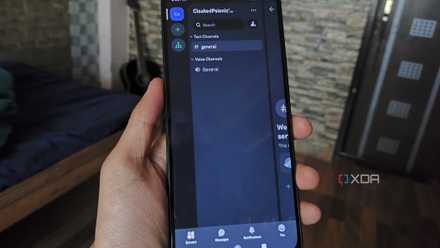
Stoat, formerly known as Revolt, has a striking resemblance to Discord in a lot of ways, which makes it one of the more compelling options for switching. Most of the UI is almost exactly the same, which is fair, because if it ain't broke, don't fix it. Chat, voice channels, attachments, server list and member list are all in their usual spots. There are roles, permissions, custom emojis, pinned messages—pretty much all the bells and whistles are here.
Stoat is server-based, just like Discord is. You can create servers that are hosted on Stoat's own infrastructure, or you can self-host using Docker Compose, which is the more attractive option for ultimate control, and is what I'll be using. The setup was fairly simple, but there are a few small pitfalls in their documentation, most of which are easy to fix.
5 reasons why I'm finally uninstalling Discord
After numerous years, I'm finally leaving Discord.
Stoat's self-hosting setup is straightforward
Docker Compose makes everything a breeze
Self-hosting Stoat is done through Docker Compose, complete with (almost) everything you need out of the box. Following the directions on their GitHub, it's as simple as pulling the image, running their config generation script to attach things to a domain, and then you're basically set.
I had to make a few small adjustments to get things working. For one thing, the default configuration features the latest version of MongoDB, which isn't supported by my processor. A similar error cropped up with KeyDB, which was easily fixed with another change. Once those lines were changed and I mopped up the networking stuff, I had a working Stoat server in-browser, which anyone could connect to using my domain.
One way Stoat's self-hosted variant departs from Discord is through the invite-only behavior: Stoat isn't invite-only by default in this configuration, so if someone has your domain and an account, they can join. This is great if your domain is only shared amongst your friends, but setting up invites would keep things more secure.

4 essential Docker containers i run on every new server
A collection of handy containers to manage my workstations
It's not usable in its current state
The self-hosted repo needs more attention before it can be used as a genuine replacement for Discord
In terms of actually using it, however, Stoat needs more time in the oven. While writing this article, the self-hosted repository updated to include voice chat capability and the new web app, and after scrapping my original instance and rehosting with the new changes, I was able to experiment a bit with the voice chat, but had issues with the old Revolt branded page cropping up, seemingly at random. This resulted in two completely different interfaces being available, depending on which login page I used. Authentication was also a challenge to get past, as the self-hosted version isn't able to use an account you created for the main Stoat Chat client, and this isn't clear from the documentation. I wasn't able to get two users in the same chat, and it's very clear that the self-hosted repo of Stoat is still heavily under construction, but as a proof of concept, it's promising.
5 Docker mistakes beginners make in their first month
We're all guilty of making them
What you could use in the meantime
TeamSpeak is just as easy to spin up and down as needed
Of course, you could start a server through the main Stoat client that's hosted on their servers, but if self-hosting is a non-negotiable, I honestly think TeamSpeak is a good option as a stopgap measure, at least until the self-hosted repo of Stoat has its issues sorted out. It certainly doesn't have feature parity with Discord nor Stoat, but if all you're after is a simple channel-based voice chat and text chat, it's one of the easiest self-hosted options out there.

I turned my Steam Deck into a home server, and it's as crazy as it sounds
If you want to find more uses for your Steam Deck, why not turn it into a home server?
Stoat shows promise
Discord has been my go-to for a variety of communication for quite some time, and after they've made some unpopular changes, looking for self-hosted alternatives became even more pertinent. I'm impressed with how closely Stoat resembled Discord at a glance, and even once you dive further into its features. The self-hosted repo is promising, but isn't ready for your community to move to just yet.