
Choosing the correct platform while building a media server is essential for your setup. I have already tried using a Raspberry Pi Zero 2W as a Plex media server and a Jellyfin media server, and both delivered satisfactory results; therefore, it would be wrong not to try Emby. When choosing a low-powered device, such as the Raspberry Pi Zero 2W, the focus is more on building a server to access your library on portable or handheld devices, rather than a large 4K screen. With that in mind, I considered building a power-frugal media server to serve files with a streaming service like UI.
Emby has been around for two decades, and if you transition between Jellyfin and Emby, the UI looks almost identical in some areas. That's because Jellyfin is an official fork of Emby, but without any subscription or pass. Emby shone in some areas while struggling in others. Let's discuss my experience with this project.

6 Docker containers I use to stream media files at home
These Docker containers help me manage and organize my personal multimedia collection easily on home lab server.
Initial setup
DietPi makes it look effortless
My idea was to connect two disks, an external hard disk drive and a solid-state drive, to the Raspberry Pi Zero 2W. For my operating choice, DietPi remains the undisputed king because of the ease of setup. I flashed the SD card with it, configured the OS with network connections and system updates, and then mounted both the disks using the built-in Drive Manager utility. It's straightforward to do so via the CLI option rather than running commands to mount the disk and then adding a fstab entry.
DietPi creates a persistent mount, so you don't have to worry about the disks not appearing after a restart. Then I installed Emby using the Software Manager utility, which contains all the supported packages for the operating system. It saves me the trouble of finding supported packages for a specific SBC. With everything installed and ready, it was time to boot to the Emby dashboard.

I tried DietPi dashboard and managing a headless Pi has never been easier
Tired of the bland CLI on your DietPi? Use DietPi Dashboard to access a GUI version of the OS tools with an excellent file management system.
Setting up the Emby server
Nothing overly complicated
I noticed a few differences when I tried setting up Plex a few weeks before. Plex requires an email account to function, even if you intend to set up everything locally. Emby is similar to Jellyfin in this case and doesn't object to the idea of a local setup. You can create a user, enter credentials, and immediately hop into the library creation phase.
The second difference is the way Plex allows library creation. You cannot simply select the disk and add it to the library. Instead, you must enable read and write permissions to the directory. Only then can it read the files present on the devices. Emby picks up everything quickly, and you can proceed to the home page after selecting drives, metadata options, and more.

5 things Plex must improve to convince me to abandon Jellyfin
Plex's recent pricing changes and feature restrictions make it a difficult pick, but it can compel me to ditch Jellyfin if it fixes a few flaws.
A refined experience
Emby shines in this department
Plex looks decent, but Emby, in my opinion, is a class apart in terms of UI. It is the small things that add up. For example, the home page contains all the necessary elements within the left-hand-side menu, while the app settings and account options are located on the right side. It's more accessible because I don't have to first click on the Settings and then click on the Dashboard option to access all possibilities, like I do in Jellyfin. I can click on Settings, and all the settings appear categorically. It even lists the local and WAN URLs to access the service in the settings.
The default theme is equally appealing with slightly curved icons and well-spaced categories. I found the overall metadata fetching and management more accurate than Jellyfin. The latter takes a while to update everything and still makes some mistakes. You can also toggle between multiple views, including lists, tables, thumbnails, and even customizable icons.
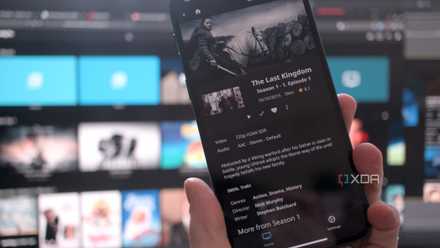
The playback experience wasn't anything problematic, as most videos in 1080p looked fine on my 2K monitor. The phone playback was decent with no hiccups during file search, changing quality, and speed. Grainy 4K resolution media wasn't a surprise because Pi Zero 2W doesn't have the raw power to support hardware transcoding. Emby also reserves the hardware transcoding behind a paywall, while Jellyfin has no blockades as long as your media server can handle it.
Like Jellyfin, you can explore its plugin store for better media server customization. I installed the Emby Statistics plugin to keep track of my playback history, and it's more reliable than the default one. I can easily see my streaming history of each category and then directly access that content from there. I also use a disk usage plugin and appreciate that basic features like Intro skip are built in.
I wanted to try out remote access in Emby, but I was skeptical that it would block me, like Plex did in its free tier. Surprisingly, Emby doesn't throw this frustrating pop-up and supports Emby Connect for remote access. I like Tailscale, so I didn't delve into the whole port forwarding scheme; I just deployed Tailscale on both the Pi and my phone. After that, I could access the media server while traveling or on mobile data/other networks when required. But the free version has its downsides.
How to stream your Plex, Jellyfin, or Emby server anywhere in the world
Access your stored media from any device any time.
Emby is "freemium"
Not everything is available
The free tier has downsides, but I didn't expect Emby to restrict an essential feature. I couldn't remotely access my media in Plex, but Emby allows remote access and downloads. Offline access is also available on the local network, which is a huge plus compared to Plex. However, you don't get access to the free tier's official mobile or desktop apps. But that isn't a huge issue, as the web client works well. I would have loved to get the backup feature or a plugin for it, but that's only for Emby Premiere users. There's also a cap on the device limit of up to five.

I ditched Plex for Kodi, and I should’ve done it sooner
Kodi makes Plex looks expensive
Build a small-scale media server with Pi Zero 2W
Emby proved to be equally good on the Pi Zero 2W, and you can consider it if you want to stream 1080p of your stored content on a few devices. Emby offers a well-balanced blend of features and UI, even without upgrading to the paid plan. It'll conserve power and free up your main PC for other tasks.