
Summary
- The Keychron Q65 Max offers a top-of-the-range enthusiast-grade build with unmatched design and build quality.
- The unique keycap design provides a fluid typing experience, while the customizable knob and macro keys enhance functionality.
- If you're looking for a premium keyboard with form, function, and customization options, the Q65 Max is a great choice.
Over the years as a reviewer, I have tested many keyboards, especially so-called gaming keyboards. A lot of these have been aimed at high-end gamers, so they come with a plethora of features and options. However, the Keychron Q65 Max has opened my eyes to a whole new world: the world of enthusiast-level keyboards.
The design and build quality of the Q65 Max is the best I have seen. While it looks like a standard keyboard, it is far from your run-of-the-mill gaming keyboard. The design and placement of the keycaps bring a unique typing experience that takes a bit of time to get used to. However, once accustomed to the fluidity, it is hard to go back to a standard keyboard. The weight of the keyboard is also very impressive and does give off a premium vibe all around. If you've been thinking about getting a more premium keyboard, this could be a great option for you.
About this review: Keychron sent me the Q65 Max for review. The company had no say in the content of this review.

Keychron Q65 Max
Customization meets productivity
- Wireless
- Yes
- Backlight
- Yes (South-facing RGB LED)
- Media Controls
- Yes(Using the fn1 key)
The Keychron Q65 Max is designed to help reduce desk clutter and offers three connectivity modes for ease of use. It also comes with acoustic foam to dampen the noise of keystrokes while providing a smoother, more tactile typing experience.
- Solid build quality
- 1000 Hz polling rate
- Customizable Knob
- Hot-swappable switches and keycaps
- Key placement may take some getting used to
- Price is getting more towards the enthusiast end
Pricing and availability
The Keychron Q65 Max comes in both a bare-bones variant and a fully assembled version. At this time, it seems to only be available from Keychron themselves, but it is available from both their US and UK stores.
Pricing starts at $189 for the bare-bones version and $209 for the fully assembled version. Both versions come with the knob, but it seems that the bare-bones variant is only available in the Carbon Black color.
Specifications
- Wireless
- Yes
- Backlight
- Yes (South-facing RGB LED)
- Media Controls
- Yes(Using the fn1 key)
- Battery
- 4000 mAh Rechargeable li-polymer battery
- Num Pad
- No
- Switch Type
- Gateron Jupiter
- Replaceable keycaps
- Yes
- Replaceable switches
- Yes(Optional)
- Number of Keys
- 72 + Knob
- Wired operation
- Yes
- Dimensions
- 14.29x4.67x1.32 inches (363x121x33.6mm) (without keycaps)
- Material
- Aluminum Frame
- Multi-device pairing
- Yes
- Charging
- USB-C
- Keycaps
- KSA double-shot PBT keycaps, not shine-through
- Internal Sound Dampening
- Sound Absorbing Foam
- Wrist rest
- No
- USB Passthrough
- No
- Polling rate
- 1000 Hz (2.4 GHz & wired) / 90 Hz (Bluetooth)
- Color
- Carbon Black or Shell White
- Price
- $209
- Compatibility
- Windows, macOS
Design and build quality
A customizable knob and macro keys make the difference
This is the first keyboard from Keychron that I have received for review, so I wasn't 100% sure what to expect. Keychron is known as a quality brand and I had high expectations for the Q65 Max as I am sure most would. Before even taking it out of the box, the weight alone gives off the impression that this keyboard is going to be very well-made.

Keychron K2 HE review: Analog switches come to Keychron's most popular keyboard
The Keychron K2 HE could be your next keyboard, and you won't regret it.
Once I took the Q65 Max out of the box, my expectations of what it would offer only increased. I immediately noticed the knob and started thinking about how helpful it would be. Next, I noticed the dedicated macro keys and how, similar to the knob placement, they are spaced a tiny bit away from the main keys of the Q65 Max. For me, this means there is less chance of hitting them by accident while typing, which is a big plus for me.
I immediately noticed the knob and started thinking about how helpful it would be.
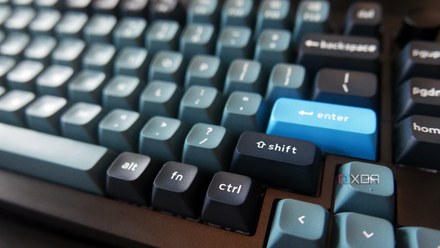
The overall look and color scheme of the Q65 Max is also very quick to grab your eye. I was sent the Carbon Black model, which features an all-black aluminum frame. The standard letters and number keycaps are white, with the enter and ESC keys coming in a teal color. The non-alphabet/numeric keys are a nice navy blue. The font Keychron has gone with is very easy on the eyes and really just helps bring the overall esthetics together. One thing I did notice was that a lot of the keys with words on them are all in lowercase. This isn't an issue, just something I can't recall seeing on many other PC keyboards.

Ajazz AK820 Max review: An excellent 75% wireless keyboard with a knob
The AK820 Max sounds great, feels balanced, and comes with all the features you'll need on a 75% keyboard.
The design of the keycaps is a bit different from what I was used to. On most keyboards I have reviewed, the keycaps slant upward a bit, starting with the spacebar as the lowest part, and then working up towards the F-keys. It's a bit different on the Q65 Max as there seems to be more of a dip in the middle few rows of keys. The above image doesn't quite do it justice but you can definitely notice while typing on it. It takes a little getting used to, but overall, I almost want to say that it improved my typing once I got used to it.
The subtle RGB lighting is a nice touch, rather than the in-your-face approach a lot of companies take. The south-facing LEDs offers a nice glow, just enough to light things up and make it so you can see the keys in a dimly lit room. The effects can be changed by pressing the FN+A. Pressing FN+A multiple times will scroll through the different effects so you can find the one that best suits your needs.
Typing on the Q65 Max
It's as lovely as it sounds
This is where things started to really get exciting. As mentioned, when you first start typing on the Q65 Max, if you are coming from a more standard keyboard, it does feel a bit odd. This is due to the layout/shape of the keycaps themselves. However, once you persevere and actually get used to it, it offers an enhanced experience that is quite enjoyable. The only issue is, once you get used to it, you won't want to go back to typing on those more standard keyboards you were once used to.
The keyboard is available in red, brown, and banana colored Gateron Jupiter mechanical switches. I had never tried the Jupiter switches, or a banana (yellow) switch, so this is the type I requested. I normally prefer red/speed silver linear switches, but the tactile feel of the Gateron Jupiter Banana switches was a nice change from what I am used to. Typing was a breeze and gameplay was just as enjoyable. In fact, I am using the keyboard as I am typing this review and have used it for a few other words, typing around 10,000 words on it during my time of use so far.
Best keyboards in 2025
There are countless keyboards on the market, but you only want one. We can help.
The Q65 Max is designed to offer the best of both worlds for office use and gaming, and it does a good job of delivering on this promise. When gaming, everything feels fluid, and reaction times for strafing while in FPS games is simply superb. I generally play a mix of FPS games and, if anything, it felt like I had better control of my movement compared to the Ducky keyboard I normally use.
The Q65 Max is designed to offer the best of both worlds for office use and gaming.
Featuring a customizable knob and dedicated macro keys really helps add to the overall performance and functionality this keyboard has to offer. Being able to use the knob as either a volume switch or to zoom in and out depending on your needs is really helpful. I am also a fan of dedicated macro keys as they make things so much easier, and it doesn't take anything away from the rest of the keyboards. For me, I use my macro keys to launch programs and when doing repetitive tasks in games.
Should you buy the Q65 Max?
If you are looking for a top-of-the-range keyboard that offers an enthusiast-grade build, the Q65 Max could be just what you're looking for. It comes in either a bare-bones kit you can build yourself, or, you can get it already fully assembled if you just want the quality without the hassle. Either way, the build quality is second to none thanks to its full aluminum frame design.
If you are looking for a top-of-the-range keyboard that offers an enthusiast-grade build, the Q65 Max could be just what you're looking for.
The keyboard itself has 10 layers to it, and once you add the switches and keycaps, the keyboard is composed of 12 individual layers. There are multiple foam layers that help with absorbing sound and offer a premium feel while you are typing. All of these combined really do give the Q65 Max a fantastic look and feel.
If you are looking to take your keyboard game to the next level, the Q65 Max is a great choice. It offers form, function, and plenty of customization options to help ensure you are getting the most from it.
You should buy the Keychron Q65 Max if:
- You want a keyboard that has a premium look and feel
- You want a smaller keyboard with dedicated macro keys and a customizable knob
You shouldn't buy the Keychron Q65 Max if:
- You're looking for a more budget-friendly keyboard
- You won't make use of the knob and macro keys
Keychron Q65 Max
- Wireless
- Yes
- Backlight
- Yes (South-facing RGB LED)
- Media Controls
- Yes(Using the fn1 key)
- Battery
- 4000 mAh Rechargeable li-polymer battery
- Num Pad
- No
- Switch Type
- Gateron Jupiter
The Keychron Q65 Max is designed to help reduce desk clutter and offers three connectivity modes for ease of use. It also comes with acoustic foam to dampen the noise of keystrokes while providing a smoother, more tactile typing experience.