
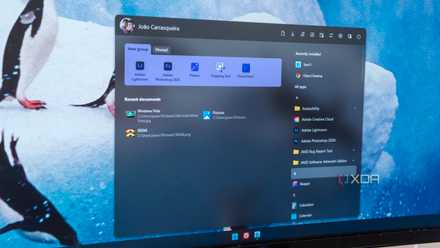
I and many other users have been complaining for years about how restrictive and limited the Start menu is on Windows 11, especially compared to the previous iteration on Windows 10. Microsoft seemingly hasn't budged, forcing many users to rely on third-party apps to improve the experience. That is, until recently, when someone spotted a completely new Start menu design that addressed most if not all the complaints users have had.
This new Start menu design is bigger and focuses more on the content users actually want to have there. It gives you access to your full list of apps right off the bat, and you can completely remove the Recommended section, which has been a baffling limitation of the existing design since Windows 11 made its debut.
Assuming this design actually makes it to regular users, it seems like Microsoft is finally listening to feedback and delivering better experiences for users, rather than just forcing them to deal with lackluster ones. This really should be the standard practice for all of Windows, so here are a few more things I hope Microsoft will fix and improve in Windows 11 in the near future.
5 Start menu alternatives and Windows tweaks that will speed up your workflow
Revamp your Windows experience with smarter Start menu alternatives and tweaks—boost efficiency, streamline navigation, and work faster
5 Clipchamp
Just give us a native version with 4K exports already
Don't get me wrong, I love that Microsoft is finally bundling some kind of video editing software on Windows 11, and Clipchamp is a huge step up from the extremely simple and limited video editor in the old Photos app on Windows 10. But it's still not anywhere near the level of what Apple offers with iMovie, which is included for free with macOS.
iMovie is a fully native app on macOS, and it's a pretty full-fledged editor that doesn't expect you to pay extra for basic features. You can export 4K videos just fine with iMovie, while Clipchamp wants you to pay for a premium plan for it. And Microsoft isn't bundling that in with Microsoft 365, either, so you have to pay about $10 per month just for this. It's frustrating.
It also doesn't help that Clipchamp is a web-based app instead of something compiled to run natively on Windows. Sure, this works, but performance could be greatly improved by making a native version, and creating 4K videos would be more warranted.
Clipchamp seems more concerned with being trendy and "easy", which means it dumbs down the options to make it as easy as possible to create a video, but it kind of misses out on more essential editing features.

How to use Clipchamp, Microsoft's free video editor
Microsoft has a free video editor included in Windows 11, and it's actually quite good for basic edits. Here's how to use it.
4 Widgets
Why aren't they on the desktop yet?
I will admit, no amount of fixing would get me to truly care about Windows 11 widgets. I don't care for them on macOS, either. However, Microsoft's implementation is still frustratingly limited in ways it doesn't need to be.
For one thing, Widgets having a dedicated interface and button means users have to go out of their way to ever look at them, which kind of reduces their appeal. On macOS, at least they're next to your notifications, plus one of the widgets includes the calendar, which on Windows, is a separate thing. Having all of these things in the same place could make all of them a bit more useful and it would be more likely users would actually look at them from time to time.
Widgets also take up a huge portion of the screen, not matter what kind of device you use. The widgets panel is very large when you compare it to the small widgets on macOS, and I get that they have to be a bit larger to be touch-friendly, but it still makes them unappealing.
One thing that could help fix this would be having widgets on the desktop — another feature macOS has implemented — so you don't have to open this giant panel every time, and you can just have informnation presented to you on the desktop. Microsoft was supposedly working on this years ago, but it never actually happened.

4 useful widgets that will boost your productivity in Windows 11
Are you looking for a new way to spice up your workflow? Try out these 4 widgets to optimize your PC and give it a bit more personality.
3 Gaming handhelds
They need a better UI
Whenever we talk about PC gaming handhelds, the conversation always comes back to the fact that Windows is simply not good for them, and that's the main reason why the Steam Deck remains the best choice for most people. It's been about three years since the Steam Deck launched, and it's starting to be hard to excuse Microsoft's inability to respond with a better gaming experience.
Sure, Microsoft has improved the Xbox app slightly, and there's a new keyboard layout for handhelds, but using Windows 11 itself is still impossible with a gamepad. You can use a touch screen as a workaround, but it's still not a perfect solution because Windows 11 is not optimal for such small screens, either.
Improving the Xbox app alone isn't going to work when so much of the PC gaming community is on Steam. Windows needs to be adapted to benefit all gaming handhelds and all kinds of gamers, and the fact that companies like Lenovo are launching handhelds with SteamOS shows how desperate everyone is to have a better experience. What will it take for Microsoft to listen?

6 things Windows needs to fix to make gaming handhelds bearable
It's just not a good experience
2 Search
Stop forcing us onto Bing and Edge
Windows Search has been one of the most annoying parts of Windows for some time now, and it feels like it's actually gotten worse over the years. The most egregious part of it is how Microsoft is hellbent on forcing users onto its Edge browser and the Bing search engine.
Any query you enter in Windows Search that takes you to a web search is forced to open in Microsoft's browser and using the company's search engine. For Bing, I can understand why that would be the default behavior. Of course Microsoft wants more users on it, and in many cases, it may work fine. But to ignore the default browser setting on your system and use Edge anyway is just unacceptable in my opinion. And even in the case of Bing, while it's understandable to have it by default, it simply shouldn't be mandatory. You should be able to change the search engine you use.
I know I keep bringing up macOS, but if even Apple, a company with a reputation for creating a walled garden and locking users in its ecosystem, can give users the freedom to use their favorite browser, why does Microsoft have to be so overbearing? If you want people to use Edge, make it better. Don't do this.

8 reasons to stop using Windows Search and use Everything instead
Windows search can be a drag. For a better search experience, check out Everything from Voidtools.
1 The setup experience
That includes the terrible "second-chance OOBE"
Finally, if we're on the topic of allowing users to use products in ways that actually help them, how about fixing the setup process in Windows 11? I was fine with a Microsoft account being required, but Microsoft couldn't stop at that. When you set up a computer for the first time, you have to decline Game Pass, Microsoft 365 (three times), allowing Edge to bring in browsing data from other browsers, and more. You used to have to turn down OneDrive backups, too, but Microsoft removed that page at one point and just started enabling them by default, so now you have to manually turn them off later. But even if you do, it's not the end yet. Because if you decline these features, Microsoft will remind you about them later. First, there's a "second-chance out-of-box experience" that appears a few days later prompting you to use some of these features again, and you have to decline them again. And then, every time there's a cumulative update, there's a chance you'll have to decline some things yet again because Microsoft just doesn't know when to quit.
Windows is huge because it's the platform where users can do everything and have the freedom to customize their experiences to their liking with different pieces of software. Microsoft wants to leverage it to make you use every Microsoft product, but most people don't want that, and forcing these products down their throats isn't going to change that. Just let users have their computer their way, and I'm sure more people will be open to using Microsoft products.
7 reasons I'm not going back to Windows after using the Mac Mini
It didn't take long to convert me
Let's make Windows 11 better
Right now, I'm keeping my fingers crossed that the new Start menu design that was recently spotted makes its way to end users. That would suggest Microsoft is actually listening, and then we can hope for more changes like the ones I just went over. These would make Windows 11 feel far more useful and comfortable for users, and it would improve Microsoft's reputation in terms of forcing unwanted experiences on its users. These are longstanding complaints users have been making for years, so it's high time for them to be addressed.