
Thanks to the enhanced processing capabilities of modern computing devices, you’ve got plenty of hardware permutations and combinations to choose from. And I don’t just mean CPUs, GPUs, and other PC components, either. Devices like Single-Board Computers, thin clients, and mini PCs are more useful than ever in the consumer market, especially with the RAM apocalypse inflating memory prices to exorbitant levels.
Mini PCs, in particular, have leveled up significantly on the computation prowess front, allowing you to integrate them into typical office workflows as well as complex DIY projects. But unless your workloads involve light tasks, they can’t really serve as substitutes for custom-built tower PCs.
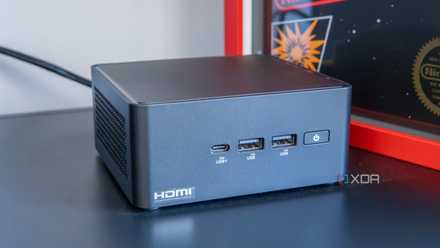
4 mistakes you should avoid when buying a mini PC
When purchasing a mini PC, there are a few key mistakes to avoid making before you finalize your purchase.
Mini PCs are great for non-demanding server tasks
They’re surprisingly useful for self-hosting containerized services
Before I talk about their drawbacks, let me go over the perks of mini PCs. And trust me, these little systems can pack quite a punch for typical home lab tasks. Containers, for instance, pair exceedingly well with mini PCs. Since your tiny tinkering companion shares its host kernel with the containerized environment, you can deploy dozens of Docker containers, Podman pods, and LXCs on it without running into performance issues. If you’ve got a hardcore home lab running AI tools, remote gaming VMs, multiple surveillance cameras with motion-tracking, and other demanding workloads, you can shift your documentation and monitoring stack to a mini PC. Plus, it has the added benefit of keeping your essential home lab tools operational even when your primary node goes down because of your experiments. Yeah, I speak from experience.
Heck, I’m not even talking about the top-of-the-line mini PCs that cost hundreds of bucks. Even a sub-$150 Intel N100 system can serve as a reliable container-hosting machine, and I say that as someone who already has one such mini PC in a Proxmox cluster. Throw in an optimized virtualization platform like Proxmox and stick with lightweight distros, and you can easily run a VM or two alongside your container arsenal.
You can even use them as secondary backup nodes
Besides their utility as container-hosting machines, mini PCs double as incredible storage hubs for 3-2-1 backups. I haven’t encountered many mini PCs that can accommodate full-fledged 3.5-inch HDDs, but many of them can support 2.5-inch hard drives. And that’s all you need for a secondary, remote node in your backup workflow.
I’m currently using a cheap 2-bay NAS for my offsite backups, but if it were to kick the bucket, I’d probably replace it with an N100 thin client that’s armed with TrueNAS, Tailscale, and a spare drive for my Rsync operations. I’d advise against relying on USB-based storage drives and SSDs, but considering we’re talking about secondary nodes, you can use them with your mini PC to house your backup files. Just make sure your remote backup node doesn’t stay unplugged for too long, or your blazing-fast SSDs will lose data.
Heck, they can perform normal tasks with ease
Your budget-friendly mini PC can run typical Windows 11 apps
Even if you’re not into home labs, mini PCs can serve as incredible daily drivers. Most x86 systems, including the N100, can run Windows 11 without any issues, provided they ship with 8GB of RAM. In fact, budget-friendly mini PCs are perfect for light browsing, printing media, editing documents, writing emails, and other office work, and their tiny size lets you prop them up on any desk without worrying about their extra footprint.
If you’re worried about the power consumption, you can rest easy knowing that mini PCs also score on the energy efficiency front. After all, the embedded processors siphon less energy than their desktop counterparts, while possessing enough system resources for most of the common computing tasks. Unfortunately, that brings us to their main drawbacks…
But they can't replace typical servers or gaming PCs
Thermal restrictions and limited GPU prowess can dampen your experience
While the miniature form-factor of mini PCs is an advantage in and of itself, certain features have to be sacrificed for their compact design. Besides limiting the airflow, the small dimensions of mini PCs can’t house large cooling fans or heatsinks. Combine that with poor-quality thermal paste, and your mini PC’s processor is bound to throttle under heavy load.
Speaking of performance, most mini PCs can’t surpass their tower-based DIY counterparts when it comes to sheer computing prowess. Sure, you could try running modern games on them, but unless you opt for high-end mini PCs, you’ll have to contend with integrated GPUs instead of their discrete counterparts. On the server front, you can’t really do much with the iGPU besides transcoding videos on Intel QuickSync-compatible systems. So, if you’re looking to run local LLMs, play demanding games, edit videos, or perform other intensive tasks, a mini-ITX (or even a micro-ATX) system is a better option.
I really hate the lack of upgradability provisions on mini PCs
Finally, you’ve got the upgradability problem – and that’s my biggest gripe with mini PCs as a tinkerer. You can’t replace the processor on these systems, so you’re pretty much stuck with an embedded CPU for your server tasks. Likewise, the lack of proper PCIe slots makes them terrible for server workloads where you may require faster NICs, HBA cards, or dedicated GPUs.
Plus, mini PCs tend to ship with soldered RAM, and I’ll never stop criticizing the lack of upgradable memory on anything that can remotely be used as a server node. The storage front isn’t all that glamorous, either. Sure, you have certain mini-PC/NAS hybrids that can accommodate smaller HDDs, but most of them only support NVMe SSDs. As such, I can’t recommend using them as your primary backup node for archiving essential data.
Nevertheless, mini PCs are terrific companion nodes
I may have been a little too hard on mini PCs here, but let me reiterate that they have plenty of perks. For the average user who doesn’t need the extra firepower of a full-fledged desktop, a mini PC can serve most of your needs – including gaming, if you go for something more powerful than a cheap N100 system. Likewise, they’re great starting points for home labbers and can run dozens of self-hosted services.
But for hardcore server enthusiasts or gamers, a cheap mini PC just won’t cut it. Sure, there may be expensive outliers, but the majority of the devices in the sub-$500 (and even sub-$750) range tend to be plagued by the unholy trio of thermal issues, performance limitations, and upgradability restrictions.
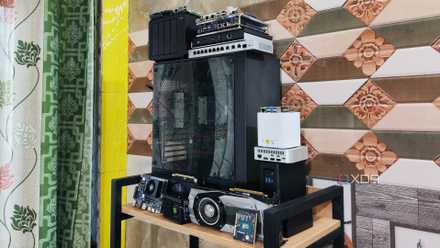
5 of the best devices you can build your home lab with
Old PCs, SBCs, NAS... everything can be repurposed into a home server!