
Summary
- Mini PCs are portable, versatile, and cost-effective, making them perfect for emulators.
- Emulators like RetroArch, PPSSPP, and DOSBox-X work well on mini PCs for gaming nostalgia.
- Mini PCs are a great option for emulators due to energy efficiency, compatibility, and nostalgic gaming fun.
With mini PCs becoming more popular, we are starting to see some great uses for them. A lot of them even have some pretty decent hardware. One of the things that mini PCs can be pretty good for is gaming. While they might not be able to play the latest and greatest AAA titles, they can play older games (and many other modern ones) with ease. This is where emulators come into the story, as they don't require the best hardware to run and can offer some nostalgic fun.
Why are mini PCs advantageous as emulators?
Versatility, price, portability, and more
One of the first things that comes to mind is their size. Mini PCs are, as the name would suggest, normally quite small. This makes them ultra-portable and easy to take with you wherever you go. Of course, you will need a monitor, peripherals, and other accessories to use with your mini PC, but the PC itself is easy to carry around.
Not only are they easy to carry around, they are also versatile. You can use a mini PC with your desktop monitor, a portable monitor, or even your television. Their small size means they can be placed almost anywhere and used with any compatible devices you may have.
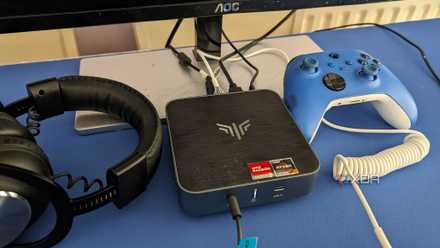
How capable are mini PCs: Are they any good for gaming?
Mini PCs may be small, but they pack a lot of power these days and can handle some light gaming
The lower cost of mini PCs also makes them a good option, as they are cheaper than your normal desktop PC. Saving money on a mini PC allows you to have more money to spend on the accessories you will need to use it. While you won't need anything overly fancy, it is nice to not have to go with the cheapest accessories you can find.
Mini PCs are also more energy efficient than a standard PC thanks to their size. They also offer more advantages than just saving some pennies on your energy bill though. Mini PCs also generate less heat than a standard PC and can be much quieter as a result of this. This will make for a more enjoyable gaming experience.
What emulators are best for a mini PC?
This is going to come down to personal preference and the type of games you want to play. However, there are quite a few different emulators out there which would be a good place to get started if you're new to the game. Something worth checking out first is EmuDeck. EmuDeck isn't just for handhelds anymore and has a number of different emulators you can use, all in one place. However, if you want individual emulators, there are a few options below to get you started.
RetroArch - This is likely one of the most well known emulators. It allows you to run a number of classic and retro games on loads of different devices, making it a one-stop shop. It features automatic controller configurations, achievements, and a straightforward interface. It will also let you record and stream your gameplay to sites like YouTube and Twitch.
LaunchBox - Originally designed as a front end for DOSBox, LaunchBox now supports plenty of retro games. LaunchBox will also let you organize your game collections and will even import your Steam library for you, so all your games are in one place. Of course, you can customize everything as well to your own preferences.

What you need to know before buying a mini PC
When looking for a mini PC, consider its specs and upgradability as well as its physical size
PPSSPP - This is one of my personal favorites, as the PSP was a console ahead of its time. I no longer have one, so it's nice to be able to play these games now and again. PPSSPP is an open-source project and, like the others, is free of charge. However, there is an option to purchase a gold membership, which is essentially a donation.
DOSBox-X - Yup, there is even an emulator for those of us old enough to remember DOS. DOSBox-X is compatible with a number of operating systems, including DOS itself, funnily enough. It will allow you to run both DOS games and programs and will really take you back in time.
Make retro gaming magic with your mini PC
Since you can use your mini PC at home and also take it wherever you go, emulation is a great investment to make. Since mini PCs also offer a more energy-efficient gaming experience, they are perfect for emulators. Plus, emulators don't need the latest and greatest hardware, so mini PCs are a great option.
Most emulators also feature support for different operating systems, offering wide compatibility with mini PCs. In fact, a lot of emulators can be run on both Windows and macOS as well as Linux. Some can even be used with Android, but that is a topic for another day.
I wouldn't go out and just buy a mini PC specifically for emulators, especially if you have another PC or laptop already. But if you have a mini PC around and are looking for another use for it, then emulators can be an effective way to enjoy it.