
When building a PC, most of us spend a lot of time focusing on the CPU specs and GPU specs, but gloss over the key motherboard specs, as long as it's compatible with the processor. While matching your CPU and motherboard is obviously essential, there's a lot more that should go into a motherboard purchase decision.
To pick a motherboard that ticks every box for your specific requirements, you need to spend some time understanding the most important motherboard specifications. Combine that with your budget and you'll be that much closer to making the right choice.
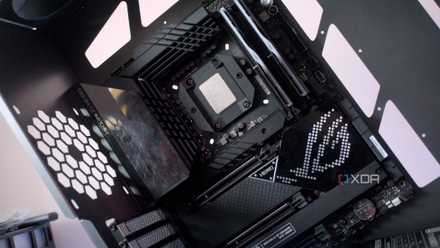
Why a motherboard might be the most important part to future-proof in your PC
Stop ignoring your motherboard.
Socket and chipset
First things first
The socket of your motherboard is the physical slot that determines which CPU you can install on it. Every processor is tied to a specific motherboard slot. For instance, Intel's 12th, 13th, and 14th Gen desktop processors are compatible only with Intel's LGA 1700 socket. Similarly, AMD's Ryzen 7000 CPUs are compatible only with AMD's AM5 socket. You can't install a CPU on a socket it wasn't created for.
While the socket is the most fundamental motherboard identifier, users generally search for motherboards using the chipset type. The chipset is responsible for linking all the components of a computer together and determining the speed of data transfer and the maximum number of ports and connectors on your motherboard. Every generation of Intel and AMD sockets is accompanied by a number of chipsets designed by the CPU manufacturers and produced by third-party motherboard manufacturers.
The currently available chipsets for the LGA 1700 and AM5 sockets are:
LGA 1700
- H610: Entry-level chipset with two RAM slots and no PCIe 4.0
- B660 and B760: Mainstream chipsets with up to four RAM slots, RAM overclocking, and PCIe 4.0 & PCIe 5.0 respectively
- H670 and H770: Similar to B-series chipsets but support 128GB RAM
- Z690 and Z790: Highest-end chipsets with CPU overclocking and the most PCIe lanes and ports
AM5
- A620 and A620A: Entry-level chipsets with up to PCIe 5.0 NVMe support and RAM overclocking
- B650 and B650E: Mainstream chipsets with more USB ports, CPU overclocking, PCIe 5.0 NVMe, and PCIe 4.0 graphics
- X670 and X670E: Highest-end chipsets with the most PCIe lanes and ports, PCIe 5.0 NVMe, and PCIe 5.0 graphics
Also, some motherboard manufacturers provide unofficial features on entry-level motherboards; features that are usually not sanctioned by Intel or AMD on particular chipsets.

5 things you will not get by spending more on a high-end motherboard
High-end motherboards can do a lot for your build. But these 5 things are not some of them
Form factor
Size does matter
The next crucial specification you need to know is the form factor of the motherboard you're buying. Desktop motherboards usually come in three popular sizes: ATX, micro-ATX, and mini-ITX. There are two major factors that should determine your choice of form factor — the size of your case and the number of components you want to install. Installing a smaller motherboard in a bigger case will look odd and unappealing, and you'll be limited by the expansion slots and ports on a smaller motherboard.
ATX motherboards are the largest of the three options and allow for additional memory slots, storage connectors, PCIe slots, fan headers, and a better Voltage Regulator Module (VRM) design. They're also usually better for cooling than the other two sizes. micro-ATX or mATX boards are scaled-down ATX boards with most of the same functionality but slightly fewer ports and a generally weaker VRM design. Finally, mini-ITX motherboards are ideal for small-form-factor builds, and feature only the most essential ports and connectors.

How to pick a PC case: 5 things to consider while buying a chassis for your build
Here's how to pick a PC case for your next build.
RAM slots – type, number, and speed
DDR4 or DDR5 — that is the question
The type of memory you can use also depends on your motherboard — a motherboard will only support one type of memory. Today, DDR4 and DDR5 are the most common memory types on the market, with DDR5 being the latest standard. If you're buying an Intel motherboard, you'll have the option of choosing between DDR4 and DDR5 versions of the same motherboard, as Intel CPUs support both memory types. But, AMD's latest motherboards with the AM5 socket support only DDR5 RAM, with DDR4 support available only on the last-gen AM4 motherboards.
Building a DDR4-based system can save you money due to the cheaper DDR4 motherboards and last-gen processors.
You also need to take into account the number of RAM slots on your motherboard. Two slots can prove to be a limitation if you want to be able to expand your memory in the future, whereas four slots give you that additional freedom. Lastly, the maximum RAM speed differs from motherboard to motherboard. For instance, higher-end motherboards might support memory kits rated to 8,000MT/s, but budget motherboards might limit that to 6,400MT/s.
Building a DDR4-based system can save you money due to the cheaper DDR4 motherboards and last-gen processors, but you'll lose out on some features, and you will be investing in a system that can't be upgraded. A DDR5-based build, on the other hand, will allow you to seamlessly drop in a next-gen CPU (in the case of AMD) on the same motherboard, saving the cost and hassle of buying a new motherboard.

Is DDR4 still viable in 2023?
Many believe the advent of DDR5 has already killed off the significance of DDR4. Let’s see if that’s really the case.
Storage connectors — type, number, and speed
Which SSD do you want to use?
The next important aspect of a motherboard is the generation of PCIe support it has. While this might not matter much for graphics cards that still work great on PCIe 3.0 slots, it matters for the kind of storage you want to install. PCIe 3.0 NVMe SSDs are mostly fine for gaming-only builds, as they allow you to leverage much faster loading times in games compared to conventional HDDs, and are sufficiently fast for booting your operating system as well.
But, PCIe 4.0 NVMe SSDs are the sweet spot for most people due to their significantly higher read/write speeds and better affordability compared to the newer Gen5 drives. Coming to the PCIe 5.0 SSDs, these are worthwhile only for users who can take advantage of their blistering sequential read/write speeds, which are useful when copying lots of files, or using productivity applications.
Do note the number of PCIe lanes available on each of the M.2 slots, as not all slots on a motherboard enjoy the same maximum speed.
Having the desired PCIe support — Gen4 or Gen5 — on your motherboard can be a make-or-break factor. Moreover, the number of M.2 slots on your motherboard will determine how many SSDs you can install. Do note the number of PCIe lanes available on each of the M.2 slots, as not all slots on a motherboard enjoy the same maximum speed.

It's 2024 and PCIe 5.0 SSDs are still not worth it for gaming
PCIe 5.0 SSDs hold the key to transformative gaming experiences. If only those promises weren't years away from actually panning out.
Expansion slots — type, number, and speed
For the enthusiasts
PCIe slots on your motherboard are needed for graphics cards, sound cards, network cards, and other components that require a high-speed connection directly to the CPU. While sound cards and network cards might not be that common today, you probably have a discrete graphics card you want to install on your motherboard. This makes the type of PCIe slots on your motherboard important.
Graphics cards today work just fine on PCIe 3.0 slots, but those who want a more future-proof motherboard will value PCIe 4.0 or PCIe 5.0 slots. Plus, you also want to focus on the number of PCIe slots — in case of multiple graphics cards —and the number and configuration of PCIe lanes available on your motherboard. This determines how many high-speed components you can run simultaneously at full speed, like graphics cards, SSDs, and other expansion cards.

PCI Express 5 (PCIe 5.0): Here's everything you need to know about the current-gen standard
PCIe 5.0 is the next big thing in the computing space.
Connectivity ports
How many peripherals do you have?
What probably escapes the attention of many users is the number of I/O ports on the motherboard. This determines the number and performance of your peripheral devices. Entry-level motherboards will have the bare minimum of USB ports, SATA ports, audio/video ports, and Ethernet ports. Mid-range and high-end boards feature more and higher-specced ports — USB 3.2 Gen 2x2, USB 3.2 Gen 2 Type-C, 2.5Gb Ethernet, Thunderbolt 4, and more.
Some motherboards also feature Wi-FI capabilities, with Wi-Fi 6 or Wi-Fi 6E being common on many mid-range motherboards. Similarly, Bluetooth connectivity is also helpful if you don't want to buy a separate Bluetooth dongle.
VRM design
Crucial for overclockers
The VRM of a motherboard is responsible for routing the right voltage to your PC components. It's made up of chokes, capacitors, and MOSFETs and determines the stability and quality of power delivered to your CPU and other components. While every motherboard has a VRM solution, only upper mid-range and high-end motherboards feature a VRM design capable of sustaining CPU overclocking and running high-end CPUs and GPUs.
A motherboard VRM is usually denoted by its number of phases (4, 8, 12, 16, 18, etc.) — the higher this number, the better the VRM design (generally). A lot of other things go into stable power delivery — the type of capacitors and chokes on the VRM, the cooling solution for the VRM, and the thickness of the PCB. If you're installing, say, Core i9 or Ryzen 9 CPUs on your motherboard, or you want a dependable motherboard for overclocking any CPU, it's always better to go with one with a high-quality VRM design.
Additional features
Nice-to-haves
There are some additional motherboard features that, while not important, can improve your overall experience. This could be onboard debug LEDs that can display error codes when something goes wrong with the motherboard, thus saving you hours while determining the underlying cause. Or it could also be a BIOS flashback button that doesn't need a CPU installed to update the BIOS.
Other quality-of-life features that you can look for on a motherboard are:
- Sufficient fan and ARGB headers to accommodate all your components without needing additional hubs or controllers
- Tool-less M.2 slots for easy SSD installation
- Pre-installed M.2 heatsinks for high-speed SSDs
- Integrated I/O shield so you don't forget to install it
- RGB lighting for some extra bling

5 features to look for in a new motherboard
Planning to buy a new motherboard? Here are some quality-of-life features you should keep an eye out for
Your motherboard is just as important as your CPU and GPU
Choosing a motherboard for a new PC should be a careful process, and you need to keep in mind both your current and future needs. The choice you make helps determine the longevity, expansion limits, connectivity options, overclocking headroom, and overall aesthetics of your device. Changing a motherboard isn't an easy affair, and isn't something you do often, so take the right amount of time before making the final decision.