
What's better than a CPU cooler that emits almost no noise? One that's silent, of course! That's precisely what the Noctua NH-P1 offers with a colossal heatsink and massive surface area for dissipating heat through the power of convection or existing PC case fans. Active cooling has become the norm for keeping processors running cool. Whether it's an air cooler or an AIO liquid kit, you'll use a fan or a few to move air through a heatsink. That is until passive coolers such as the Noctua NH-P1 came to be with their exceptional thermal performance with no active parts.
To put this CPU cooler to the test, I installed it on top of an Intel Core i5-13600K where it performed well enough that you could run the system without a single case fan installed, so long as you don't keep hitting the CPU hard with stress tests or heavier workloads. I then decided to try the 12-core AMD Ryzen 9 7900, which has a TDP of 65W, and activated precision boost overclocking (PBO) to transform the chip into an AMD Ryzen 9 7900X. The results were astounding and not what I expected from a passive CPU cooler.
So long as you can fit the Noctua NH-P1 inside your PC case and keep expectations in check, this is one powerful silent cooler that can handle high thermal loads. Throw on a single 120mm fan onto the side of the NH-P1 and you've got an additional 20% headroom.
About this review: XDA purchased the Noctua NH-P1 for this review and Noctua had no input to its contents.
Noctua NH-P1
- Brand
- Noctua
- Cooling Method
- Convection (Passive)
- Integrated Lighting
- No
- Noise Level
- 0 dBA
The Noctua NH-P1 is a passive CPU cooler for those who are looking to build a custom PC with no fans.
- Impressive build quality
- Works well with numerous CPUs
- Can create a truly silent PC
- Massive size and some serious weight
- Doesn't work with overclocking
- Somewhat niche application
Price, specs, and availability
Noctua does ask for a small premium for the NH-P1, costing $110. This is considerably higher than some AIO kits and better-value CPU coolers, but they're all active. This is a passive CPU cooler and plenty of research and development went into creating a beefy heatsink to handle modern processors. There's not much to this cooler. There's no included fan, no cabling to route, and the installation process is simple. Plenty of sockets are supported, including Intel LGA 1700, LGA 1200, and AMD AM5 and AM4 so recent processor generations will work fine.
The Noctua NH-P1 comes in at 158 mm high, 154 mm wide, and 152 mm long. Your PC case must handle CPU coolers up to 160 mm in height. Your RAM should be either low-profile or modules without massive heat spreader designs as the NH-P1 can interfere and there wasn't much clearance between our testing DIMMs and the lowest part of the heatsink. Weighing 1.2 kg, the Noctua NH-P1 is heavy and bulky. Though the installation process is straightforward, I urge caution when moving the motherboard with the cooler installed.
Specifications
- Brand
- Noctua
- Cooling Method
- Convection (Passive)
- Integrated Lighting
- No
- Noise Level
- 0 dBA
- Fan Speed
- 0 RPM
Design and features
The Noctua NH-P1 isn't simply a radiator the company took it from an existing CPU cooler with a fan, enlarged it, and called it a day. This cooler was designed and built from the ground up, allowing the team to work on perfecting its thermal performance through convection and get as much performance out of a processor. Noctua even markets the NH-P1 for high-end CPUs, which include Intel Core i9 and AMD Ryzen 9 SKUs, so the bar has been set high for this passive cooler.
Noctua even markets the NH-P1 for high-end CPUs, which include Intel Core i9 and AMD Ryzen 9 SKUs, so the bar has been set high for this passive cooler.
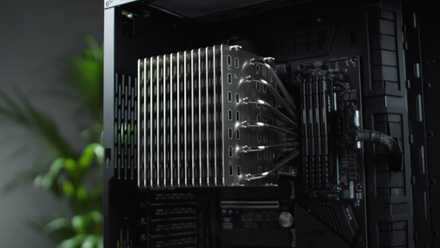
Unboxing the cooler itself is straightforward as there's one mass. No fans or other attachments are included or necessary. A single accessories box holds all the mounting hardware you'll need for AMD and Intel platforms. Looking at the NH-P1, it's immediate that this thing is massive. It puts many other CPU coolers to shame in the dimensions department. The copper base plate contacts the CPU and uses six thick copper heat pipes to take this heat to the radiator fin array.
The fin stack is made of aluminum. Because of its size, the NH-P1 should be able to soak up a lot of heat. It's the same idea behind moving up the radiator size for AIO coolers. The larger the surface area, the more heat can be effectively dissipated and the same goes for the NH-P1. It's huge for a very good reason. You may have noticed some cut-outs on the side of the plate, which go all through the heatsink. This is to aid heat dissipating from the fin stack and make active cooling more effective with airflow passing through.
The fins themselves are thick and 13 are layered atop one another with ample space between them. "Normal" coolers will have fins tightly stacked together, which then requires high-pressure fans to force air through. By spacing the fins, Noctua is able to rely on natural convection to take heat from the CPU and allow case airflow to more effectively pass through.
Best CPU coolers in 2025
Buying the best CPU cooler is just as important as buying any other core component. Here are some of the best CPU coolers on the market.
Installation and performance
Fear not if this is the first larger passive cooler you've installed. The sheer scale of the Noctua NH-P1 is imposing, but it's no more difficult than your average air cooler or liquid AIO kit. Actually, I would go as far as to say Noctua has made the process of installing this cooler easier than many others on the market. The manual outlines the short steps required to attach the NH-P1 to AMD or Intel processors. A long screwdriver is included with the accessories box to secure the cooler base to the mounting brackets, and you can have everything set and ready to go in minutes.
A downside to the mounting of this cooler is the use of hex screws. This isn't an issue since Noctua includes the branded screwdriver (and it's really good!) but is definitely something to bear in mind. I believe the company did this to ensure you use the correct screwdriver throughout the process. Physically handling the Noctua NH-P1 can also be tricky. It's best to take your time and make small movements when moving around the heatsink. The fins aren't too sharp, but there's no plastic cladding or fan to latch onto.
Running the Intel Core i5-13600K, the Noctua NH-P1 handled the heat load well. There was no thermal throttling under general usage of the system and lighter gaming. Firing up more cores with games that can take advantage of multi-core processors did show signs of heat saturation. Typically, I found the longer you applied heat to the NH-P1, the worse the results would be. This should be obvious as, without active airflow, you're relying on natural convection which has its limits.
The AMD Ryzen 9 7900 was almost as easy as the 13600K to keep cool with PBO disabled.
The AMD Ryzen 9 7900 was almost as easy as the 13600K to keep cool with PBO disabled. AMD's architecture is more efficient than Intel and it showed with the NH-P1. I barely saw the temperatures rise above 70C playing games and general computing. Running synthetic benchmarks saw CPU temperatures shoot up and stabilize with some minor throttling, but this worsened over time as the cooler became more saturated with heat. PBO enabled pushed readings to thermal throttling territory and we saw reduced speeds almost immediately. Just a single 120mm fan was blowing across the cooler and motherboard.
If you want to enjoy better performance, you will need to buy the NF-A12x25 LS-PWM separately. One thing to bear in mind with the Noctua NH-P1 is the lack of any active cooling from the stock installation, especially over the voltage regulator modules (VRMs). This can cause other components to run hotter, not just the processor. It's an impressive CPU cooler and the passive nature does work well, but you will need to plan accordingly with adequate case airflow if you don't want sky-high temperatures across the board.
Should you buy the Noctua NH-P1?
You should buy the Noctua NH-P1 if:
- You have a low-power CPU or don't plan on doing heavy workloads on the system.
- You want to build a silent PC.
- You have a large enough PC chassis to fit the NH-P1.
You shouldn't buy the Noctua NH-P1 if:
- You plan to run the system at higher loads for longer periods.
- You prefer to run hardware as cool as possible.
- Your case doesn't support massive CPU coolers.
You should buy the Noctua NH-P1 if you want to build a silent PC or have good enough case airflow to take advantage of a massive CPU heatsink block. There are some cases where the Noctua NH-P! makes more sense and the company even went as far as to test the cooler with numerous cases available, rating each one for the NH-P1. So long as your motherboard, PC case, and RAM will work with the Noctua NH-P1, you'll have a gloriously quiet system. Just don't go overboard with the heat generated from your CPU.
Whether you're using a budget-friendly Intel CPU or an AMD Ryzen 9 7900, the NH-P1 is capable of handling the heat. It's one impressive cooler.
Being a passive cooler, you will have to get accustomed to seeing higher temperatures under sustained loads such as gaming. This is how the NH-P1 works. Heat soaks up the heatsink and slowly dissipates but the warmer the heatsink gets, the less headroom is available to take heat from the chip itself. So we need to keep the cooler as quiet as possible to make the most of the available processing performance. Whether you're using a budget-friendly Intel CPU or an AMD Ryzen 9 7900, the NH-P1 is capable of handling the heat. It's one impressive cooler.
Noctua NH-P1
- Brand
- Noctua
- Cooling Method
- Convection (Passive)
- Integrated Lighting
- No
- Noise Level
- 0 dBA
The Noctua NH-P1 is a passive CPU cooler for those who are looking to build a custom PC with no fans.