
I was talking to a friend recently and asked her, “When you hear the word ‘AI,’ what’s the first thing that comes to mind?” She didn’t even blink before saying ChatGPT. A couple of days later, I asked a fellow tech journalist (who primarily writes about AI) what her favorite AI tool is, and guess what? Her answer was ChatGPT too.
Though it’s been nearly three years since OpenAI released ChatGPT, it’s hard to deny that it still dominates the conversation around AI. Of course, I use ChatGPT too, but I’m not as big of a fan as most people seem to be. Not because it’s bad (it’s brilliant, actually, like every other AI tool), but because it doesn’t meet all my needs on its own.
An AI tool that I absolutely love, and that’s convinced me AI can be a game-changer for productivity, is NotebookLM. If you aren’t familiar with it, NotebookLM is Google’s AI-powered personalized research assistant. NotebookLM, to me, is what ChatGPT is to most people. Suddenly, it hit me: why not pair the two? So, that’s exactly what I did, and it might just be the best decision I’ve made for my workflow all year.
4 features in NotebookLM that changed how I study
At this point, I might just owe NotebookLM my degree.
NotebookLM turns ChatGPT's lengthy responses into AI podcasts
Why read when you can listen on the go?
One of the biggest benefits of AI is how much time it can save you. Think about it for a minute, though — if you're conducting research on something, decide to prompt ChatGPT for help, and get a never-ending essay in return. A lot of times, the response will be useful, but also overwhelming to process all at once. If you're sitting at your desk and have time on your hands to go through the entire response at once, great. Even then, wouldn’t you rather save that time and get the key points without having to read through the whole thing?
One of NotebookLM's features that went viral on social media can help solve this issue. Google’s research assistant has a tool called Audio Overviews, which, as the name implies, converts anything into an engaging audio discussion. These "discussions" aren't just a person reading your source in a tone that'll bore you half to death. Instead, it's a podcast-style conversation between two AI hosts, a male and a female, who discuss your sources in an engaging and lively manner.
What I love about NotebookLM's Audio Overviews is how human-like they sound. The virtual hosts don’t sound robotic like most AI narration tools. They also throw in witty jokes and remarks throughout the podcast, and bring up questions that genuinely make me sit and think.
When I'm not in the mood to read yet another essay ChatGPT gave me, all I do is copy its response, head to NotebookLM, and create a new notebook. On the Add Sources page, I click Copied text and paste the text as-is into the text box. Then, I hit the Generate button in the Studio panel to generate an Audio Overview.
Within minutes, I’ll have an insightful audio discussion ready. The best part is, I can download it to my device and listen to it while doing house chores, taking a walk, or simply not in the mood to read walls of text.
ChatGPT researches, NotebookLM fact-checks
No more guessing what's real
Though NotebookLM is advertised as a research assistant, it doesn't help you find new information. Instead, it helps you interact with information you already have and understand it better. This means it can't access the internet and essentially builds a personalized AI based on the sources you feed it. So, when I need to conduct research and find new information, I either go traditional and search the web myself or ask an AI chatbot like ChatGPT.
One thing everyone knows about AI, including ChatGPT, is that it hallucinates. A lot of times, it'll tell you fabricated answers just to tell you what you want to hear. So, it'd be nothing but foolish of me to rely on the information it spits out alone.
Thankfully, instead of needing to vet it myself and verify each claim manually, I paste the ChatGPT response into NotebookLM. I also paste the original source, like an official website or press release, into the same notebook.
For example, when I asked ChatGPT about the specs of the iPhone 16e, it gave me a detailed answer that sounded legit, but I wasn’t about to take its word for it. So, I copied that response into NotebookLM as one source, and then added Apple’s official specs page as the second source. I prompted NotebookLM with the following:
Can you compare the iPhone 16e specs I’ve pasted in Source 1 with the details found on the URL in Source 2?
Within seconds, it highlighted the differences and confirmed which details matched up.If you're thinking, If you're thinking, "NotebookLM's an AI tool too, are you just trusting another chatbot?" — a totally fair question. The key difference here is that NotebookLM cites every claim it makes. When it tells you something, it links it directly to the exact sentence or paragraph in your source. So you're not just taking its word for it, you can literally click the citation and see where that info came from.
5 ways NotebookLM completely changed my workflow (for the better)
Hey Siri, how did I ever survive before NotebookLM?
NotebookLM can break down entire ChatGPT conversations
Organize the chaos in seconds
When you're using ChatGPT to research, you know how easy it is to get carried away. Before you know it, your conversation with the AI chatbot has turned into a long scroll of follow-ups, clarifications, and deeper dives. Instead of scrolling up and down to find that one reply or losing track of where a certain point was made, I just paste the entire conversation into NotebookLM.
Unfortunately, even if you generate a publicly shareable ChatGPT link and add it as a source in your notebook, NotebookLM won't be able to parse it. So, your only option is to hit CTRL/CMD + A, copy the entire conversation, and paste it manually as a source.
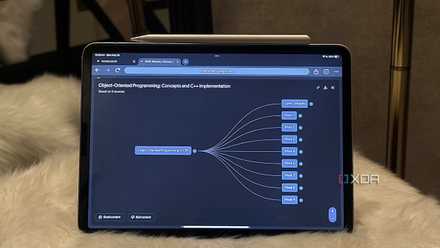
You can then ask NotebookLM to summarize the entire conversation, surface key takeaways, organize the content, and more. If you went over multiple topics and want to see how they link to each other, you can even generate a Mind Map within NotebookLM. It’s one of my favorite NotebookLM features and works especially well for visual learners. You can also convert the full ChatGPT conversation into an Audio Overview and recap it on the go.
You're seriously missing out if you haven’t paired these two
I've paired a lot of tools with NotebookLM before. Some examples include Perplexity, Excel, Google Docs, Slack, Gemini, and the list goes on. So, trust me when I say: ChatGPT and NotebookLM make an incredibly powerful combination. If you're only using one or the other, you're not getting the full picture.