
I’ve been using Windows since XP was a thing and got a laptop in 2012. Presently, I have two spare laptops serving a purpose in my self-hosting endeavors rather than collecting dust in a desk drawer. However, it wasn’t like that a couple of years back, as I had discarded the old laptops in favor of my new Asus TUF gaming laptop. I also have a few SBCs, and I love their role in locally hosting some of the best tools.
But if you’re just beginning your self-hosting journey, your old PCs and laptops are the most important devices you’re ignoring. An SBC, no matter how latest or greatest, cannot match the power of your dusty laptop. It’s a harsh truth that is accepted after buying multiple SBCs, and I now use both of these devices in appropriate projects rather than overburdening only one of them.
The laptop is on another level
No comparison in performance
The Arm architecture focuses on power efficiency, and the consistent upgrades in the last decade have made it powerful. Most of the high-end SBC chips you see today use Arm and can help maintain multiple self-hosted tools and act as a mini server. But power efficiency means you're losing out on performance. The small chip with a basic cooling fan can only do so much, but it still can't compete with a laptop. There are some exceptions with x86 and other chip architectures that are more powerful but pricey, almost nearing the cost of a mini PC.
Even if you compare a dual-core processor from a decade back to a Raspberry Pi 5’s performance, the former will win by a huge margin. It's a bonus if you have four core processors in your old laptop because then it can handle more powerful and demanding self-hosted tools. I can easily put something like Jellyfin or Home Assistant on the Raspberry Pi 5. The problem arises when the users multiply because its CPU won't be able to keep up with the demands.
If you were in school or college a decade back, you might have one or more laptops from that era. It might not run the latest Ubuntu or Deepin OS perfectly. Still has the raw power to transcend any new SBC. All you need is a lightweight Linux distro like AntiX, and the laptop is ready to run any self-hosted tool or a container platform like Docker.
Let's not overlook the GPU chops of a laptop. Not many self-hosted tools need a GPU, but if you are building a home server, it can come in handy. For starters, any media streaming server tool like Jellyfin or Emby can immensely benefit from even an integrated GPU. Hardware transcoding is not a joke, and serving media to multiple devices with different resolutions and demands isn't feasible for most SBCs.
So, you cannot take full advantage of it and would have to use software transcoding, which isn't the best. If you want to combine a local LLM with any self-hosted tool, the old laptop will be your best bet against an SBC. Some SBCs now integrate an NPU with the board, while others, like Raspberry Pi 5, offer an AI HAT module.
However, these tiny computers struggle under real-time AI workloads, while a laptop with an integrated or discrete GPU can run them with no problem. So, if you plan to tinker with AI integration in self-hosted tools, the old laptop can still be a worthy proposition.
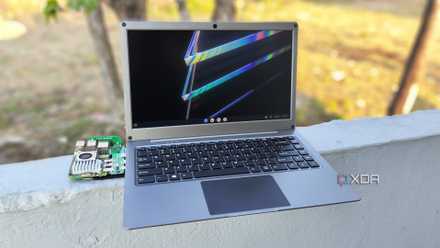
Can a Raspberry Pi replace your laptop?
While a normal laptop will always beat a Raspberry Pi-powered replica, the latter definitely has its perks
Old laptops save you money
No need to invest in multiple SBCs
An old laptop is a spare machine that's yet to find a new purpose. If it still runs, has a working battery and power adapter, you don't need to invest in it. All you need is maybe a complete clean and a thermal paste replacement, and it's ready for action.
If you go the SBC route, you're looking at a $50–100 minimum investment for a brand-new product with a learning curve. The accessories like power adapters, SD cards and other storage, USB hubs, and cases bump the price even higher.
I won't be able to justify this investment if I'm only looking for self-hosting tools rather than GPIO development. A better choice would be to save money, because even after that, you won't get the performance of a full-fledged computer. Your self-hosted tool stack will run, but it won't run as well as it would on a laptop and will cry under pressure from multiple devices.
Old laptops don't chug 200W as the new gaming ones do, and the idle load will not be much. It'll be higher than a Raspberry Pi or other SBC, but the difference wouldn't be so big that your electricity costs would hurt your pocket. It's just an additional laptop using 30-50W and running a complete self-hosted tool stack with much better performance.
I have previously experimented with running eight Docker containers of just 4GB DDR3 RAM, and it didn't flinch or falter even once. On top of that, I can still use the laptop for basic web browsing if I want. I did a $15 upgrade to bump the memory to 12GB, which now ensures that all the tools have plenty.
SBCs don't fit into every mold
Raspberry Pi and other teeny-tiny devices are powerful for some tasks, but that doesn't mean you put them into every role you can think of. I personally use them as single-role devices, such as running a remote downloading device and a retro gaming system. However, putting on the burden of running a complete self-hosted stack is something I wouldn't suggest if you have an old laptop.
Repurposing the laptop is a wiser decision that'll not only save money but deliver the power that's needed for demanding tools like Paperless-ngx, NextCloud, and more. You can easily upgrade some of the components and don't have to use additional USB hubs for connectivity. All these quirks make it difficult to recommend a Raspberry Pi unless you want to minimize power consumption.