
Summary
- Look for tools with categorization features, geotagging, and editing for efficient photo storage.
- Nextcloud offers secure cloud-based or on-premise file storage for individual and enterprise use.
- Immich is a self-hosted tool with features like automatic backup, facial recognition, and partner sharing.
Open-source photo management tools need to benefit your workflow rather than hinder it. Most tools offer similar systems, but for the best results in your cloud-based or locally hosted photo storage, you should look for tools with categorization features, geotagging, editing features, and a range of hosting options. Organizational toolswith features such as facial recognition, a wide range of accepted formats, rating systems, and metadata extraction will offer the best results for photo management.

This Western Digital 5TB portable drive delivers tons of storage on the cheap at just $90
A great way to store all your data that won't cost you a lot
8 Nextcloud
Content collaboration made easy
Nextcloud is a next-level open-source tool. It offers cloud-based or on-premise file storage without data leaks to third parties. You can securely store documents, calendars, contacts, and photos with Nextcloud.
It provides self-hosted and data-secure file storage, with easy access across mobile, desktop, and web browsers. Nextcloud has solutions for individuals, enterprise teams, and everything in between.
You can store your Nextcloud plan on a local server, an external cloud like Dropbox, or your at-home NAS server.
Nextcloud
- OS
- Windows, macOS, Linux
- Key highlights
- Self-hosted, open source
- iOS compatible
- Yes
- Android compatible
- Yes
- Desktop compatible
- Yes

3 tools to monitor and manage your NAS remotely
There are many ways to manage and monitor your NAS when not next to it.
7 Piwigo
Personal or team photo storage
Piwigo is an open-source photo management tool that is available on your system or hosted on the cloud. You can manage, organize, or share your photos from Piwigo, whether you’re part of a large organization, a small team, or just storing your own personal photos.
Piwigo is great for high-volume storage requirements, allowing up to hundreds of thousands of photos in your account. You can set a hierarchy for your albums for an organization that makes sense to your images.
Whether organizing your personal library or managing a team’s photos, you can benefit from Piwigo’s batch management tools. You can easily filter your collection and apply actions in batch workflows.
With an open-source tool like Piwigo, you can be rest assured of your privacy. Piwigo allows you to set permissions for individual photos or entire albums to ensure no one sees what they shouldn’t.
Piwigo
6 Photoqt
Simple photo viewing solution
Photoqt is an entirely free image viewer that supports hundreds of photo and image formats and a handful of video formats and packed archive formats.
While it’s quite simple compared to other photo management services, it offers features such as face tagging to organize portrait photos. PhotoQt allows for organization based on metadata, such as the camera settings of the photos in question, geolocation tags and data, and time and date information.
It’s a lightweight and efficient tool that doesn’t have bloatware upon installation. This simple and easy-to-use tool doesn’t offer any complex photo organization tools, but it does the job just fine without costing a penny.
Photoqt
5 Digikam
Internal hierarchy for professional-level management
Digikam is an open-source professional photo management tool. You can label and tag your images, and it also includes GPS options, so you can geolocate each image stored. Digikam is great for large image libraries of up to 100,000 photos.
You can import settings and rules from other devices when importing your photos from external storage devices to Digikam. It allows for storage and management of both photos and RAW format files — along with editing tools for each.
With tags and specifications you can apply to each file, you’ll be able to easily and quickly find photos and files based on specific criteria. These search capabilities include tags, labels, ratings, date, location, and specific EXIF, IPTC, or XMP metadata using Exiv2.
Photo albums in Digikam are directories for hosting. The albums are organized by hierarchy within on-disk sub-albums. Tag hierarchies and properties are virtual albums stored within the database and can be organized with the Tags Manager tool. Files can be grouped together by name, date, or time.
Digikam
4 Darktable
RAW-format development and organization
However, it’s also an organizational tool for your digital negatives. It’s a good photo management tool for organizing the RAW files you’ve edited in Darktable, but using it for storing or organizing non-RAW files doesn't make as much sense.
Darktable allows you to filter and sort your images for seamless organization. Sort and search by tagging collections, using a star rating for images, and adding metadata to your images for database queries. Darktable features a Smart Albums dynamic organizational tool, allowing you to search and categorize photos based on previous tags and data applied to them.
You can synchronize your edits to apply as presets to groups of photos. Along the same vein, you can also save custom search parameters such as presets, allowing you to save your search terms in easy-to-access systems and saving you time when looking for specific image types in the future.

4 reasons Darktable is the best free alternative to Lightroom
While it doesn't surpass Lightroom in every aspect, Darktable is the perfect open-source tool for all your professional image editing needs
Darktable
3 Ente Photos
Freemium photo storage
Ente provides end-to-end encryption in its Ente Photos photo-management app. You can access the app via mobile, desktop, and web browser for secure storage and management whenever you need it.
Ente Photos is an open-source tool with free and premium plans. Free users receive 5GB storage, which is a large enough amount for basic photo storage for casual needs. Paid plans begin from the Starter plan at $2.50 per month with a 50GB offering and go up to the Pro+ plan, which offers 2000GB for $20 per month.
With Ente, you can organize your photo library in many ways. With collaborative options and family plans, along with three data backups within Ente’s cloud system, your photos can be shared and stored safely.
Ente Photos
2 Photoprism
AI-powered photo management
Photoprism is an AI-powered photo management tool. It uses technology for automatic tagging and search capabilities to smooth your workflow when organizing your photos. Photoprism can be hosted on the cloud, on a private server, or directly from your home.
As one of the few open-source photo organization tools with AI-integrated features, Photoprison can automatically classify your photos, recognize faces within your uploads, and easily find specific photos in your collections.
Photoprism is developed for the decentralized web and it has broad format support. It features duplicate detection to save on storage when you’ve got double the images you need, advanced metadata extraction, and 100% security guaranteed.
Photoprism
1 Immich
One of the best self-hosted photo management tools
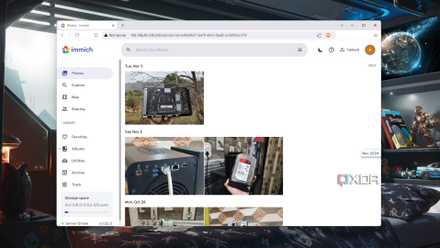
Immich is a great alternative to Google Photosif you’re looking for an open-source photo management and storage tool. You can purchase individual and lifetime licenses for Immich to support the project. Individual licenses cost $25, and lifetime ones are $100. Immich can also be used free of charge without a license.
Immich features automatic backup for your images, facial recognition, and partner sharing. You can apply tags to your images and reverse geocoding for data extraction and search purposes.
Although Immich is self-hosted, you can download external apps on Android and iOS to access your photo library from various platforms. It’s also available via the desktop. Your privacy is Immich's biggest concern.
Here's how you can replace Google Photos with a self-hosted Immich server
Take full control of your privacy by storing your photos and videos in a self-hosted Immich server
Immich
- Key highlights
- Self-hosted
- iOS compatible
- Yes
- Android compatible
- Yes
Immich is a self-hosted photo and video backup solution.
There are many great photo management tools to choose from
Many open-source photo management tools offer similar features for organizing your photo and file libraries. While there are few with AI features, PhotoPrism’s AI tools speed up your workflow when organizing and categorizing your images. Traditional tools feature rich categorization systems that work without AI, such as tagging and flagging, as well as facial recognition tools. Most open-source tools are available for free, but any with paid plans offer generous prices for storage amounts, allowing you plenty of options for organizing your photo and image files.