
Contrary to popular belief, home labs don’t require a lot of investment. Containerization distros, for instance, can deliver solid performance on SBCs, while Proxmox and OpenMediaVault pair well with budget-friendly systems and outdated PCs.
But once you’ve dipped your feet into the wondrous world of home servers, your barebones setup might start appearing rather unimpressive. Before long, you'll succumb to the curse of wanting new hardware for your experimentation lab. So, here’s my curated list of the best home lab equipment that, despite being optional, can bring some quality-of-life improvements to your setup.
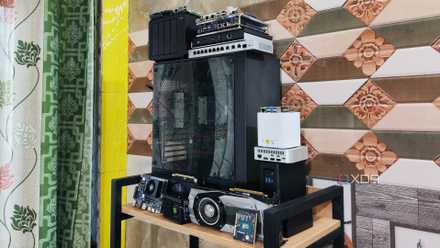
5 of the best devices you can build your home lab with
Old PCs, SBCs, NAS... everything can be repurposed into a home server!
5 Spare mini PC
Or an SBC/NAS
Outdated PCs can serve as the crux of casual home labs and can handle a surprising number of virtualization projects, provided you don’t go wild with overprovisioning the hardware. That said, you’re better off relegating certain projects to separate computing rigs. For example, you could technically virtualize a backup server for your VMs and containers, though one botched experiment is all it takes for you to lose your virtual guests and their snapshots.
Likewise, a monitoring container is borderline useless if it goes down with the rest of your home lab. If you’re building a robust firewall for your home network, it’s better to stick to an SBC or mini-PC, as it's possible to bring down your Internet connection should you mess up a DIY project while hosting the router OS on your home lab.
-
Khadas Mind
- CPU
- Up to Intel Core i7-1360P
- Graphics
- Intel Iris Xe graphics
- Memory
- Up to 32GB RAM
- Storage
- Up to 1TB SSD, free M.2 2230 slot
- Motherboard
- Custom
- Ports
- 2x USB Type-C, 2x USB Type-A, HDMI
-
Raspberry Pi 5
- CPU
- Arm Cortex-A76 (quad-core, 2.4GHz)
- Memory
- Up to 8GB LPDDR4X SDRAM
- Operating System
- Raspberry Pi OS (official)
- Ports
- 2× USB 3.0, 2× USB 2.0, Ethernet, 2x micro HDMI, 2× 4-lane MIPI transceivers, PCIe Gen 2.0 interface, USB-C, 40-pin GPIO header
- GPU
- VideoCore VII
- Starting Price
- $60
-
Radxa X4
- Storage
- M.2 M-key slot, eMMC storage (optional)
- CPU
- Intel N100
- Memory
- Up to 16GB LPDDR5
- Operating System
- Most x86 operating systems, Windows 11
- Ports
- 3x USB 3.2 Gen 2, 1x USB 2.0, 1x 2.5GbE RJ45, 1x audio/microphone AUX jack, 40-pin GPIO
- Display
- 2x micro-HDMI
-
LincPlus LincStation N2
- CPU
- Intel N100
- Memory
- 16GB DDR5 (soldered)
- Drive Bays
- 4x M.2 SSD, 2x SATA drives (2.5-inch)
- Ports
- 1x USB 3.2 Gen 2 Type-A, 1x USB 3.2 Gen 2 Type-C, 2x USB 2.0 Type-A
- OS
- Unraid
- Dimensions
- 210x152x39.8 mm
4 KVM switch
Great for multi-PC setups
Most home lab devices don’t require a dedicated keyboard, mouse, or display connected to them 24/7, as you’re likely to use them in a headless manner after the initial OS setup. However, considering the experimental nature of home labs, an input device and a monitor can come in handy when you need to troubleshoot a failed project.
If you’ve got as many devices in your home lab as I do, a KVM switch becomes a crucial part of the setup. True to its name, a Keyboard Video Mouse switch lets you connect a single set of peripherals with all your devices and cycle between them at the press of a button.
Ugreen USB 3.0 KVM Switch
3 Rack
Rat’s nest and home lab are two sides of the same coin
Cable management can be a grueling process when building your gaming desktop, but it’s an absolute nightmare in a home lab. Rather than just organizing the wires inside your PC, you’ll have to manage the power and Ethernet cables outside your server. Throw other SBCs, mini-PCs, and IoT devices into the mix, and you’ve got a rat’s nest to organize.
Thankfully, a server rack can take care of your cable management woes, especially when you have a dedicated network stack in your home lab. Mounting your battalion of home server devices onto a rack also makes the setup more space-efficient, as you don’t have the paraphernalia spread out all over the basement.
Sysracks Server Rack
2 Network switch
Preferably one with VLAN support
Although a router with a couple of RJ45 ports will suffice for a makeshift server, a network switch is always better when you want to build a dedicated computing lab. If you want to arm your server, NAS, and other rigs with faster NICs, you’ll have to invest in a switch of comparable speeds.
Likewise, home labs with multiple devices can benefit from the massive port collection, and you can even put your spare Ethernet connections to good use by setting up link aggregation on your NAS. Then you’ve got switches with PoE support, which let you leverage Power-over-Ethernet provisions to reduce the number of cables in your living space. For security-conscious folks with multiple IoT gadgets in their computing stack, a VLAN-compatible switch is a godsend as it lets you isolate the insecure devices from the rest of your home lab equipment.
-
NETGEAR 8-Port 10G Multi-Gigabit Ethernet Unmanaged Switch (XS508M)
-
Sodola 8 Port 10G Web Managed Switch
1 UPS
Don’t let blackouts dampen your tinkering spirit!
Whether you’re hosting mission-critical applications or backing up all your virtual guests, sudden blackouts can throw a wrench in your operations. NAS devices, in particular, suffer the most from random outages, and a little bad luck could result in corrupted drives and irrecoverable storage pools.
As such, an Uninterrupted Power Supply becomes a necessary investment if your location is prone to outages. Many UPS models also feature inbuilt brownout safeguards to protect your painstakingly acquired hardware from getting damaged by sudden spikes in the power supply. Not to mention, double-conversion UPS can filter the random fluctuations from your home energy supply and deliver clean power to all your home lab devices.
Amazon Basics UPS 600VA
- Brand
- Amazon Basics
- Load
- 600 VA / 360 W
- Battery
- SLA
- Outlets
- 8 (4 connected to battery)
- Display
- No
- Warranty
- 3 Years
Outfit your home lab with cool accessories
Aside from the options I’ve discussed so far, I’ve got some other cool devices that deserve a mention on this list. Graphics cards can be useful for demanding workloads, including AI text/image generation, video transcoding, and gaming (though you’ll have to pair your GPU with a decent processor for the last one). If you’re concerned about bit-rot affecting your data archival servers, I recommend grabbing a couple of ECC RAM sticks. Finally, a 3D printer can be fairly useful if your home lab involves extensive use of microcontrollers and SBCs.

4 ways you can use dual GPU setups in your normal PC
Assuming you're able to grab two graphics cards in this economy