
Summary
- SSH into your single board computer (SBC) with ease using PuTTY for seamless Terminal commands and quick configuration.
- Use Visual Studio Code and Thonny for coding complex projects like web servers and weather stations.
- Design custom 3D parts for your SBC projects effortlessly with FreeCAD, a free tool with decent CAM support.
The SBC industry may be thriving today, but the situation was radically different a few decades ago. In the past, you had to go through a lot of hassle to bring your DIY ideas to life. SBCs were nowhere near as popular or accessible as they are in this day and age. Factor in the lack of driver support or proper documentation, and the world of DIY projects used to be a lot harder to get into.
And that’s before you include how much better things have gotten since easy-to-use applications have simplified the process of making projects. So, here are five PC apps that every budding tech enthusiast should install before they embark on their project-building journey.
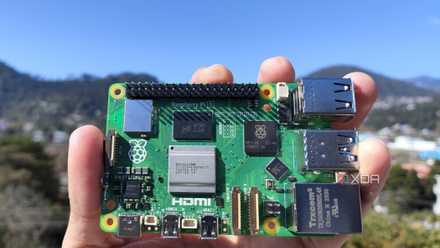
Raspberry Pi 5 review: The holy grail of DIY projects got even better (and rarer)
The Raspberry Pi 5 is one of the most powerful consumer-grade SBCs out there. Sadly, its limited stock means you'll have a hard time finding one.
5 PuTTY
The easiest way to SSH into your SBC
For the uninitiated, Secure Shell (SSH) is a protocol that utilizes encryption to provide a safe method for you to execute terminal commands on another system over a network. Although many users prefer a combination of Windows Terminal and OpenSSH, I encountered a couple of issues when I attempted to create a NAS-berry Pi and run LLMs on the SBC.
As such, I had to experiment with other SSH clients for these projects, and that's when I found PuTTY. It’s fast, lightweight, easy to configure, and works well without any hitches, making it a solid app for anyone who needs to run Terminal commands on an SBC from the comfort of their PC.
4 Visual Studio Code
Thonny is also useful if you're editing scripts on your SBC
While beginner SBC projects do not require much effort besides flashing the microSD card and installing some mandatory packages, the same can’t be said for the more complex things that you can pull off with these tiny devices. Take an SBC-based web server, for instance. Whether you choose to create a LAMP server or build one using Flask, you’ll have to get your hands dirty with coding if you want to make the most of your self-hosted website.
The same holds for other complicated projects, like our Raspberry Pi-powered weather station, where you can add additional functionality to the scripts if you’re well-versed in coding. While coding is perfectly viable on a capable SBC such as the Raspberry Pi 5, my preferred style of creating custom scripts involves creating Python scripts using Visual Studio Code (with the necessary extensions) on my PC before transferring them to my Raspberry Pi, then making any final changes using Thonny.
3 FreeCAD
The best free tool for creating 3D models
If you’re fond of tinkering with SBCs and other small devices, you may require custom-designed enclosures, screws, or other components for your project. 3D printing becomes quite useful in this scenario as you can simply manufacture these components yourself instead of spending hours online searching for parts with similar dimensions.
Of course, before printing the parts, you’ll need to design them. While it requires some finesse in 3D modeling, FreeCAD is my tool of choice when I need to design some accessories for my Raspberry Pi. Sure, its UI is rather unintuitive when compared with Fusion360 and other industry-grade tools. However, it’s fully open-source, has decent CAM support, and has a variety of plugins for easier design of custom parts.
2 RealVNC
For the times when you may need a GUI interface for your projects
When working with SBCs and low-power systems, you might want to install a command-line interface OS and SSH into the device to reduce the performance overhead if you’re working on demanding projects. However, the VNC protocol is pretty effective when you just want to work with an intuitive icon-based GUI operating system.
Having tried multiple VNC clients over the past few months, I can confirm that RealVNC easily surpasses its competitors. I’ll admit that RealVNC's compatibility issues with the Wayland protocol can be a real buzzkill. However, as long as you’re willing to switch from Wayland to X11, RealVNC is one of the simplest VNC apps out there, and the free version has all the facilities you may require for your GUI-based projects.
1 Raspberry Pi Imager
Or Balena Etcher, if you’re on any other SBC
Having spent hours writing boot images onto flash drives and microSD cards, I’ve tried out most of the popular flashing tools. If you only use Raspberry Pi boards for your projects, the official Raspberry Pi Imager app is the only tool you’ll ever need. Besides supporting most of the operating systems you may require, the official Imager application lets you enable SSH, Wi-Fi, and a host of other features to cut down the time you’d otherwise waste when booting into the OS for the first time.
But for those on non-Raspberry Pi boards, Balena Etcher is a great alternative if you want a hassle-free experience when writing OS files onto a microSD card or a flash drive.
There’s no shortage of productivity-driven apps for DIY enthusiasts
These are some of my favorite apps that I specifically use for my SBCs. But there are plenty more if you’re into other types of DIY projects. For example, if you love creating custom boards tailored to your specific use cases, KiCAD is a fantastic tool for designing your PCBs. Likewise, LTspice is perfect for those who require a robust app to visualize and simulate electronic circuits.
But if you’re just looking for some quick SBC ideas to sink your teeth into, then we have a list of projects that you can build on practically any SBC out there.

8 simple projects you can build with any SBC
Who says you need a Raspberry Pi to build your next DIY project?