
From top-tier performance in virtualization workloads to native support for LXCs, clusters, and ZFS, Proxmox has enough features that justify its popularity in the home lab ecosystem. However, the sheer number of first and third-party tools available for Proxmox is its biggest advantage over other virtualization platforms and server distros.
I often spend my weekends looking into all the cool services, packages, and scripts I can integrate with my Proxmox nodes – and here’s a list of utilities that I consider essential for my PVE workstations.
Proxmox Backup Server
I’ve got two PBS instances instead of just one
Backing up virtual guests to a separate system is a great way to recover a Proxmox setup from critical conditions, and there are a couple of ways to do so. Personally, I prefer going down the Proxmox Backup Server route instead of relying on the built-in snapshots and vzdump facilities.
For one, PBS’ incremental backups and compression algorithm reduce the amount of space occupied by LXC and VM data, while the deduplication feature ensures I don’t accidentally store multiple versions of the same files. On the troubleshooting side, the live restore and selective recovery facilities cut down on the amount of time my Proxmox virtual guests would otherwise need to get back in action. Plus, I’ve got PBS installed on a separate NAS, so I don’t end up accidentally losing all backups to a failed experiment. And call me paranoid if you must, but I have a secondary remote PBS server that receives the snapshots from my local instance. That way, I get the extra redundancy of a 3-2-1 backup setup.
Pulse
The best monitoring utility for PVE and PBS
While we’re on the subject of critical failures, a monitoring hub that can keep an eye on LXCs, VMs, and even the underlying Proxmox host is quite useful when you rely on your home lab as much as I do. While Uptime Kuma, Beszel, and the holy Prometheus + Grafana combo are solid picks, I use Pulse exclusively for my Proxmox nodes, as it synergizes extremely well with them.
Besides displaying the uptime statistics of every virtual guest running on PVE nodes, Pulse can also pull their CPU consumption, memory utilization, network speeds, and other useful metrics into its web UI. Capable of pairing with PBS instances as well, Pulse displays the storage utilization stats of the node and a neat log and frequency of the backup tasks. Heck, Pulse even lets me add custom URLs for each LXC, effectively doubling as a makeshift dashboard for my self-hosted empire.
Gotify
A lightweight alert server
Pulse is fairly useful on its own, but keeping its web UI open 24/7 isn’t plausible. And since I want to get alerted the moment anything untoward happens in my home lab, I need a dedicated notification hub. Although Discord and Slack can integrate with Pulse as well as Proxmox’s built-in alert system, I prefer going down the self-hosted route instead.
Gotify serves as my alert hub and is hooked up to my Pulse instance. Besides keeping me in the loop about any changes in the operational status of my nodes and virtual guests, Pulse lets me configure resource consumption thresholds for LXCs and VMs that, when exceeded, send alerts to my Gotify container.
Proxmox Datacenter Manager
To manage all my Proxmox nodes
By now, you may have noticed that I use the plural version of node whenever I talk about my home lab setup. That’s because I’ve got more than one device running Proxmox – there’s my primary Xeon server, a 3-node cluster cobbled together from budget-friendly devices, an old laptop that doubles as a self-hosting hub, and some unholy, virtualized PVE setups.
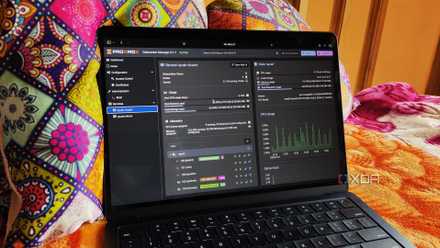
Proxmox Datacenter Manager makes managing them all a breeze by providing a centralized UI without forcing me to add the standalone PVE nodes to the cluster. It can also start and stop LXCs and VMs directly from its interface, and provides links to allow easy access to each node’s interface. But the real draw of PDM is its migration facility, which lets me transfer virtual guests between different nodes with just the click of a button.
I used Proxmox Datacenter Manager with my PVE nodes - here’s how it went
Proxmox's alternative to vCenter is far from perfect, but it has tremendous potential
Proxmox VE Helper-Scripts
My home lab was built with these handy scripts
By default, Proxmox includes TurnKey LXC templates to make container deployment somewhat easier. However, most of the essential self-hosted services don’t feature TurnKey templates, and even the ones that do – like Nextcloud – tend to be more outdated than their official Docker/LXC images.
That’s where the Proxmox VE Helper-Scripts repository comes in handy, as it includes hundreds of commands for spinning up LXCs, which range from common services to the most obscure and unhinged apps. For HASS and a few other services, this neat scripts repo can even get entire VMs up and running. Heck, it even includes a couple of add-on scripts, post-install commands, and tweaks that make configuring new Proxmox nodes a cinch.
Tailscale subnet router
That runs as an LXC, no less
As much as I’d love to rely on a self-hosted VPN, the scourge of CGNAT prevents me from configuring port-forwarding on my router. With free VPS providers shaking me down for my private info before I can even configure them, I use Tailscale to remotely access my Proxmox nodes. Well, there are a couple of ways to go about installing Tailscale, including setting it up directly on the host machines.
But since I avoid loading the underlying Proxmox installation with extra packages, an LXC-based Tailscale subnet router is the best antidote for my remote access woes. Sure, an unprivileged container requires a little bit of extra elbow grease, but once I enable address forwarding and specify the subnet of my home lab, the Tailscale LXC works incredibly well.
Proxmox Ultimate Updater
It really lives up to its name
Since I have dozens of LXCs and VMs scattered across my Proxmox nodes, updating the virtual guests becomes a royal pain. Proxmox Ultimate Updater solves this problem by automatically arming my entire virtual guest stack with their latest updates. But unlike the default Watchtower configuration, which can pull broken images, the Ultimate Updater only shows the available updates and doesn’t install them without my permission.
Better yet, the Ultimate Updater works with containers deployed using Proxmox VE Helper-Scripts as well as their TurnKey counterparts. With a handful of QEMU tweaks, this package even works with my virtual machine collection. It also creates snapshots of each virtual guest before installing the updates, making it easy to recover from broken packages.

This Proxmox script makes updating my VMs and LXCs so much easier
One script to update them all!
Semaphore
My all-in-one PVE automation LXC
Terraform and Ansible may not be all that useful for the average home labber, but they’re a terrific duo of automation services for my Proxmox nodes. When I want to create experimental VMs for my server projects, I use pre-configured Terraform templates (including those featuring GUI desktops) to spin them up with all the necessary settings enabled. Then, Ansible takes care of arming my freshly-minted virtual machine with the necessary packages, and I’ve got multiple Playbooks configured with the essential apps I’d need for my projects. Heck, I even use Ansible when installing packages and bulk-modifying settings for my normal VMs and LXCs.
However, my Terraform and Ansible misadventures would be rather tedious if I relied solely on terminal commands. As such, I use Semaphore’s web UI to manage my Ansible artifacts and Terraform templates. Besides executing my automation chains, Semaphore can also add custom parameters to them and schedule them at a specific time when I don’t want to run my scripts right away.
Make your Proxmox life easier with convenient tools
If you’re still hunting for other cool services to integrate into your Proxmox workstation, I’ve got a couple of honorable mentions. Authentik, for example, makes deploying an SSO server for my home lab a lot easier, while NetBox is my go-to utility for documenting my network infrastructure. On the script side of things, PECU is great for folks looking to pass GPUs to virtual machines. There’s also the Node sensor readings view script within the PVE-mods repo, which adds real-time temperature monitoring for my Proxmox nodes. These days, I also use the Backup Proxmox PBS & PVE System Files repo to save and export my Proxmox config files for easy recovery if (or rather, when) I end up breaking the virtualization platform and need to reinstall everything from scratch.