
The realm of enthusiast-grade keyboards is chock-full of options, with experiences ranging from the budget board, all the way to the ultra-premium, containing all the bells and whistles. Pulsar’s XBOARD QS falls squarely at the premium end of that spectrum, and despite its hefty price tag, it doesn’t disappoint. Pulsar put extensive effort into making this thing feel great to use, and everything from the typing experience to the quick-switching feature feels responsive and works great out of the box.
The aforementioned quick-switching feature is the main calling card of this keyboard; the ability to connect two different PCs and swap the input between them seamlessly does come in handy for someone like me, who works at a two PC setup. The integrated USB 2.0 hub further plants this keyboard firmly in “content creator” territory, allowing one to connect additional devices, like a stream deck. For the budding content creator, this keyboard is an absolute knockout, but even for those just looking for a keyboard that feels excellent to type and game on, as long as the steep price doesn’t scare you off, look no further.
About this review: Pulsar provided an XBOARD QS for the purposes of this review. The company had no input into its contents.

Pulsar XBOARD QS
- Colorways
- Black/White
- Construction
- CNC Aluminum
- Keycaps
- Double-shot PBT
- Supported operating systems
- Windows, MacOS
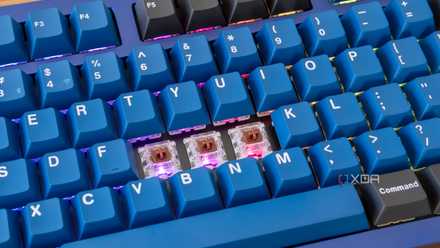
The Pulsar XBOARD QS is a mechanical gaming keyboard that features quick switching functionality, allowing users to switch between two different devices instantaneously. It features Kailh Box Ice Mint V2 switches and multiple gaskets to provide a quiet, but satisfying typing experience.
- Quiet, but satisfying typing experience
- Quick switching between two devices
- Full macOS support
- Expensive
- USB hub is limited to 2.0 speeds
Pricing and Availability
The XBOARD QS comes in at $299, and is available directly from Pulsar’s website, as well as on Amazon for the same price. It comes in either a black or white color, with accents to match. There are no alternative switch options; it comes stock with Kalih Box Ice Mint V2 switches, but they are hot swappable with most 3 or 5 pin MX-style switches.
Specifications
- Colorways
- Black/White
- Construction
- CNC Aluminum
- Keycaps
- Double-shot PBT
- Supported operating systems
- Windows, MacOS
- Hot-swappable
- Yes
- Connectivity
- 2x USB-C 2.0, 2x USB-A 2.0
- Dimensions
- 360mm x 163mm x 35mm
- Weight
- 1480g / 52.2 oz
- Price
- $299
- Number of Keys
- 88
- Brand
- Pulsar
- Num Pad
- No
- Included switches
- Kailh Box Ice Mint V2
What I like
A premium experience through and through
I’ve never actually tried any Pulsar products in the past, and I was pleasantly surprised. Starting with the unboxing, the accessories included were of high quality. Nothing felt cheap. The cables, keycap puller, switch puller all felt like they had some heft to them. The extra switches and velvety carry bag were a nice touch. Pulsar do a great job justifying the high cost of the board, and this will become a running theme throughout the review.
As far as the keyboard itself, the CNC aluminum construction give it a very premium feel. It’s actually quite heavy for a keyboard, coming in at 1480 grams, or just over 3 pounds. This isn’t a knock against the XBOARD QS by any means, but it is by far the heaviest keyboard I’ve used. That construction doesn’t go to waste though. Beneath the uniquely open-back design is a layer of foam, followed by silicon gaskets and other noise dampening material. This gives the XBOARD QS a very quiet, but satisfying sound signature when typing. The keycaps themselves have a slightly textured feeling to them, and along with the south-facing switch layout, offers a comfortable and familiar typing experience.
Pulsar opted for the Kalih Box Ice Mint V2 switch, which are a fast, linear switch, coming in with a 2mm actuation distance. Actuation force is fairly low and feels snappy, but not overly so. One thing that took some time getting used to initially was actually how little “give” and bend there is in the keys. The choice of switch combined with the included keycaps makes for an incredibly stable experience. If these switches aren’t your jam, they’re fully hot swappable, with full support for most MX switches out there.

5 ways a good keyboard and mouse combo can take your productivity to the next level
Here's how you can improve your workflow with a good keyboard and mouse.
Software (or lack thereof)
One thing I absolutely despise about some of the big players in the keyboard space is their attempts at software. Pulsar does the right thing here, and allows for the XBOARD QS to be flashed with any custom QMK firmware. This essentially means the sky is the limit when it comes to customization. The only downside of this is that it’s not as user-friendly, but chances are if you’re buying a $300 keyboard, you’re not going to have entry-level knowledge. It’s also fully compatible with Signal RGB as well as OpenRGB.
The out of the box experience didn’t need any additional installations or setup. I plugged it in to both my desktop PC and my MacBook Air, and immediately began using it as I would any other keyboard. With function key combinations you can do things like turn off the Windows key, enable N-key rollover, and change RGB effects. I absolutely love this, and I think this is how every keyboard should be; changing settings on-board is just so much better than having additional bloated software installed. Speaking of RGB, there are 44 different built in effects, which are more than enough for me. They range from the normal rainbow affairs in different styles, to reactive effects that light up based on which key is pressed.
Mechanical, magnetic, or optical: which keyboard switch should you choose?
What's the difference between mechanical, magnetic, and optical switches?
Quick switching between systems is awesome
I often have my MacBook at my desk to assist with a variety of productivity tasks, but one annoyance I have is having to shift my entire body to type on it. In comes the XBOARD, which has two different outputs that can be switched between instantly using the large “+” and “x” buttons near the volume knob in the top right of the keyboard. OS compatibility isn’t an issue either; there’s a dedicated key for switching between Mac and Windows modes, allowing for seamless use of both operating systems. The keycaps even feature legends for each OS if they differ on a specific function key.
The quick switching feature is killer for anyone who does content creation with multiple PCs. For a dual PC streaming setup for example, having two dedicated keyboards for each system can be a huge pain, and while you could have a complicated KVM setup, there’s just no need when something like the XBOARD exists.

5 things major keyboard brands need to improve to compete with budget players
Bigger keyboard brands need to step up their game to stand against premium offerings from budget competitors
What I didn’t like
I was hard-pressed to find anything I didn’t like about this keyboard. Honestly, the only true knock I can have against it is its price. $300 is expensive for a non-HE keyboard, but with the additions of the quick switching feature and full Mac support, I have to give it some extra points. The lack of a dedicated piece of software might be a downside to some, and I would’ve liked even a basic web-based solution dedicated just to the XBOARD. QMK compatibility does a lot of heavy lifting here, but that’s totally fine with me. The integrated USB hub being limited to 2.0 speeds and Type-A is also a bit of a bummer. Another minuscule nitpick is the lack of a dedicated play/pause media button, but there are media functions available using the function key combinations, so it’s not a huge deal. Again, overall, it is tough to really find much wrong with this keyboard. It’s rock solid.
Should you buy the Pulsar XBOARD QS?
In one word: yes. If you’re a gamer that uses multiple computers at the same time, this is absolutely the keyboard for you. The quick switching technology combined with the superb typing experience make it the perfect keyboard for streamers. Even if you’re not a content creator, the XBOARD QS is good enough to stand on its own, but might be a bit on the expensive side for those just looking for the best typing experience for their dollar. It looks and sounds fantastic, and provides an incredibly consistent typing experience both in gaming and productivity.
You should buy the Pulsar XBOARD QS if:
- You want a well-built, premium feeling keyboard.
- You use multiple computers in your workflow.
- You like RGB effects.
You shouldn't buy the Pulsar XBOARD QS if:
- You're budget conscious
- You prefer hall effect switches
Pulsar XBOARD QS
- Colorways
- Black/White
- Construction
- CNC Aluminum
- Keycaps
- Double-shot PBT
- Supported operating systems
- Windows, MacOS
Pulsar's XBOARD QS is the perfect gaming keyboard for those who work with multiple computers in their workflow. Unless price is a concern, gaming creatives should look no further.