
The Raspberry Pi 5 is the first Pi that genuinely feels like a modern computer rather than a quirky little experiment. It has enough CPU power, RAM, and I/O bandwidth that you can forget about most of the old bottlenecks and just get things done. Whether you are running a desktop environment, hosting services, or juggling a handful of containers, it rarely feels out of its depth. That alone puts it in a very different category than the boards that made the Raspberry Pi name in the first place.
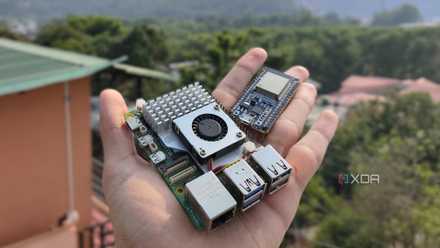
On paper, the Raspberry Pi 5 looks like a tiny desktop, a home lab node, a media box, and an embedded controller all at once.
The trouble is that the story around the Raspberry Pi 5 never quite matches how capable the hardware has become. On paper, it looks like a tiny desktop, a home lab node, a media box, and an embedded controller all at once. In practice, the ecosystem, marketing, and accessories do very little to help new buyers understand what it is actually best at. The result is a superb little board that can do almost anything, yet somehow still feels like it has not decided what it wants to be.
5 projects you can do for much cheaper with an ESP32 than a Raspberry Pi
Why spend extra on a Raspberry Pi when you can build these cool projects with an ESP32?
Raspberry Pi 5 finally feels grown up
Hardware that catches up with real expectations
The Raspberry Pi 5 delivers the kind of performance people have been asking for since the Pi 3 era. CPU-intensive tasks that used to feel sluggish, such as modern web browsing or code compilation, are noticeably smoother and more responsive. Storage is no longer limited to slow microSD cards if you choose NVMe or a fast USB SSD instead. For the first time, it is realistic to treat a Pi as something you can sit down in front of and actually work on for a while.
That power ceiling opens up a wider range of roles than any previous Raspberry Pi model could comfortably fill. You can run multiple self-hosted services without constantly babysitting load averages, and you can test heavier stacks that would have overwhelmed earlier boards. As a small-form-factor desktop, it can handle office work, light development, and basic media editing if you are patient. For makers and tinkerers, it is also capable enough to simulate the environment of larger servers or cloud instances when you are prototyping.
The broader ecosystem has also grown around this new capability, which adds to the sense that the Pi 5 is ready for more serious work. Official NVMe storage options, improved cooling solutions, and better power delivery mean fewer compromises when you start pushing the hardware. There are also more accessories aimed at structured use cases, such as cluster cases and carrier boards, rather than just one-off hobby projects. Everything about the platform says it is time to take the Raspberry Pi more seriously than before.
A powerful board without a clear purpose
When every possible role blurs into confusion
As the hardware has matured, the messaging around what the Raspberry Pi 5 is for has become harder to parse. The official materials still lean heavily on the familiar mix of education, tinkering, and “general-purpose” computing. At the same time, many of the improvements clearly target more demanding users who want a stable desktop or a home lab workhorse. That split personality makes it difficult to say whether someone should think of it as an impulse-buy hobby board or as a foundation for long-term projects.
This confusion shows up quickly when you try to pick a use case and stick with it. Treat the Pi 5 as a desktop, and you’ll run into the cost and friction of buying cases, power supplies, storage, and possibly active cooling. Treat it as a cheap embedded controller, and the board feels overpowered and pricey for the sort of tasks a microcontroller or older Pi could handle. Try to push it into the role of a serious home server, and you run into limits around memory, storage expandability, and network throughput.
The end result is a device that often feels like it is straddling too many worlds at once. It is still presented as the default choice for first-time Pi buyers, even though its price and complexity are no longer entry-level. At the same time, it is not clearly framed as a niche tool for a specific type of workload, as some competing boards and mini PCs are. That lack of a sharp, opinionated identity makes it harder for people to know when the Pi 5 is exactly right for them and when it is the wrong tool.
Mini PCs and rivals blur the picture
Competing options sharpen the identity problem
The Raspberry Pi 5 also exists in a very different landscape than the early boards did. Compact x86 mini PCs built around efficient CPUs have dropped in price, often including RAM and storage for less than the full cost of a loaded Pi 5 setup. For someone who just wants a low-power home server or a media box, those systems can be easier to justify. You plug them in, install an operating system, and you are done, without worrying about HATs, USB adapters, or power headroom.
That comparison makes the Pi 5’s identity problem much more apparent. If you mainly care about performance per dollar for typical server workloads, a mini PC will often come out ahead. If you mainly care about rock-solid device support and mainstream app compatibility, x86 again has a strong story. Even in the maker space, other SBCs lean into specific niches, like networking, AI accelerators, or industrial I/O, with product pages that make those roles clear at a glance.
At the time of this writing, the so-called "RAMpocalypse" compounds the problem of affordability for the Raspberry Pi 5. Recent price hikes have rendered the Raspberry Pi 5 with 8GB of RAM almost the same price just for the SBC itself as many comparable mini PCs. Then you have to add in the cost of a power supply, case, active cooling system, and storage. As I've noted previously, this drives the price for a "full kit" Pi 5 higher than most budget-conscious mini PCs.
Pricing and availability history also complicate the picture, even though supply has improved. For a long time, many people viewed Raspberry Pi boards as the cheapest way to experiment with Linux and hardware. The Pi 5 is simply not that product anymore, yet much of the surrounding conversation still treats it as if it were. When a device is marketed as a budget-friendly starting point while competing with more turnkey systems on raw capability, buyers are left wondering which metric matters most.
How Raspberry Pi can find clarity
Embracing focus without losing flexibility and fun
None of this means the Raspberry Pi 5 is a failure, or that it cannot find the right audience. In many ways, it is the best expression yet of what made the ecosystem successful in the first place. The problem is not the silicon, but the story the platform tells about itself. The Pi 5 tries to be the default option for everyone, when it would probably serve users better by owning a smaller set of roles more confidently.
One way forward would be clearer, more opinionated bundles and messaging. A Pi 5 “Desktop Kit” that is explicitly framed as a casual Linux PC, a “Lab Node” kit aimed at self-hosters and students, and a “Maker Core” kit for embedded projects would send very different signals. Each could prioritize the right accessories, documentation, and example projects for that audience. Instead of one vague idea of a general-purpose board, you would get concrete stories and expectations that match how people actually plan to use the device.
Raspberry Pi could also lean more heavily on the features that other platforms do not offer. That includes educational material, community projects, and a long history of low-level tinkering that helps people learn fundamental skills. The Pi 5 has enough headroom to be both a playground and a serious tool in that space, whether you are teaching networking, programming, or system administration. If the platform focused more on that unique angle and less on trying to be everyone’s next desktop, the hardware and its identity would finally feel aligned.
Why this excellent board feels oddly directionless
The Raspberry Pi 5 proves that the foundation is stronger than ever, but it also exposes how much the project’s self-image lags behind its hardware. It is capable enough to replace older desktops, run meaningful home lab workloads, and anchor ambitious maker projects, yet it is still marketed as a general “one size fits all” board.
The Pi 5 is excellent, but until Raspberry Pi clarifies who it is really for, it will keep feeling oddly directionless.
In a world where mini PCs, niche SBCs, and cloud services are all competing for attention, that vagueness does it no favors. The Pi 5 is excellent, but until Raspberry Pi clarifies who it is really for, it will keep feeling like a device that can be everything and, somehow, end up being nothing in particular.
Raspberry Pi 5
- CPU
- Arm Cortex-A76 (quad-core, 2.4GHz)
- Memory
- Up to 8GB LPDDR4X SDRAM
- Operating System
- Raspberry Pi OS (official)
- Ports
- 2× USB 3.0, 2× USB 2.0, Ethernet, 2x micro HDMI, 2× 4-lane MIPI transceivers, PCIe Gen 2.0 interface, USB-C, 40-pin GPIO header
- GPU
- VideoCore VII
- Starting Price
- $60
The Raspberry Pi 5 is an excellent SBC, much more powerful than its predecessors, but think long and hard about your use case scenario to make the most of it.