
Summary
- Raspberry Pi 500 is a versatile mini-PC packed with powerful hardware for tinkerers.
- The new Raspberry Pi monitor complements the Pi 500 with a 15.6" HD IPS panel and 45% color gamut.
- You can buy a standalone Pi 500 unit for $90 or a desktop kit for $120 that includes accessories.
Raspberry Pis work great even when they're not attached to a monitor; not so great when you want to use them as a standalone PC. Fortunately, the Raspberry Pi Foundation has released a new monitor to help you keep tabs on everything happening in your Pi. To go with your new monitor, the Foundation also released the Raspberry Pi 500, a new version of its computer-keyboard combo.
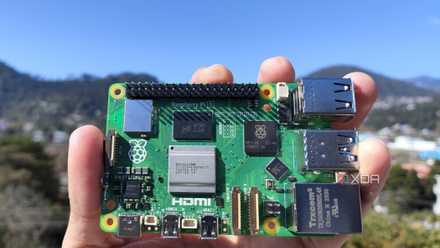
Raspberry Pi 5 review: The holy grail of DIY projects got even better (and rarer)
The Raspberry Pi 5 is one of the most powerful consumer-grade SBCs out there. Sadly, its limited stock means you'll have a hard time finding one.
The Raspberry Pi 500 is the perfect tinkerer's mini-PC
First up, let's take a look at that new computer. The Raspberry Pi 500 is a mini-PC that's tucked away within a keyboard, which makes it super portable and easy to plug in wherever you want. It's the next step up from the Pi 400, utilizing the Pi 5's hardware to make an even better companion.
Here's what's under the hood:
- 2.4GHz quad-core 64-bit Arm Cortex-A76 processor
- 8GB LPDDR4X-4267 SDRAM
- VideoCore VII GPU, supporting OpenGL ES 3.1 and Vulkan 1.3
- Dual 4Kp60 HDMI® display output
- Dual-band 802.11ac Wi-Fi® and Bluetooth 5.0
- 2 × USB 3.0 ports, supporting simultaneous 5Gbps operation
- 1 × USB 2.0 port
- Gigabit Ethernet port
- Horizontal 40-pin Raspberry Pi GPIO connector
You can buy the standalone unit for $90 or a $120 desktop kit that includes a mouse, a 27W USB-C power supply, a 2-meter micro HDMI to HDMI cable, and a handy Raspberry Pi 5 beginner's guide.
The Raspberry Pi Monitor is a suitably-named addition to your kit
To go with your shiny new Raspberry Pi 500, the Foundation has also released an official monitor. This clocks in at $100 with a 15.6'' HD IPS panel, a 45% color gamut, and two 1.2W speakers so you can hear what's going on. It even has its own foldaway stand and VESA mounting points for easy setup.
You can power it via USB-C using one of two modes. First, you can power it from the Pi itself, albeit this will lock the monitor at 60% brightness and 50% volume. If you want the full gamut, you can plug the USB-C into an outlet instead.
You can read more about these two items on the Raspberry Pi blog, including a sale on the Raspberry Pi 400.
-
Raspberry Pi 500
-
Raspberry Pi Monitor