
Summary
- Gaming is enhanced on an ultrawide monitor with more pixels and a wider field of view, meaning you can see more of the game world.
- Ultrawide monitors are great for multitasking, allowing users to have multiple apps open side by side without a distracting bezel in the middle.
- Ultrawide monitors are perfect for movie enthusiasts, providing a cinematic experience with widescreen videos.
Once you upgrade your monitor’s resolution or refresh rate, it’s hard to go back to lower specs. While I haven’t had the chance, or the need, to upgrade to a high-refresh-rate monitor, I’ve upgraded my monitor from 1080p to 1440p and then had to revert to 1080p. While it looked good, I didn't really have the hardware to push all the extra pixels, especially in games, and other than a higher resolution, it looked basically the same.
On the other hand, using an ultrawide was a big change, and it's been a blast. I've been using an LG 29BN650, a 21:9 ultrawide monitor with 2560x1080 resolution and HDR10, for a few months now, and I'll never get a boxy-looking 16:9 monitor ever again.
4 Gaming looks better without any major impact on FPS
More pixels means happier players
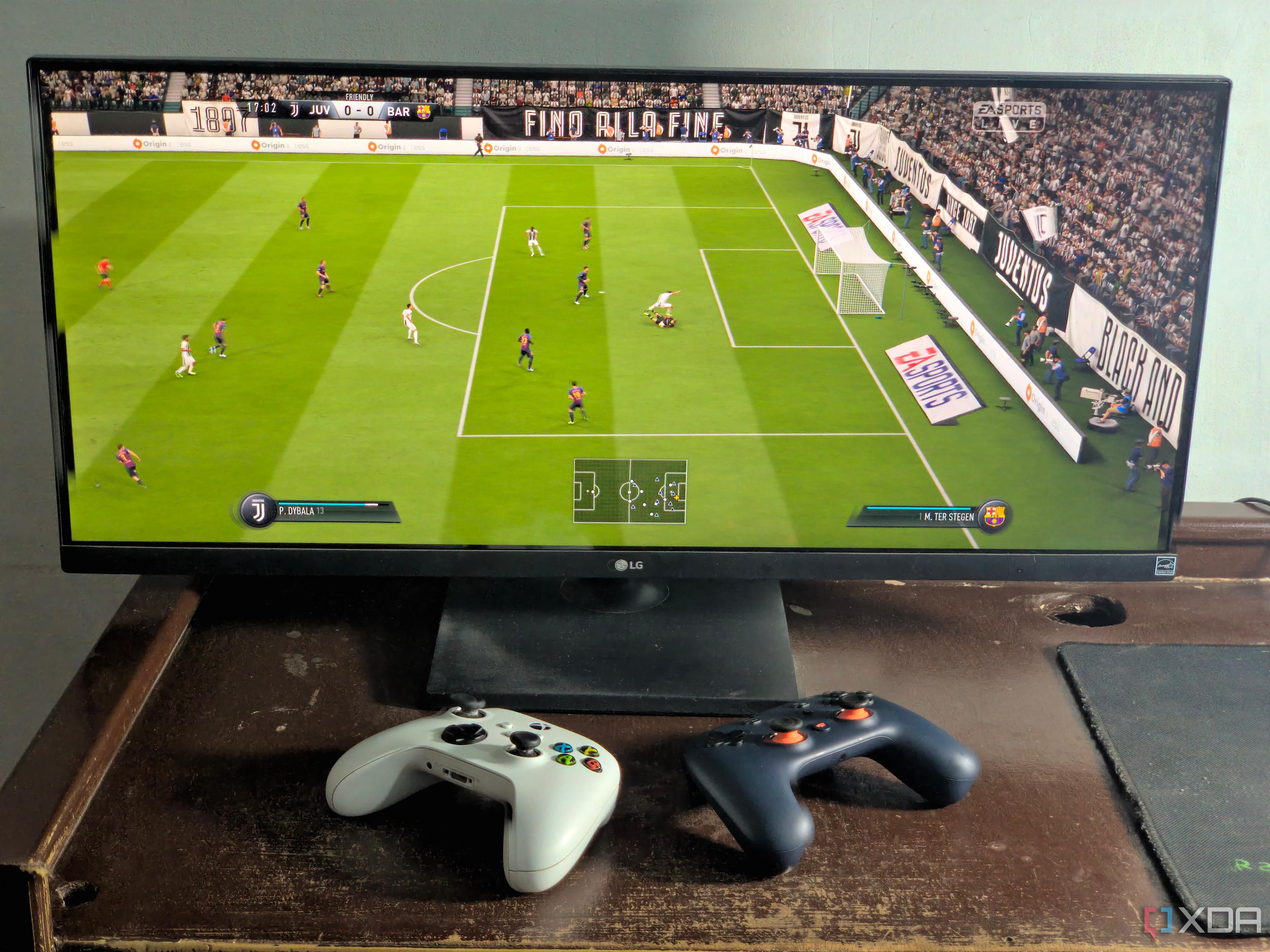
Almost every new game natively supports ultrawide monitors, which allows you to see more of the world while you play. Compared to a standard 16:9 monitor, games look infinitely better on an ultrawide monitor. For example, while playing FIFA 19, the FOV automatically expands to show you more of your players, with more than half the field visible at once. Similarly, Subnautica: Below Zero scales up to 21:9 automatically to show you more of the ocean horizontally. And if you absolutely need a higher resolution and have the hardware to back it up, you can get up to a 32:9 5120x1440 ultrawide monitor, which is the crème de la crème of the market.
Unfortunately, there are some games, especially older ones, that require some tweaks before they can run properly on a 21:9 screen without looking stretched out. You can check whether a specific title supports ultrawide aspect ratios either through the game's official page or with a quick Google search. There's almost always a workaround for titles that don't support ultrawide, including Flawless Widescreen, which has helped me tackle even the toughest games.
3 It helps with multitasking
Work isn't as boring as it used to be
Since you have the extra screen real estate, you can multitask like a hero with two (or more) consecutive apps open side by side. Maybe you fancy watching YouTube videos while you scroll through Facebook or Instagram, or you want to have Spotify open in one window and Mail in another so you can type away in Google Docs simultaneously. The possibilities are endless, especially on something like a 32:9 monitor, which is like having two 16:9 monitors stacked side by side.
And unlike dual-monitor setups, you don't have to put up with an unsavory bezel in the middle. Since everything's on a single monitor, the colors and brightness are uniform across the screen. Not to mention, you don't have to deal with any configuration processes for dual monitors, which can be a nightmare.
And if you're somebody who frequently uses video or audio editing software like Adobe Premiere, an ultrawide monitor will make your life easier by showing you more of the timeline at once. For Excel, it means more columns on the screen at once, or for developers, it means that they can code in one window and see the results in another without switching tabs. Plus, it's always more convenient to have everything laid out right in front of you instead of having to move your head every time you want to check another window.
2 Ultrawide monitors just look better
Your desk setup will steal the show
16:9 monitors have become standard nowadays. To truly make your setup stand out, you need a monitor that makes a statement, and in my experience, nothing stands out better than an ultrawide display that spans across your entire desk. It's perfect for people who chase minimalism, since setups with ultrawide monitors look cleaner with fewer wires compared to a dual-monitor build. You can have all the RGB peripherals that you want and hook up some sick lighting combinations, but if your monitor is ugly with huge bezels, it will completely ruin the aesthetics of your setup.
1 Widescreen movies and videos look the way they’re supposed to
One step closer to IMAX at home
If you watch a lot of movies, an ultrawide monitor is a must-have. Sure, it puts black bars along the sides of videos that aren't in widescreen format, in which case you’ll simply be watching the movie in the intended 16:9 aspect ratio.
It’s the handful of widescreen movies where ultrawide monitors really flex their muscles. Most major streaming platforms like Netflix and Amazon Prime support ultrawide monitors, allowing widescreen videos to size automatically across the entire screen for an incredibly cinematic experience.
Ultrawide displays aren’t perfect
For most people, paying a hefty premium for an excellent ultrawide monitor just isn’t worth it. Most web applications, software, and even YouTube videos are made with 16:9 monitors in mind, which are way more common than ultrawides anyway. Similarly, while modern games do support a wider aspect ratio, it will do little to help you in fast-paced FPS games since you’ll have to move your eyes and head around too much to view enemies displayed on the edges of the monitor. And all of these problems come after you manage to find enough space on your desktop for an ultrawide monitor because they take up a lot of space. However, for all their faults, ultrawide monitors are excellent for people with the budget and the need for a ton of screen real estate.