
Moving to Linux from Windows can be a daunting prospect. Will all your favorite software work? Can you even play games on Linux? How difficult will the learning curve be? Thankfully, Linux and its distros have come a long way over recent years, and now it's a viable platform for Windows converts. I've always recommended Linux as a viable alternative to Microsoft's OS, but 2025 feels like the ideal time to make the switch, especially to Linux Mint with recent advancements in Valve's Proton for gaming.
5 There's a start menu
Although it's different and more useful
One thing you may appreciate with Windows is the start menu and instant access to apps. Some Linux distros use an app drawer of sorts, similar to mobile devices, but if you prefer the traditional way of navigating what's installed on your system, Linux Mint has everything configured and ready to go with the base installation. As soon as the distro has been written to a drive and booted, you'll be greeted by a Linux Mint taskbar and start menu button in the bottom-left corner.
Clicking this button brings up the start menu, which can be used to access installed packages and system settings and to reboot or shut down the PC. It's a powerful tool that works best with those who prefer using the mouse over keyboard shortcuts. It's powered by Ubuntu and Debian, so everything is fairly easy to use and refined, thanks to the custom GNOME desktop environment, which doesn't look too dissimilar to Windows. Linux Mint is excellent for Linux beginners.

5 software and tools for Linux that aren't available on Windows
Linux also has some exclusive tricks up its sleeve.
4 It's based on Ubuntu
Solid Debian foundations
Linux Mint may be a separate distro, but the underpinnings of this OS is Ubuntu, the same friendly distro I've recommended countless times. But Ubuntu itself is based on Debian, another OS, which in turn uses the Linux Kernel. It's quite the maze of dependencies, but this is good news for Linux Mint. It means you're using the most stable distro out of the bunch, with only the best parts taken from the foundation. Linux Mint has a slower major release cycle, too.
If you've dabbled with Ubuntu or Debian in the past, Linux Mint will feel familiar. It's set up to resemble Windows slightly more, but the underpinnings are absolutely Ubuntu, Debian, and GNOME. You can even continue using this distro once you become accustomed to how everything works and not feel like you're missing out, thanks to how versatile Linux distros are. Everything should work, too, including your AMD, Intel, and Nvidia GPUs.
How to install Linux Mint
Want to get started with using Linux Mint? You'll need an ISO image and a few other tools to install
3 A Microsoft Store replacement
Plenty of FOSS options
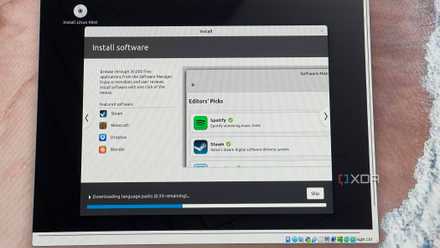
With Linux, you don't need to use the terminal to install and manage apps. It's possible (and I recommend you use the terminal), but everything can be achieved using the GUI, and Linux Mint has a capable software store and manager. And because this is FOSS, everything on the Linux Mint store is free. With the click of a button, you can install everything from Steam to GIMP, Libre Office to Firefox and Thunderbird. Although you may find that some software on Windows doesn't have Linux support, alternatives can be located.
2 It will work on your Windows PC
Adding a dose of Mint freshness
The best part about Linux-based distros is that they will work on almost any device. From a Raspberry Pi SBC to state-of-the-line enthusiast gaming rig, there's a very good chance Linux distros will be supported. The requirements are low too, so your old PC can have some life breathed into it, whereas Microsoft may state its Windows is too good for your meagre PC parts. This is all Linux Mint requires to get through the installation and have a fully working system
- 2 GB RAM (4 GB recommended).
- 20 GB of disk space (100 GB recommended).
That's it! No CPU requirement, though you can bet that having one with higher clock speeds and at least a few cores will perform better than super-old or budget-friendly solutions. Regardless of what type of system you'll be installing Linux Mint on, you can be sure you'll have a great computing experience with a lighter OS. And when you're ready to upgrade to beefier specifications, Linux Mint will continue being the same great OS you've come to know and love.
1 Gaming is now viable on Linux
This isn't Linux Mint-exclusive
Poor gaming performance and support on Linux has always been a disaster for the free platform, but it has largely become a myth. That's largely down to Valve's Proton and packages such as bottles. Proton is a collection of open-source software and tools to translate Windows-only games to work on Linux. The company forked Wine and made it possible to load up any game without having to mess around with Windows directors and the rest, something which held WINE back from making strides.
With Proton and Steam installed, you can now click "Install," and the game will be downloaded, installed, and playable. The degree to which the game will be playable depends on the version of Proton you're using and the game itself. Most PC games will work, and many have been "certified", which essentially guarantees a good experience. There are even times when a game will run better on Linux through Proton than natively on Windows. Installing Steam (and Proton) on Linux Mint is straightforward, so you'll be gaming in no time.

How to play Windows games on Linux using Proton
With Proton, Valve unleashed PC gaming on Linux
Give Linux a try today
Replacing Windows (and macOS for that matter) is a great way to free yourself from the shackles of a corporate entity, and Linux Mint is a user-friendly way to get started with the penguin OS. There have been plenty of myths around Linux and how difficult it is for beginners to get accustomed to all the differences, but Linux Mint is a great middleground between Linux and Windows. It's easy to get started, too. All you need is the downloaded ISO and a free USB drive.