
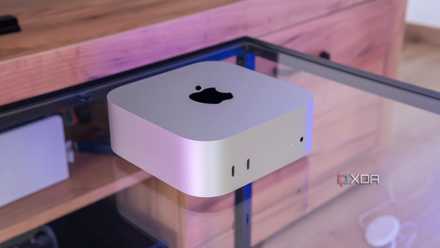
Regular XDA readers will already know that I made the switch to an M4 Mac Mini after reviewing the computer late last year, and I've been enjoying my time on it ever since. Recently, though, I got to test out Parallels Desktop — arguably the best virtualization software for Mac — and wanted to run Windows 11 on it.
The thing is, shortly after I did, I realized there wasn't much of a reason to be using Windows 11 at all. Outside of maybe testing the occasional software to grab screenshots for it, I have no use for Windows 11 in my workflow anymore. There were a few things I did want to try, but after doing so, I didn't see much of a reason to keep going back to Windows.
7 reasons I'm not going back to Windows after using the Mac Mini
It didn't take long to convert me
macOS can do everything I need
I can unleash my productivity just like on Windows
There are some things that I think Windows does better than macOS out of the box, but to be frank, the most important things for me already required a third-party app, and macOS has very similar apps that work just as well if not better. All the tools I use for work are available here, whether that's my web browser, Adobe Photoshop and Lightroom, or an Office suite. But perhaps more importantly for me, I can also get a great window manager with MacsyZones and stellar launch bar with Raycast.
On Windows, two of my most important apps are PowerToys (due to the FancyZones feature) and Flow Launcher. FancyZones makes it super easy to manage open windows on my super ultrawide 32:9 display, but I can do exactly the same thing on macOS with MacsyZones, which is also free to use. Customizing layouts works very similarly, and actually using them works just as well, too. There's nothing FancyZones does that I really miss on my Mac.
And for Flow Launcher, I'd say Raycast is actually even better, and it makes macOS a perfect platform for whatever I need. It's so easy to use Raycast to launch my apps, put my PC to sleep or shut it down, and even use extensions to do things like search for a YouTube video and download it. Those are all things Flow Launcher does on Windows, but Raycast on macOS usually does them even better. One of my favorites is the Pokédex extension, which looks beautiful and presents a lot more information about a Pokémon without having to open a website in your browser.

6 apps I can't live without on my Mac
How can you even get work done without these?
Windows loves getting in your way
Parallels actually makes it better
One thing that was unusually pleasant when setting up Parallels is that the setup process to get to Windows 11 was incredibly smooth. All it takes is choosing the option to download Windows automatically, and Parallels does all the work, including handling the out-of-box experience (OOBE). Your account is set up as a local account, and you don't get any of the ads for Microsoft 365 or Game Pass. Even after getting to the desktop, I didn't have pointless OneDrive sync actions trying to take place, Edge didn't bother me about collecting my data, it was all smooth sailing.
If only setting up an actual Windows 11 PC was that easy. Using a Windows 11 PC can be a nightmare from the initial setup and throughout your entire time with the experience. The OOBE these days forces you to sign in with a Microsoft account and then shows you three whole pages dedicated to Microsoft 365: one for the standard plans, one for Microsoft 365 Basic, and another screen just to tell you some Microsoft 365 features are available for free. The kicker with that last one is that your mouse will be over the back button after declining the first two offers, so if you're quickly trying to click through the process, this will get you stuck in a loop of Microsoft 365 ads until you realize you need to click a different button.
Even after the initial setup, Windows 11 loves to remind you to enable OneDrive backups if you disabled them, to change your browser settings, or to link your phone. Whenever you install a cumulative update, there's a chance you'll see those screens again. Thankfully, Parallels seems to circumvent a lot of this by just using a local account.

4 Windows 11 features that make me regret upgrading
These Windows 11 features are more of a nuisance than useful
Using a VM is a little too slow
Ruining the only benefit I could think of
One thing I still haven't quite figured out in macOS is how to easily crop images to a specific aspect ratio, something Windows 11 makes fairly easy with the Photos app. On macOS, I've been using Photoshop, and I thought maybe using the Photos app on Windows 11 would be better since it's faster to launch. But, as it turns out, switching to the virtual machine adds enough of a delay for this to stop making a lot of sense. Photoshop launches decently quickly on a modern Mac, and once it's open, images open almost instantly in it too. Plus, I can open multiple images in one go.
Similarly, the Snipping Tool has an easy feature for hiding sensitive text automatically in a screenshot, but the only reason I generally need that is when I'm taking screenshots in Windows because the Settings app always shows my email. Since I use macOS most of the time, there isn't much of a point to this. On the rare occasions I need to hide my email address, Photoshop's heal brush works just fine.

7 features I wish would come to Windows from macOS
Microsoft should take a page out of Apple’s book for the next major Windows version
I don't have much of a reason to go back to Windows
I never thought a day would come when I would say this, but after using the Mac Mini and getting used to it, I can't say I have much of a desire to go back to Windows at all. I've been able to find apps that do basically everything I want and then some as a former Windows user, and my productivity hasn't been hindered at all. If anything, it's gotten better. I even find myself kind of wanting the new MacBook Air to go along with this.
That's not to say Windows has been invalidated in any way and there are definitely use cases for it, with gaming being a major one. Those use cases just don't apply to me, and I find that it gives me more headaches than anything I actually want.