
Gaming on Linux was always viewed as a compromise. Leaving the clutches of Windows was met by roadblocks when it came to running PC games.
That was until Proton came around. Now, Nvidia has released GeForce Now on the platform, providing more official ways than ever before to enjoy your favorite games. But there's still another, arguably better way involving a server, two packages, and any device you have at hand. The answer? Sunshine and Moonlight, which we've covered before here on XDA.
Instead of relying on GeForce Now, which requires a monthly fee, or being tethered to my gaming PC to run all my titles via Proton, I set up a game server running Sunshine. Moonlight is the client, which can run on just about everything. From laptops to smartphones, it's possible to render and enjoy some heavy hitters thanks to all the processing on the server side. It's essentially GeForce Now but without the fees and enhanced support for more titles.
GeForce Now has its place
It's great for a quick setup
GeForce Now is brilliant at what it achieves. Remote streaming of games without the processing overhead requires running them. You save money by running a system to process everything for streaming, but you're locked into a subscription and at the mercy of Nvidia for game support. There are ways to bring your own games to the table, but it's still going through Nvidia's platform. You'll need an internet connection that's always active to play, and it just felt a little too convoluted for me.
Then there's the question of control. I would be effectively playing on someone else's hardware, under someone else's rules. Settings can be limited, modding is often off the table, and session time limits can interrupt longer play sessions. Yes, Nvidia imposes limits on how many hours can be played through GeForce Now. But even with a reliable fiber connection, fluctuations can introduce compression artifacts, input lag, or brief interruptions. It's good, but not quite a native bare metal replacement.
GeForce Now is brilliant at what it achieves.
But if all you care about is a way to play games on various devices without needing top-tier specs to enjoy them at higher resolutions, it's a solid choice. Even Fire TV sticks are now supported by Nvidia's platform, effectively allowing you to take your gaming almost anywhere within the home and out the front door. In addition, Nvidia offers a free tier, limited to 1080p at 60 frames per second (FPS), one-hour sessions, and is ad-supported. From there, it's a monthly subscription for more game time and higher resolutions.
That's when I took a serious look at Sunshine and Moonlight. This open-source client was designed to work with Nvidia's GameStream tech, and Sunshine is a self-hosted server that essentially replicates GameStream. Combine the two, and we have a self-hosted gaming platform with a client frontend that runs on supported devices. Add a capable system to run favorite games, and you have the perfect solution for remote play, whether I'm chilling in the living room with the big screen or on the tablet up in bed.

4 reasons why a Sunshine + Moonlight setup is better than Parsec
While it's not the best option for remote desktop setups, a Sunshine and Moonlight combo is perfect for gamers
Getting my own game streaming service online
It was easier than I first thought
To test Sunshine and Moonlight out, I installed the former on my main gaming rig, running Linux (Windows is also supported). This software package handles everything, including encoding, streaming, and exposing all installed games to Moonlight clients. Everything can be adjusted, including resolution, bitrate, and performance. Once Moonslight was installed on my phone and Windows laptop, I could connect to the Sunshine instance and pair them using a PIN.
Even if you've tried GeForce Now before, there's something about booting up a super-demanding game on a lightweight Snapdragon laptop with epic battery life and enjoying hours of local streaming thanks to the server handling all the load. It's also a good way to get around system incompatibilities. While Linux gaming has come a long way, there are still games that aren't fully supported or have minor issues that can impact gameplay. These are non-issues when running Sunshine on a Windows PC.
With the successful test out of the way, I didn't just want to have my gaming rig running to play games. At higher loads, it can easily pull north of 500 watts from the wall, including two monitors. That's where Proxmox came into play. Instead of relying on an overkill system for what I needed it to do, Proxmox running a Sunshine Ubuntu VM seemed like the logical step to have something available that could fire up at a moment's notice and launch a game, saving some power in the process.
Local game streaming is flawless
I don't need to apply aggressive compression to prevent the network from being bogged down, as the internal LAN has 2.5Gbps connections at its slowest point between the Sunshine server and the devices. Wi-Fi will depend on the signal strength, of course, but bandwidth is usually rock solid with multiple hardwired access points dotted around the home. But if I want to stream remotely, Sunshine supports hardware encoding via VAAPI.
Getting Ubuntu running on Proxmox is painless, and passing the GPU through is a non-issue with AMD and Nvidia cards. It's possible to do this with a lighter distro, but it's perfectly fine for running Sunshine, and the package requires one with a GUI. Once Sunshine was installed and running, I could configure it as I liked, and everything was ready to go — actually choosing which devices I wanted to run Moonlight on was more time-consuming.
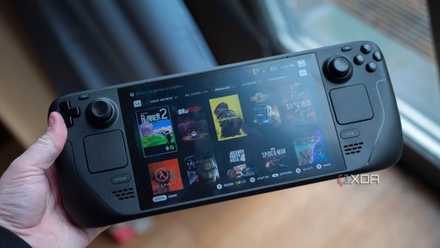
How to install and use Moonlight on Steam Deck
Moonlight is a great way to make more games playable on your Steam Deck, and it only takes a few minutes to set up.