
Raspberry Pi is iconic and was a solid recommendation for learning and home projects. Whether it's a small server, a Home Assistant hub, or learning Docker, a Raspberry Pi earned its spot thanks to its affordable price tag for hobbyists and everyone interested.
Somewhere along the way, it stopped making sense to recommend the Raspberry Pi for many projects. It’s odd that I didn’t notice it immediately. That said, I understand Raspberry Pi’s unique position, and rarely recommend it based on the project’s nature. Otherwise, there are several other options that are much better than a Pi, and hence I suggest them instead.
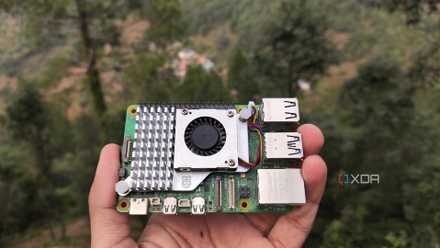
Cheap mini PCs are the death knell for Raspberry Pis
With x86 mini PCs becoming more budget-friendly, I find it hard to recommend Raspberry Pi SBCs
Losing the price-performance ratio spot
Failure to keep up with transformations
Over the years, the newer Raspberry Pi models have been more powerful than their predecessors. The makers crammed a lot of hardware features onto a single board. However, the world around it has changed.
While the Raspberry Pi started out as a low-cost, general-purpose SBC, its value proposition in 2026 looks a bit inferior toe-to-toe with mini PCs.
Pi runs fine for light workloads, but strains to keep up with modern requirements such as running several containers, smaller utilities, media servers, and self-hosted apps.
The top-tier Raspberry Pi models are priced so steeply that they're difficult to recommend over mini PCs. It’s natural to suggest a machine that promises multicore performance and rivals an x86 machine with decent hardware.
Besides, you’ll need to assemble a Pi board with other components to build a computing system. That assembly raises the cost, and it is no longer a budget option.
Raspberry Pi’s cost advantage has eroded over time
Norms of budget hardware changed
Raspberry Pi’s cost was its advantage over x86 machines, and it’d be easy to grab one to get started. However, that has changed over time since the cost of owning a Raspberry Pi system ballooned. With the Pi system's higher prices, you’ll need additional components along with the SBC.
A typical Raspberry Pi build requires a power supply, a decent case, and a cooling solution. You can use micro SD cards for storage, but m.2 NVMe SSDs with HATs are far more reliable. While SBCs seem affordable, you’ll rarely see the hidden cost of building an SBC machine that requires buying storage, a case, and a power supply separately.
Meanwhile, mini PCs typically include the core components. For $100, an Intel N100 mini PC can clobber Raspberry Pi and give it a run for its money.
Rocky component upgrade path in Pis
Difficult to work without HATs
To add hardware-level features to the Pi, I need to check out different HATs (Hardware on Top), ranging from SSDs to DACs for audio. Buying a HAT or add-on component means a standard case won’t fit the SBC. So I need to buy a separate case that supports NVMe SSDs.
Despite that, the Pi doesn’t support the latest storage standards — it still offers only PCIe 2.0 via NVMe or SATA.
Upgrading components on mini PCs is relatively easy for adding memory, and fitting a higher-capacity SSD is relatively easy. Besides, some mini PCs also support adding a Wi-Fi card or another add-on to include a secondary LAN port.
With a mini PC, it’s easy to install old components I had lying around, or even used ones. Also, the upgrade process is straightforward and doesn't require going through hoops.
Used mini PCs suit most projects easily
Absurdly good value
The gradual rise in used mini PCs fuels the growing interest in home labs. Those enterprise-grade used office mini PCs from Dell, HP, and Lenovo are often cheaper than a fully kitted Raspberry Pi.
Since those used office mini PCs are designed to run all day in offices, they’re perfect for home labs. Many of them support SATA or NVMe SSD storage, enough RAM, and multiple USB ports to let you easily run Docker containers and VMs. Even under significant load, these mini PCs are quiet, power-efficient, and more robust than the Raspberry Pi.
Unless the project requires using GPIO, sensors, relays, smart home automation, or robotics on an always-on system, it has become extremely difficult to recommend the Raspberry Pi. It’s still a worthy choice for battery-backed, low-power projects for keeping things simple.

10 creative uses for a Raspberry Pi in a home office setup
Your tiny Raspberry Pi can add some essential QoL features to your home office
The ecosystem outgrew Raspberry Pi
Mini PCs are more suitable for running self-hosted servers, home automation hubs, and media servers. But for DIY projects involving hardware hacking, the Pi is still a stellar choice. So, Pi didn’t lose its relevance overnight. It’s the market that now offers relatively powerful, capable hardware at the same or a lower price.
When software compatibility, storage, and reliability are of prime importance, the Raspberry Pi is no longer my default recommendation. And that’s not a bad thing. Because a mini PC handles multiple tasks without freezing or crashing, putting an SBC through the same workload won't yield better results.