

To some extent, everyone enjoys traveling, and the memories you create while visiting new and old places are something you should cherish for the rest of your life. We live in a time when capturing those memories and saving them for later is easier than ever, but it often comes at a cost. Cloud storage costs can add up, and if you use a service like Google Photos, you're giving Google access to your pictures, which can be used to improve facial recognition and other Photos features. Not to mention, relying on Google opens you up to other potential issues, such as your account being disabled without prior warning.
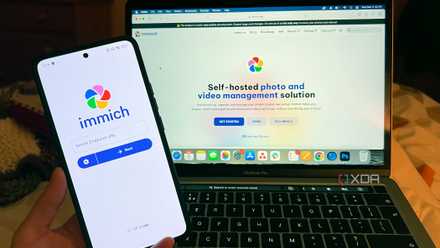
Self-hosting is a truly amazing hobby, and a solution to this very predicament. Now, instead of using a cloud server, I back up all my photos to my own private server, and I can still browse them in a beautifully-organized and intuitive way thanks to Immich. And if you have a NAS or are planning to get one, I highly recommend you set it up, too.

It took some work, but I'm in love with these 6 self-hosted services now
Self-hosting has been an amazing journey
Installing Immich
TrueNAS makes things easy
My NAS setup is powered by TrueNAS SCALE, and I'm going to assume you've already got your NAS itself setup here. You can read about my experiences setting up a home lab and NAS using a mini PC if you're not sure where to start.
Once you have TrueNAS up and running, setting up your private photo storage is very easy. Immich is one of the many apps available in the app repository for TrueNAS SCALE, so you don't need to jump through overly complicated hoops to get things going. Simply head into the Apps section, click Discover apps, and search for Immich to get started.
Setting up the app is relatively easy. There are a lot of fields here, but only a handful are mandatory, and for the most part, it's just about you setting the password you want for the database to be kept safe. The only thing you really need to pay attention to here is the Storage Configuration section. TrueNAS defaults to storing application data on a system-defined location (ixVolume), but you'll want to use a the Host Path option instead.

This self-hosted image gallery can give Google Photos a run for its money
Store your photos safely for free
You want to create a dataset for Immich, and within that dataset, create more subsets for each type of media storage. So, you'll create a dataset called immich (the path will be something like mnt/Storage/immich) and then various datasets inside that path, such as photos, videos, postgres, and so on for all the kinds of data stored by Immich. This will keep your files organized in the TrueNAS file structure, but also allow you to easily backup your photos to another location for extra peace of mind. Without defining specific paths for your individual storage locations, you won't be able to use the built-in TrueNAS backup system to reference those paths.
Otherwise, you can leave most of the settings as they are by default and just install the app.
Using Immich
It's like your own Google Photos server
Once you've set up Immich, you can get into the web UI and set up the first user account on Immich, which will be the administrator for the server. You might only need that one account, but I created a separate one for my wife as well, since we don't really need to have a single pool of every photo we've ever taken.
Using Immich is as easy as it gets. You can drag and drop photos to upload them, and they're all shown in chronological order using the metadata in the image files. Just like Google Photos, this makes it really easy to take a stroll down memory lane to relive your favorite memories of specific times. What's more, you can easily create albums and add photos to them, which I've done a lot. I have albums for all the trips I made to visit my wife before we lived together, and albums for trips we've taken together, as well as for smaller events, like pictures from birthday parties or Christmas decorations for a given year.
Immich makes it really easy to keep everything organized while giving me a beautiful way to go through these photos and show them off. It really does feel like Google Photos, but everything on it is stored on my own server, so Google or Microsoft never have any access to these pictures. Many of the AI features you're used to are still here, too; Immich will leverage the hardware available to it to recognize objects and faces, so you can search "cat" and find your pictures of cats, just like on Google Photos.
5 benefits I never expected when I self-hosted Immich
It's way better than I expected!
Backing up the photos
I still use the cloud, but in a different way
In an ideal scenario, you'd never have to rely on the cloud to keep your photos safe, and if you do have a proper NAS, you can avoid it thanks to the redundancy of multiple hard drives. However, in my case, I just have a mini PC with a single HDD, so I still rely on the cloud for backups. But instead of using a typical file management service like Google Drive or OneDrive, I have my NAS back up my Immich datasets to Backblaze.
Backblaze is a more enterprise-focused cloud storage solution; it integrates with TrueNAS, and it's much cheaper than Google or Microsoft's offerings. Google will charge you $10/month for 2TB of storage, while Microsoft charges you about the same for 1TB. However, you always pay that amount, no matter how much storage you're actually using, plus it's not really scalable. A Backblaze B2 bucket costs $6 per month per terabyte, but it's a sort of pay-as-you-go solution. Technically speaking, you'll pay more for two terabytes of Storage than using Google, but with Backblaze, you'll be in full control of your data and may not even use the full two terabytes. Plus, the first 10 GB is free, and you only pay for what you use after that, and it can scale to any amount of storage you need, while Google will limit you to 2TB per account. I'm storing nearly 100 GB on my Backblaze bucket right now, and my cost for this month is under $1.50 so far, and it's mostly brought up because I initially set up my backup incorrectly, so that it used more of Backblaze's API transactions.
You can create a backup task in TrueNAS under the Data Protection tab using the Cloud Sync Tasks section. You just insert your Backblaze B2 key to link to your bucket, set the Direction to PUSH and the transfer mode to SYNC, then select the Immich dataset to backup. To avoid increased costs like I had, you'll also want to go under Advanced remote options and enable use --fast-list to reduce the API usage for Backblaze. This makes a big difference in what you'll end up paying, so I highly recommend it. This option makes it so you just use one Class C API transaction per 1,000 files, and you get 2,500 of these transactions for free every day.
I self-host my own Google Photos alternative, and my cloud backups are so much cheaper than what Google offers
Plus, the backups are pretty easy, too.
How is it secure?
Your network is less likely to be targeted
Storing these files privately on your own server has upsides and downsides in terms of security. It's true that most cloud services will probably have much more robust security measures, but those cloud services are also much more widely accessible and can be targeted in different ways. While it's unlikely someone can just breach into a server and directly access your data, password leaks happen, or you may log into these services on a public PC and inadvertently make your account accessible to someone else. For the former, Backblaze offers server-side encryption that can be enabled for your storage bucket, which should mitigate any risk even in the event of a data center compromise. Plus, TrueNAS also has its own built-in encryption option for cloud backups, so you have ways to make sure your files are safe. For the latter, you can use a password manager and be careful about the devices you use to log in to Backblaze. To be honest, most of the time, you'll only ever need to be logged in via TrueNAS, as it's rare that you'll need to individually retrieve files from Backblaze on any other device, rather than pulling them from your NAS.
While your home server won't have all the same security as a massive company like Google by default, you're also much less likely to be targeted this way. If someone were to access your photos, they would specifically need to target you and have access to your home network where you set up the home server, assuming there's no public way of accessing your running services. That already reduces the potential attackers to near zero for the vast majority of people, and on top of that, if you have a secure Wi-Fi network with WPA2 encryption (or even WPA3), then it's unlikely anyone can get into your network without you knowing. And on top of all of that, both TrueNAS and Immich have account systems that require additional passwords to get into, so there are a lot of steps stopping a potential attacker from getting to your files. Even if you set up something like Tailscale to access your home server remotely, the connection between your server and your client is a tunnel that other users can't breach, and your data can't be intercepted.
Meanwhile, even though my data is also in the cloud through Backblaze, this isn't a service I'm going to need to connect to regularly away from home. I only log into it to check on my billing every now and then, so there's no chance I'll accidentally leave the account open for someone to sign in on a public device or something. It's a small price to pay for peace of mind, and ensures that my data is always safe and secure even in the event of a failing drive or, god forbid, some kind of disaster in my home.

How I use my NAS as a secure backup server for both of my PCs
Turns out, the first-party apps are more than enough
Save your memories forever
Remembering the happy moments in our lives is extremely important, and keeping those memories alive someitmes means taking and storing pictures for as long as you can. And while you could let a company like Google take care of that for you, self-hosting Immich gives you way more control over your data, and it offers just as good of an experience.
It does take a little bit more work, but I have more peace of mind and control with this setup, and I don't have to spend more than I need on cloud storage. If you want a private and secure way to save your own photos, I highly recommend trying this out.
Immich
- Key highlights
- Self-hosted
- iOS compatible
- Yes
Immich is a self-hosted photo and video backup solution.