
As great as Linux can be, it's easy to look at the sheer number of desktops and distros you can use and be overwhelmed by all the differences between them. The truth is we often talk about Linux in contrast to Windows, but the latest Windows version only has one desktop paradigm, and even across versions, it doesn't tend to change that dramatically; so, having different Linux platforms be so radically different on the surface can be confusing.
But these days, things aren't as bad as they used to be. Yes, there are still a ton of Linux desktops and distros, and I've tried a lot of them. Distros like Ubuntu, Linux Mint, Arch, Fedora, as well as desktops from GNOME to KDE, COSMIC, LXQt, Xfce, Cinnamon, and even Hyprland (albeit briefly). I've got my hands on all of these at some point, and I realized that the fragmentation that seemed to be such a big problem before is no longer that big of a deal.
Different desktops for different tastes
But the end goal is the same
The wide range of Linux desktops exists for a reason, and I'd argue variety isn't a bad thing. There's always a desire for standardization among some groups of people, and of course, that would make things easier, but it would hurt the ability to make the desktop your own. This diversity of desktops makes it much more likely that you can find something that fits your specific needs, even if it takes a little longer. And some desktops are heavily customizable, too, so if you want an easier choice, you can go with something like KDE Plasma to make things easier, and then customize it later on.
At the end of the day, you're using a desktop to get to the apps you need, and if you want to change the look of your desktop, you can also just install a different desktop environment without switching distros, so it's not as much of a hassle as you might think. Some distros are fully designed around that flexibility and don't even have a preferred desktop, like Arch. You're supposed to choose the desktop (or desktops) you want at the start, but Arch itself doesn't provide one. It's completely agnostic in that regard.

COSMIC desktop surprised me, because it's the Linux DE I've been waiting for
Discover the Linux desktop environment that's turning heads with its modern tech, superior performance, and unmatched user experience.
Admittedly, on other distros, it can sometimes be harder to find a specific desktop to change up your system, but still, the option is almost always there, especially on more popular distros like Ubuntu and Fedora. So then it's about the apps, and that's where things can get more complicated.
Flatpak and AppImage are changing the game
Apps are much more universal now
I'm lucky to have entered the Linux space at the time that I did, because it's undeniable that the app situation has improved a lot in recent years, and it's thanks to something called Flatpak. See, every Linux distro typically has its own package manager with its own repositories for apps, which creates a frustrating amount of friction if you want to switch to a different Linux distro. You never know if the apps and packages you're used to will be available on your next distro, if they'll be up to date, or if they even have the same name. Sometimes, a package with the same name on a different distro may be for something completely different.
For a very long time, this was the main way to get apps on Linux, and it's true that it's often beneficial to install apps through these package managers because those apps are native, meaning they can access the dependency model of your specific distro, as well as being updated alongside all your other system packages. But Flatpak has changed that from being a requirement to being an option.
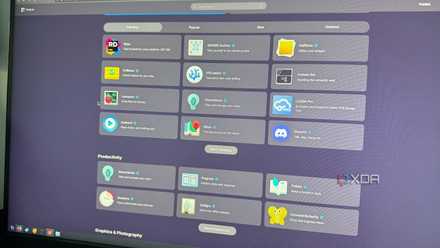
Flatpak is, in itself, a package manager, but it has different goals in mind compared to a typical one. For one thing, Flatpak apps are designed to run in a sandboxed environment with an explicit set of permissions, so you have a clearer idea of what it can do on your system. But Flatpak is also meant to be a universal package manager that works on any distro or desktop, and support for the platform has been very widespread. Many mainstream Linux distros come with Flatpak support out of the box, along with a GUI for installing them, whether it's Discover or Bazaar, which makes it easy for anyone to find the same apps they've always used regardless of what desktop they end up on. You could make a similar argument for Snap packages, which are supported natively in Ubuntu and supported by Canonical, though that platform has gained less traction across the rest of the community.
5 reasons why Linux beginners should be using Flatpak
App management on Linux can be confusing for new users, and Flatpak simplifies it.
But that's not all: there's also AppImage, which is another format that's changing how Linux apps can be distributed. AppImage is actually a fairly old format that was born as klik back in 2004, but in recent years, it's become more popular, and a few apps are now distributed this way. The great thing about AppImage is that, much like Flatpak, these applications can run on almost any modern Linux distro, and they don't even require an installation because they're fully self-contained. If you use the messaging service Beeper, the official website only serves the AppImage file (though it is available in both RPM and DEB packages).
Distrobox bridges the gap
Put a distro in your distro
So you have a desktop you like and Flatpak covers most of your app needs, but sometimes you may just need to use a more specific system tool from another distro, or something that's really only available in a different package manager but isn't feasible in Flatpak.
Well, that's where containers come in, and Distrobox has made them more accessible than ever. Distrobox is a container manager that relies on backends such as Docker, Podman, or lilipod to deploy Linux containers inside your own Linux distro. What that means is you can essentially run a completely different distro inside your own in a containerized, isolated environment, but without all the performance overhead of a virtual machine. Distrobox containers still feel native on your system, and they share the same kernel as your host machine, so there isn't complete abstraction, which is a good thing for performance.

Distrobox itself is available in a wide range of package managers across distros, so you can get it set up on almost any PC, and there's even an unofficial GUI called DistroShelf that's available on Flatpak (which is also universal) to make things easier. With this, you can set up your Linux PC to run all kinds of Linux apps, regardless of what desktop or distro you have. In fact, some distros base their entire identity on the promise of running apps from every Linux distro, as is the case with Vanilla OS.
You can use what you want
Trying anything new inevitably means some degree of adjustment, so I'm not trying to say everything will always be smooth sailing without any friction at all. But solutions like Flatpak, AppImage, and Distrobox have made it almost trivial to run any kind of Linux app on any desktop, to the point where choosing one or the other is entirely up to your personal preference in terms of the UI paradigms. For everything else, you can generally get by on any desktop just fine.