
Ask any hardcore Raspberry Pi enthusiast about the accessories they pair with their single-board computer, and you should be prepared to hear a long sermon about all the HATs, adapter boards, and gizmos in their arsenal. Truth be told, I’m no different, as I’ve got a bunch of devices stashed in my home lab, including peripherals I bought simply because they looked interesting.
But with the abysmally high price tags on mainline Raspberry Pi units, investing in extra accessories seems wasteful. I noticed this trend when I looked back at all the projects I’ve put together over the last couple of months, and realized that over half of them didn’t require anything other than my Raspberry Pi, a type-C power brick, and a microSD card.
Light server projects are terrific for barebones Raspberry Pi setups
You can deploy containers without buying extra devices
As much as I adore x86 machines, Raspberry Pi boards are perfectly viable for deploying lightweight server projects. If you’re into web development, a Raspberry Pi can double as a testing ground for tinkering with LAMP and Flask servers. Likewise, it’s well-suited for coding simple applications, especially with the Thonny IDE that ships with the Raspberry Pi OS. Or, you can try hosting a Code Server instance on your tinkering companion and using it as a private, cross-platform code editor that’s accessible from every device in your tinkering stronghold.
Speaking of self-hosting, Raspberry Pi boards are pretty surprisingly useful for running containerized services. You’ve probably heard of good ol’ Pi-hole, which is light enough to block ads and create local DNS records even on a tiny RPi Zero. But it’s also possible to deploy a FOSS alternative to the Microsoft Office 365 suite using Nextcloud with your Raspberry Pi. Likewise, you can turn your tiny DIY buddy into a planning hub for your everyday tasks with the Mealie, Wger, Firefly III, and Trilium Notes combo.
In fact, I’ve already got multiple x86 servers deployed in my home lab, and I still rely on my Raspberry Pi to serve as a secondary node for my mission-critical services. Since it has a minimal footprint and consumes a fraction of the energy siphoned by my workstations, my Raspberry Pi is ideal for running dashboards, reverse-proxy services, notification servers, and documentation tools.
If I could only keep one, this is the Raspberry Pi project I'd choose above all else
My Raspberry Pi-flavored monitoring hub is an indispensable part of my home lab
You can embark on distro-hopping adventures with a microSD (or two)
The Raspberry Pi Zero I bought as a teenager is what sparked my interest in the Linux ecosystem, and it’s low-key the reason why I still love tinkering with different distributions. With modern Raspberry Pi devices supporting a variety of distros and unofficial ports, these SBCs are pretty fun for messing around with different flavors of Linux. Thanks to the low prices of microSD cards, you can grab a few for under $20, flash them with different distros, and keep swapping them around as you see fit.
Better yet, you don’t have to stick with the Raspberry Pi OS, Debian, Ubuntu, and other conventional Linux distributions, either. If you’re new to containerization and have trouble self-hosting services via terminal commands, you can try spinning up containers inside YunoHost, UmbrelOS, or FreedomBox. Or, you could opt for FydeOS, which is easily the best way to run Android apps on the Raspberry Pi, even though it’s technically meant to be a ChromeOS alternative first and foremost. For audiophiles, moOde Audio can turn your Raspberry Pi into a handy music-streaming hub. And if you’ve got a high-end RPi board, you can even try running full-fledged VMs and LXDs via Canonical’s MicroCloud, provided you keep your expectations in check. Then there’s RetroPie, Lakka, Batocera, and a bunch of other cool emulation platforms you can run on your Raspberry Pi, though you’ll ideally want to use them with a controller. Speaking of gamepads…
You can even pair random accessories with your SBC
External drives, webcams, microcontrollers – everything is fair game!
If you’re an avid PC user, you’ve probably got a bunch of peripherals lying around that you can integrate into your Raspberry Pi setup. Using controllers with emulation platforms is one example, but you can also add a spare external HDD to your Raspberry Pi and use the SBC as a local file-sharing hub. Although this makeshift setup isn’t ideal for dedicated NAS tasks, you can use it as a secondary storage hub for a 3-2-1 backup setup by arming your Raspberry Pi with OpenMediaVault and configuring Tailscale for remote connectivity.
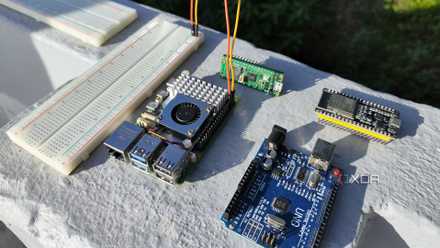
As for a spare webcam, you can use it with a Raspberry Pi as a time-lapse camera, or even a full-fledged surveillance system, assuming your SBC has enough RAM and processing horsepower to run Frigate. Then there’s the smart home side of things, where your Raspberry Pi can double as a Home Assistant hub to control and automate your IoT paraphernalia. Heck, you can even turn it into a programming hub for your spare Arduino, ESP32, or Raspberry Pi Pico microcontroller with ESPHome (or by using the good ol’ Arduino IDE).
Still, I'll always recommend grabbing a cooler for your SBC
If there’s one accessory that’s almost mandatory for the newer Raspberry Pi boards (especially the fifth iteration of the SBC), it’s a proper cooler. Attempting to run anything even remotely demanding on the RPi 5 without any cooling provisions will cause it to hit the red zone within minutes. But as long as you’ve got the thermal issues sorted out, a little bit of patience is all you need to build some of the best Raspberry Pi projects out there.
5 cool things I learned from my first Raspberry Pi
Despite its unassuming appearance, the Raspberry Pi can teach you a lot about computing