
As the very device that got me into single-board computers, DIY projects, and (to some extent) the Linux ecosystem, the Raspberry Pi holds a special place in my heart. I’ve written dozens of articles centered around my Raspberry Pi 5 and Zero boards here on XDA, and even though I went down the home lab route a few years ago, I still use my pint-sized companions a lot in my tinkering adventures.
That said, I’ve never been fond of the high price tags on the mainline Raspberry Pi systems, and the situation has only worsened ever since cheap x86 mini-PCs powered by the N100 stepped into the fray. With the RAM apocalypse massively inflating the prices of computing hardware, the Raspberry Pi Zero 2 W is the only device from the uber-popular SBC manufacturer that’s worth buying right now.
Cheap mini PCs are the death knell for Raspberry Pis
With x86 mini PCs becoming more budget-friendly, I find it hard to recommend Raspberry Pi SBCs
It’s the only Raspberry Pi board with somewhat normal pricing
Mainline RPi boards are far from affordable these days
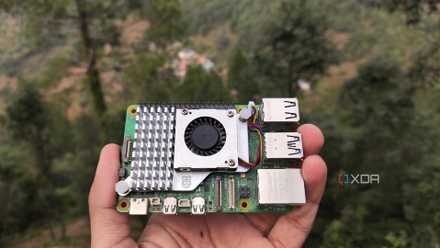
One of the biggest reasons behind the Raspberry Pi’s explosive popularity is the affordable nature of its progenitors. The $35 RPi 1 was released at a time when typical computing systems were far too expensive for random projects, but things are a lot different now. The mainline Raspberry Pi boards have become a lot more expensive these days, and once you factor the price hikes caused by the memory shortage into the equation, a RPi 5 can cost you well over $100 for just the SBC. That’s just the cheapest model, with the more expensive variants costing close to $170, if not $200. For folks planning to arm their little gizmo with a microHDMI plug, a decent-sized microSD card, and the right charger that can meet its weird 5V/5A requirement, the price goes up another $50.
At the price, you’re better off grabbing a cheap mini-PC or an N100-powered system. Sure, it will drain more energy, and unless you opt for specific devices, you’ll lose the GPIO headers built into mainline RPi systems. But you get significantly higher performance and better compatibility with most distros and packages with an x86 machine. Or, you can go the other direction and grab a Raspberry Pi Zero 2 W instead.

The Raspberry Pi Pico can do something the full Pi can't, and nobody talks about it
The tiny Pico has some niche advantages over full-fledged Raspberry Pi boards
Unlike its expensive mainline brethren, the Raspberry Pi Zero systems are meant to be light and affordable machines for DIY projects, and their budget-friendly nature hasn’t changed all that much even with the ongoing RAM armageddon. Yes, it can’t hold a candle to the computing prowess of even a Raspberry Pi 4, let alone its successor or x86 rivals. But for typical DIY projects and beginner-friendly SBC experiments, this tiny board can satiate your tinkering thirst.
You can still get the basic functionality of a normal SBC on RPi Zero 2 W
No need to spend $100+ to emulate the oldest gaming systems or run a simple Pi-hole server
Despite its small size, the Raspberry Pi Zero 2 W has a quad-core Arm Cortex-A53, which is faster than the processor on the original RPi 1. Meanwhile, the RAM may be limited to 512MB, but you can still run a bunch of CLI Linux distributions on the SBC. You can even opt for the GUI-laden versions of Raspberry Pi OS, provided you don’t run multiple apps at once. It also has built-in Wi-Fi and Bluetooth capabilities for wireless projects, and you get the same 40-pin GPIO header as its mainline counterparts for experiments involving sensors, motors, and other gadgets that can communicate over SPI, UART, and I2C.
So, you can use it for a bunch of beginner-friendly SBC projects. For example, it can run SNES, NES, and Game Boy titles without buckling under the extra load for a retro arcade. Likewise, you can use it to self-host lightweight containers, making it a viable option for home lab monitoring, note-taking, network monitoring, or Pi-hole shenanigans. Even all of them at once, if you opt for light container images and use an even lighter distribution for the SBC.
Heck, even an ESP32 makes more sense for cool projects than mainline RPi boards
I don’t like comparing microcontrollers to SBCs, as they’re fundamentally different products. But if I had to design light projects where the OS doesn’t matter all that much, I’d rather stick with an ESP32, as it’s a lot cheaper than even a Raspberry Pi Zero 2 W. ESPHome and Home Assistant are a terrific combo for everything from simple automations involving different sensors to monitoring dashboards and weather stations. Since ESP32 boards also support wireless connectivity, they can serve as makeshift network scanners, with ESP32-CAM setups mimicking the cheaper, low-resolution Raspberry Pi Camera modules while costing under $10.
Don’t get me wrong, I still use my Raspberry Pi boards. But if I had to grab a new SBC today, I’d look at the RPi Zero family instead of going for their overpriced mainline siblings.