
After I began using Home Assistant to build my dream smart home, I recommended it to everyone. Those who were convinced by my suggestion asked me to help them deploy and set it up. The objective is to build a primarily local smart home where I can create smart devices using sensors rather than off-the-shelf devices.
Every time I deploy Home Assistant, I install the Home Assistant add-on — ESPHome — before configuring themes, dashboards, or automations. That add-on is an integral part of my Home Assistant installation, and it’s the first thing I install before setting up everything else. I enjoy building custom firmware with ESPHome for ESP32 microcontrollers to create smart home devices.

7 ESPHome projects that made my smart home actually feel smart
Unlocking deeper control and reliability with ESPHome projects that turn everyday sensors into powerful smart home upgrades.
Why the ESPHome add-on is my first choice
Efficient smart home building
The objective of using Home Assistant as a smart home platform is to build a reliable, fully local smart home that integrates with the internet and cloud services.
I assumed that using ESPHome involves soldering sensors to devices. I couldn’t have been more wrong. I simply plug sensors onto ESP32-boards with jumper cables.
The ESPHome add-on integrates natively and plays a major role in configuring a customizable firmware that makes smart devices at a fraction of the cost of off-the-shelf ones. It is an open-source IoT platform that provides a comprehensive framework for building custom smart home devices.
In a way, ESPHome is a wrapper for the ESP-IDF framework on the ESP32 microcontroller to improve IoT device development.
I can make declarative configurations in a YAML-style file to create custom firmware for ESP32 boards and sensors. That relieves me from writing C++ code for those configurations. Additionally, all variables mentioned in the YAML file store the data within the Home Assistant instance.
No soldering. No code writing. No dependency on any vendor firmware, app, or ecosystem. I can adapt to and use any compatible hardware brand. It’s a paradigm shift for me, since I moved from buying off-the-shelf smart home devices to creating my own.
Why do I install it before everything else
Purely for consistency
Home Assistant’s flexibility in handling a wide range of smart home devices through integrations and add-ons is commendable. That means accommodating random devices from various ecosystems. That often involves some code-level workarounds.
However, I prefer the ESPHome add-on purely for consistency’s sake. Hence, I try to standardize the process of building custom firmware in ESPHome for ESP32 boards and inexpensive sensors. That means my temperature and humidity monitor, motion and presence detection node, Bluetooth proxies, and other devices have a similar firmware stack.
Most importantly, all are manageable from a single interface and receive OTA (over-the-air) updates. That’s why installing ESPHome first helps set the hardware standards as the smart home grows to accommodate more devices.
The ESPHome and ESP32 combo works out well
Creating programmable smart devices
The true potential of ESPHome comes to light with the widely available ESP32 boards. Also, they’re inexpensive, mostly the standalone dev kits. With the Wi-Fi and Bluetooth chip on a single board, it is handy to configure in the firmware, besides supporting other wireless protocols.
The same ESP32 microcontroller can be reused across different ESPHome projects, such as Bluetooth Proxy or ESP-NOW mesh, with some C++ code in the YAML. The GPIO pins on the ESP32 boards allow adding multiple sensors to build a multi-sensor node.
There’s a massive ESPHome community that offers replicable code and solutions to troubleshoot problems. No need to pay a premium for smart devices with closed code and cloud dependencies.
Flashing ESPHome-built firmware facilitates auto-device discovery in Home Assistant. Once paired, the relevant entities of the ESP32-powered devices also appear in cards on the dashboard and can be used to create automations.
Home Assistant
- OS
- Windows, macOS, Linux
- iOS compatible
- Yes
- Android compatible
- Yes
Totally fun for power-users and beginners alike
Creating your own infrastructure
I want my smart home devices and automations to run without any cloud dependency or third-party servers. My smart home provides robust local control, so I can manage devices even during an internet outage.
The automations trigger the desired output every time. On top of that, the automations can also make the most of multi-sensor nodes for more complex actions and triggers.
The best part is that local automation logic keeps ESP32 devices running ESPHome firmware working even when Home Assistant has crashed or become unresponsive.
Conserving power on the already low-power ESP32 requires configuring deep sleep to preserve the battery power in the relevant battery-powered ESPHome devices.
Apart from that, I managed to carry out complex projects, including creating Bluetooth Proxies and even an ESP-NOW Mesh with ESP32 boards. All that helps me lean more towards a power user rather than a regular user seeking plug-and-play support.
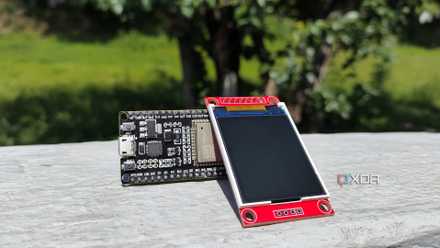
I added an open‑source ESP32 dashboard to my Home Assistant setup, and I'm glad I did
It's a customizable display that can fit practically anywhere in my smart home
ESPHome is a quintessential add-on for Home Assistant
After installing Home Assistant, ESPHome is a foundational add-on that power-users can install first. With ESPHome running devices, I enjoy the privacy of the data that stays on my home network. Along with hardware flexibility and cost-effective scalability, I get to build a resilient, local-first smart home system. All of that requires regular maintenance.
That said, the ESPHome isn’t for everyone, especially those who prefer plug-and-play smart home devices. If you don’t want to deal with ESP32 boards, wires, and sensors, the ESPHome is not for you.
ESPHome
ESPHome is an open-source firmware framework that enables the easy creation of custom smart home devices using WiFi-enabled microcontrollers. It utilizes simple YAML configuration files, integrates seamlessly with Home Assistant, and supports multiple interfaces, including web, API, and MQTT. With built-in support for on-device automations and wireless over-the-air updates, managing your devices becomes straightforward and flexible.