
I take notes on my smartphone, laptop, and tablet all the time. Whether it's new ideas for articles or a bug that I experience on a device I'm testing, I make it a point to note them down since I tend to forget things quite easily. Apart from storing all my notes in one place for quick referencing, I need to be able to access my notes from all of my devices. Since a lot of users have similar requirements, app stores on all platforms are flooded with note-taking apps that cater to this exact use case. So, deciding which tool to use for taking notes and syncing them across your devices can be confusing.
Would you trust the ad giant enough to use Google Keep? Are you someone who prefers self-hosting to avoid sending your data to the cloud? There are several types of users who may have distinct requirements. Taking all of those into consideration, I've come up with the best tools and services to take notes and sync them across all your devices. All of these services have their perks and downsides, so pick the one that suits your use case and workflow.

Should you use Notion, Evernote, Obsidian, or OneNote?
Finding the perfect note-taking app for your workflow
5 Obsidian with Syncthing
Open-source syncing
Whether you're looking for an app to use as your digital journal, a simple markdown editor, or even a convenient way to take notes, Obsidian can do it all. The UI is simplistic, there are vaults and folders to segregate notes, and the best part is you can even use Obsidian to create a personal knowledge management system. While all this sounds good, what can be disappointing for most users is the fact that Obsidian doesn't automatically sync your notes across all devices. This is a bit weird compared to apps like Notion, but it is what it is. Thankfully, Obsidian does provide multiple ways to sync your notes thanks to all the amazing plug-ins on the app.

Obsidian explained: The ultimate tool for organizing your thoughts
Unleash the power of bidirectional link-based note taking
While you can use Obsidian's first-party syncing service, it comes with a monthly fee. You can opt for it if you're all about convenience. But, if you're like me and want to save money wherever possible, I would highly recommend syncing your Obsidian notes via Syncthing. You can also use the Remotely Save plugin within Obsidian to sync your notes to a cloud storage platform of your choice. The initial setup may take some effort, but you don't have to bother about it once it's done. All your notes will sync across devices seamlessly.
Obsidian
- OS
- Windows, macOS, Linux, iOS, iPadOS, Android
- Individual pricing
- Free normally; $4/month for Obsidian Sync
Obsidian is a feature-rich note-taking app that's available on different platforms and offers a neat and clean interface. It's also free-to-use for individuals.
4 Apple Notes
Sync with iCloud
This one's clearly for all the users in the Apple ecosystem. The Notes app comes pre-installed on all iPhone, Mac, and iPad devices, so it's a no-brainer to use it for all your note-taking needs. Apple's Notes app can not only take text as input but the app can even be used to take notes with the Apple Pencil on an iPad. There's also a built-in scanner to scan documents on the go, and it does a fantastic job! As long as your devices are connected to the internet, all your notes will sync in real-time and can be accessed via any Apple device that is signed in to your Apple ID.

5 reasons Apple Notes is way better than OneNote
I wanted to like OneNote, but Apple Notes just works better for my needs. It's simpler and more secure with smoother syncing and Siri integration.
Now, I have a Mac and an iPad, but don't have an iPhone. So, I generally refrain from using Apple Notes. However, if I do want to access my Notes on my Android device or a Windows PC, all I have to do is head to the iCloud website and sign in with my credentials. From there, I can access all my synced notes. So, it can be a viable option even for those who aren't completely trapped in Apple's walled garden. What I also like about Apple Notes is the fact that I can create folders outside of iCloud. This means I can create notes that I only want to store locally instead of syncing with all devices. Useful if you want to save sensitive information only on one device.
Apple Notes
Apple Notes may not be the most powerful or feature-packed notes app on this list, but it gets all the essentials right, like a built-in scanner, the ability to organize and search notes, and more.
3 Notion
Keep your knowledge base up to date
If you haven't heard of Notion by now, you're probably living under a rock. That's how popular the service has become in the recent past. Apart from using Notion to host knowledge bases, landing pages, habit trackers, and whatnot, you can also use it for a simple task -- take notes. Just like Obsidian, you can create multiple folders and sub-folders to segregate your notes for convenience. Apart from that, there are tools that even let you automate Notion to take your note-taking experience to a whole new level. For instance, you can add buttons, use Notion APIs, etc.
A big advantage of using Notion would be the fact that you can eliminate the need for multiple apps to perform different tasks. For example, if you want a to-do list, a productivity booster, a habit tracker, and a note-taking app, Notion can do all of this and more. Unlike Obsidian, Notion automatically syncs all your notes across devices for free, which is a bonus. I highly recommend checking out Notion as it can integrate well with your workflow.
Notion
Notion is not simply a note-taking app but one that can also perform additional functions like habit-tracking, knowledge base creation, etc.
2 OneNote
Sticky Notes on all your devices
Like how Apple Notes is the default option to take notes for Apple users, OneNote -- unfortunately -- doesn't enjoy the same popularity on Windows PCs. However, that doesn't mean it's not a good app to take notes. It syncs your notes to Microsoft's OneDrive so it's accessible on all your devices. Unlike Apple Notes, which is only limited to Apple's operating systems, the OneNote app can be downloaded even on macOS and iOS. You also get additional perks like templates and a web clipping tool to enhance your productivity.
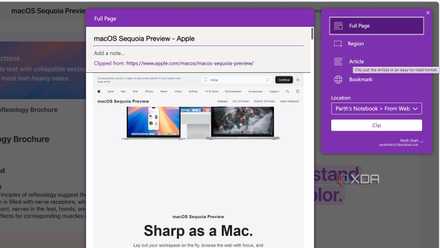
OneNote is Microsoft's neglected masterpiece
OneNote is a surprisingly great tool that manages to fly under Microsoft's radar
I also happened to discover recently that Sticky Notes on Windows 11 also sync to your OneNote account, so they can be accessed remotely on all your devices. This is an excellent feature since I use Sticky Notes all the time when I'm browsing the web on a Windows PC and I need to take a quick note or reminder. OneNote is definitely an underrated note-taking tool that not a lot of people talk about. It gets the job done while providing a no-frills experience -- something that's generally tough to say about a Microsoft product.
Microsoft OneNote
OneNote is one of the most powerful notetaking and scrapbooking programs that's available on almost all major platforms.
1 Joplin
For all you self-hosters
Joplin is an open-source note-taking app that offers a good host of features. It's simple, free, and is available on most major platforms. What makes it a good inclusion in this article, though, is the fact that Joplin offers multiple ways to sync your notes across devices. One of them is hosting your own Joplin server at home. You can self-host Joplin on a Raspberry Pi, so you don't have to rely on third-party cloud services to sync your data. This is a big deal for those concerned about privacy, especially if you have sensitive data in your notes app.

9 reasons you should self-host Joplin on your Raspberry Pi
Joplin is a great note-taking app that can sync between all your devices. Here's why you should self-host your Joplin notes on Raspberry Pi.
Once you figure that out, you can use Joplin to save to-do lists, research projects, and whatnot. The fact that you can host your own server means you can use Joplin in an office environment where a bunch of folks need to access common notes or databases. There are several advantages other than privacy, like saving recurring subscription costs that you may be paying for cloud storage.
Joplin
Joplin offers a way to self-host your own server to sync notes across multiple devices.
Sync your notes safely
Whether you want to host your own server because of privacy concerns, or if you simply want a note-taking app that syncs your data across multiple devices without having to go through too many loopholes, there are several apps that facilitate the process. You can try them all to decide which one floats your boat!