
There's a good chance you're using a router from your internet service provider (ISP), but did you know it's easy to build your own firewall? Attach a switch and access point, and you'll have a powerful DIY networking solution that provides you maximum control over every aspect. The only question is: which firewall should you use? I've passed through a few, and I kept bouncing between them until I discovered OPNsense — I've not looked back since.
5 reasons to replace your basic router with a pfSense or OPNSense box
A custom router and firewall gives you so many more options.
OPNsense is free, open, and powerful
It's the best for a reason
The best part about OPNsense is the fact that it's available for free and is completely open source. You could peek through the code, if you so desire. Having such a talented community supporting the development of a vital piece of software is paramount to creating a secure and reliable firewall. This is the first (and often last) line of defence between your LAN and the outside world. You want it to be as powerful and easy as possible.
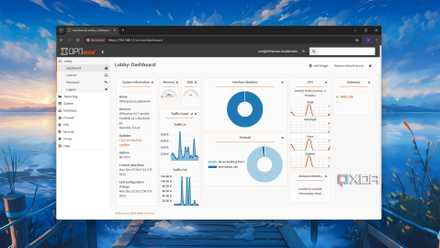
That's precisely what OPNsense offers. Built on top of pfSense (and powered by FreeBSD), this firewall has become increasingly popular as more attempt to build out their local networks. OPNsense is incredibly capable with support for virtual LANs (VLANs), reverse proxies, DMZ, VPNs, and more. You can make it as simple or as advanced as required. Installing the firewall results in a networking solution that's already good to go — OPNsense starts protecting your LAN from the get-go.
Configuring the NAS will make it possible to dig deep and implement additional functionality, usually reserved for enthusiasts and network professionals. Many ISP routers often omit some of these features because the average homeowner won't bother activating them. Creating your own OPNsense firewall provides insight into how your network works, everything from DHCP leasing to port forwarding and DNS. It's worth checking the well-documented features before spending time in the admin GUI.
How did OPNsense fork from pfSense and become a better firewall?
OPNsense and pfSense have the same origins, but OPNsense is now the go-to recommended firewall.
You learn a lot about networking
Feel like (and become) a pro
Connecting a LAN cable between your ISP router and printer won't magically transform you into a certified networking guru. Installing, configuring, and running OPNsense can. If you don't mind spending countless hours troubleshooting issues, installing packages, managing hardware, and learn more about how a network works, you can't go wrong with this open-source firewall. After a few hours, you'll know how to configure unbound filters to destroy tracking.
A VPN can be activated for the entire network, shielding every device connected to the LAN. Reverse proxies can be set up for conveniently accessing services running on systems within your home, making it easy for any member of the family to access Jellyfin, Immich, and other handy tools. By working on each component of the LAN, you'll learn what everything does and how it all interconnects to create a feature-rich platform for communications.
Modern ISP routes aren't necessarily "dumb," but they often fall short of OPNsense.
Although OPNsense could be seen as having a slightly steep learning curve, plenty of documentation and guides are available (some of which are on XDA!) to help you get to grips with the UI and what the various options do. And because you're using custom hardware, you'll be able to continue updating the software almost indefinitely and even use an available PCI slot to improve networking performance. Modern ISP routes aren't necessarily "dumb," but they often fall short of OPNsense.
OPNsense is not for everyone
Let me be clear: OPNsense is hands-down the best open-source firewall solution. If all you wish to have is a firewall (or router) that's completely hands-off and doesn't require dedicated hardware, you'd best continue using your ISP-supplied router. For everyone else, I recommend building your own OPNsense firewall. You will need to pick up an access point for wireless connectivity, since it's not recommended to have Wi-Fi on the same device as OPNsense, but this is a small price to pay for maximum control.