
Summary
- Cooling components are crucial to keep your PC functioning smoothly at all times.
- Those considering an AIO can look at options like the Hyte Thicc Q60 and the Silverstone IceMyst 360 that have unique design.
- The Silverstone AIO, in particular, looks very different with its stackable VRM and RAM fans, making it a practical and visually pleasing CPU cooling solution.
- You can also opt for the Thermalright HR10 2280 PRO SSD cooler to maximize the performance and longevity of your primary M.2 drive.
Building a gaming PC is all about pushing performance and ensuring your rig has enough grunt to run all the latest, demanding AAA titles out there. But "with great power comes great responsibility" to keep your PC components cool, unless you want to leave them sweating and throttling. It's easy to get overwhelmed with all the cooling solutions and components on the market, but it's important to stick with the right options, ignoring the rest.
Having gone through the process of picking various cooling hardware myself on multiple occasions, I've put together a list of cooling components I'm going to buy very soon for another build. If you are in the market for some new components for your new PC build, or if you simply want better hardware to keep your existing system cool, then consider checking out these cooling components, which I believe would be exciting and unique additions to your PC.

How many fans should a PC have?
You know your PC needs fans but how many do you really need? Let's find out
4 Hyte THICC Q60
"Technology Harnessing Innovative Chonk for Cooling"
More than just being an AIO with an incredibly cool name, the Hyte THICC Q60 is exciting for a few good reasons. Firstly, there's a massive 5-inch IPS display with a 720 x 1280 resolution that's attached to the water block, which tilts and swivels, letting you adjust and get the right viewing angle. But what makes this a particularly cool cooler (no pun intended) is that its pump is located right next to the radiator and the fan assembly, as opposed to the CPU block, meaning you don't have to worry about the radiator's mounting spot on the case to ensure there's no air accumulating on the water block area. It's a clever design, and one of those things that makes you wonder what took them so long.

Air cooling vs water cooling: Which is the best option for you?
For cooling CPUs and GPUs, there are two basic options: air and liquid. Here's how each cooling style measures up.
What's also great about this AIO is that it eliminates cable clutter by employing a single power cable to the heat exchanger. The two 120mm fans used in this particular cooler's assembly daisy chain together and connect to the heat exchanger via Nexus Link Type-M magnetic couplers. I love how manufacturers are now using new and innovative ways to eliminate the cable clutter in PC cases, and this one's right up there with the best implementations. Also, the ginormous 240mm radiator should help keep even your most demanding gaming CPUs cool at all times, so I'd say this is perfectly fit to be used in high-end gaming PCs, too.
HYTE Thicc Q60
The HYTE Thicc Q60 is one of the more unique AIO coolers out there with a massive 5-inch LCD panel and a power radiator assembly. It also uses a single cable solution to get rid of the cable clutter, which is great for those who despise cable management.
3 Silverstone IceMyst 360
A really cool CPU cooler
Another component I'm highly considering for my upcoming PC build is the Silverstone IceMyst 360 AIO. This particular liquid cooler is unlike any I've seen recently, and I'm sure you'll find it equally exciting. The highlight of this CPU cooler is that it comes with stackable VRM and RAM fans, which you can attach to the CPU block. What's interesting is that you can even adjust the fans to cover specific spots on the motherboard, meaning you can have one fan cooling the VRMs, while the others cooling the RAM and SSDs.
Installing these stackable fans is fairly simple, and I also love the fact that the pump and the additional fans can run at separate speeds, thanks to Silverstone's design which uses separate PWM connections. Not only is it a very practical cooling solution to keep your components cool, but it also makes your PC look unique. I, for one, love how it looks from the front, and I can't wait to see how it'll look on my final build.
SilverStone IceMyst 280
This AIO liquid cooler may like a regular CPU cooler, but you can improve its capability by adding some stackable 70mm fans to its pump. The added fans could improve airflow within the case and cool components like the VRM and RAM.
2 Thermalright HR10 2280 PRO SSD Cooler
An optional "luxury" upgrade
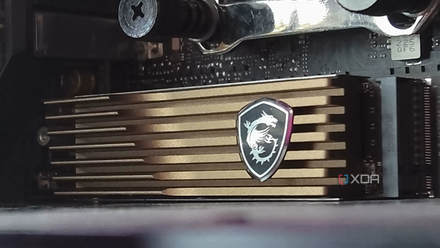
Blazing-fast PCIe 5.0 SSDs are here, along with the impending need for "beefier" M.2 cooling. You don't necessarily need a dedicated heatsink and a cooler for all M.2 SSDs, but there have been multiple reports on PCIe 5.0 SSDs freaking out without one. While a lot of the initial PCIe 5.0 teething issues have now been resolved, and you don't necessarily need one of these as a casual user, I'm personally going to add one to my build, just to ensure smooth functioning, and to increase the longevity of my primary M.2 drive.
Do I need a heatsink for PCIe 5.0 SSDs?
PCIe 5.0 SSDs require a heatsink for optimal performance, but whether you need to buy a heatsink alongside a PCIe 5.0 drive is something else.
If you call me crazy for adding an SSD cooler, then wait till you hear about the RAM module coolers that are being put out by various brands these days, which I'll mostly grab sometime soon.
Thermalright HR10 2280 PRO SSD cooler
The Thermalright HR10 2280 is one of the best SSD coolers out there, with a massive heatsink and a small fan to keep things cool. It comes in both a black and silver finish, both of which come with a silicone pad that attaches directly to the SSD.
1 iCUE LINK QX120 RGB fans
Fewer cables to worry about
Cooling fans are often the most overlooked PC components, in my opinion, and I hope that changes soon, especially with the arrival of new fans on the market. I've been eyeing Corsair's iCUE Link stuff for quite some time now, and I'm definitely putting its iCUE LINK QX120 RGB fans on my shopping list. These fans are essentially similar to the ones you get with the Hyte Thicc Q60 AIO, meaning they reduce the cable clutter by directly connecting to the next one with the help of a universal connector.

4 overkill components & peripherals you should avoid to save money on your PC build
It's very easy to overspend while putting together a new gaming PC setup.
You can get these fans in both 120mm and 140mm sizes, and they all connect to a single hub on your PC via an iCUE LINK cable to be seamlessly controlled through the software. You can even use these fan with Corsair's AIO, or use them directly in your case as intake or exhaust fans. They tend to run a bit expensive compared to regular fans, but I truly believe they're worth the asking price, and are easier to recommend compared to, say, fans with a display. Notably, there's also a built-in temperature sensor and a dedicated MCU on each of these fans, allowing you to easily set and control custom fan curves.
Corsair iCUE LINK QX120 RGB fan
The Corsair iCUE LINK QX120 RGB fan is great for quickly adding multiple case fans to your PC without having to worry about cable clutter. These connect to each other via a custom connector, and they even have a built-in temperature sensor and MCU, allowing you to control them separately.
Don't skimp on cooling components while building a PC
Cooling components like the CPU cooler and case fans are perhaps on top of my list of parts one should never skimp on while building a PC. Shopping for these components may not be as exciting as, say, buying a CPU or a GPU, but they're extremely crucial for the overall PC, and ignoring them will definitely affect how well your other components perform.