
Dust is your PC's worst nightmare. It infiltrates the chassis, lands on a component, and starts to accumulate over time. Too much dust can create a layer of insulation, causing the hardware to run hotter than usual. Clogging up fans could result in less air being forced through vents and the performance of everything inside your PC will be compromised. Luckily, keeping dust outside your PC, or at least keeping on top of the stuff that makes it inside your system, is easier than you may think.
4 Buy a PC case with reliable dust filtration
The most important line of defense against dust accumulation is good filtration. Most PC cases will have some form of dust filter attached to vents. It's more important for locations where fans will be drawing air inside the chassis, rather than exhausting, though having a dust filter everywhere never hurts and can help prevent particles from falling into the PC through the top. If we prevent as much dust from entering the PC as possible, we'll have less to deal with when regularly cleaning your PC. And you do regularly clean your system, right?

Best PC cases for airflow in 2024
Buying a PC case with airflow is crucial to the overall performance of the rig. Here are the best PC case for airflow you can buy in 2023.
3 Regularly clean out your PC
Yes, you should take off the side panels once in a while and spray the inside with compressed air. It takes a few minutes of your time and can help avoid future issues relating to dust build-up. All you need to do is pick up a can of compressed air from your favorite reputable retailer, take the PC outside (while it's dry), remove both side panels, and give all parts of the inside a blast. Pay close (and careful) attention to using air with more sensitive parts and an anti-static brush can prove useful in sweeping away tougher particles.
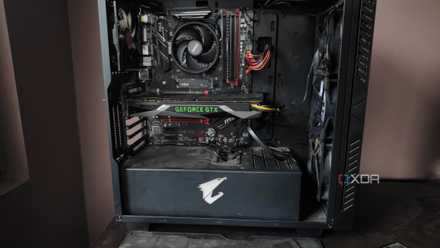
How to clean the dust out of your PC tower
Dust buildup is bad for your system, so you should regularly clean your PC tower to keep it free of dirt and grime
2 Spend time sorting your cable spaghetti
Did you know that messy cabling can help dust accumulate inside your PC? When wires aren't neatly tucked away or bundled to take less space, there's a greater chance for particles to stick to a loose wire, which then starts the snowball effect. Invest in a few Velcro ties to bring together all your internal wiring and create bundles, utilizing all available channels to create a clean PC. It not only looks better, but you'll be doing yourself a favor and saving time cleaning.

The step-by-step guide for perfect PC cable management
PC cable management is an important part of the PC building process. Here's a step-by-step PC cable management guide to help you get started.
1 Move your PC to a different spot
The location of your PC can make all the difference. Should the tower be on the floor and the room has carpet, you'll have a higher risk of dust, fabric, and other particles making their way into your PC. Since the fans will be located closer to the floor, you'll be sucking in everything that falls in front of the chassis. It'll be a good idea to move your PC to an elevated position, even if it's simply on a desktop stand. It's especially useful for houses with pets that shed, such as cats, dogs, or even rabbits. All these animals will shed cells and fur that can make their way into your PC.