
One of the great things about USB-C becoming so popular in all kinds of devices is that it's an incredibly capable port — plus it's more durable than the micro-USB of old — so it has enabled all kinds of accessories to be paired with modern phones. A popular option these days is to use a controller like the Backbone, which plugs into the USB-C port and lets you play console-style games in a much more comfortable way.
But there's actually a lot more you can do with a USB-C port, and it can turn your phone into an even more useful device for all kinds of things. Or, sometimes, it may just make your experience better. Here are a few uses you may not have tried yet.
Moving files around
USB-C flash drives and SSDs
One of the more basic use cases for your USB-C port is to use it for external storage. Many external USB drives these days use USB-C ports, and you can plug them right into your phone to manage files on your USB drive or backup files from your phone if you don't want to rely on cloud storage. I used this a few times when I wanted to print something and didn't have a printer at home, so I could easily grab a file on my phone and put it on a drive to give to the printing service.
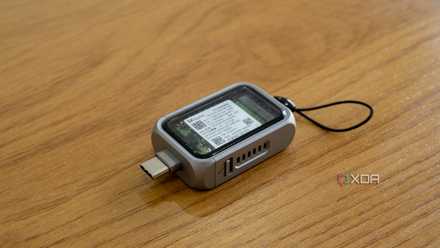
Satechi Mini NVMe SSD enclosure review: An ultra-portable SSD housing for all your devices
This tiny SSD enclosure is the perfect pairing for your phone (or PC)
But there's a potentially more interesting use case for this, too. With the rise of portable SSDs, you can now get very fast, large capacity external storage that you can use for recording videos. I've used this before when recording longer videos that I didn't want taking up space on my phone's internal storage, particularly if I planned to edit those videos on my PC anyway. Many phones let you directly record to external storage, and it can be very handy. Just make sure the USB connection is stable so your files don't get corrupted.
Satechi Mini NVMe SSD Enclosure
- Capacity
- Drive not included
- Power
- Bus-powered
- Speed
- Up to 10Gbps
- Connection
- USB 3.2 Gen 2 port (or included cable)
- Portable
- Yes
- Upgradeable
- Yes
This tiny portable SSD enclosure gives you fast external storage anywhere, and it works with your phone and PC.
A better listening experience
USB-C headphones and earbuds
This is probably something of a strange take, but I don't love using Bluetooth for my audio needs. I've become accustomed to it for the most part, but I find the audio latency can be quite noticeable, connection problems aren't that uncommon, and multi-device support can be iffy. Not every device and platform handles Bluetooth reliably.
A hard, physical connection is always more reliable, but the convenience of wireless is still too great to ignore. That's why I love accessories like the Razer Barracuda X headset, which, instead of (or in addition to) Bluetooth, have a USB-C dongle with a proprietary 2.4GHz wireless connection. You can just plug it into the USB-C port on your phone and start listening to music in a much more seamless way, and what's even better is it can work with any other USB-C device, too.
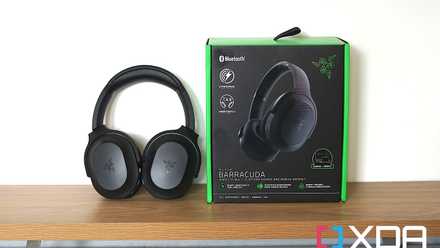
Razer Barracuda headset review: Mixing gaming and premium wireless headphones
The Razer Barracuda is the company's newest wireless headset and it takes a few cues from Razer's Opus headphones. Check out our full review.
Razer has been one of the biggest supporters of this kind of technology, with multiple devices featuring the HyperSpeed brand, but a few others exist, and I still love the idea.
Razer Barracuda X (2022)
- Microphone
- Detachable
- Surround Sound
- Surround 7.1
- Weight
- 9.6 ounces
- Battery Life
- 50 hours
- Driver
- Triforce 40mm
The latest Razer Barracuda X headset features both Bluetooth support and a USB-C dongle for faster and more reliable wireless connectivity.
- Bluetooth
- 5.2
- Connection Type
- Wireless 2.4GHz
Recording videos
Wireless microphones make a difference
A more recent use case I've found for the USB-C port on my phone has been recording videos, particularly for YouTube Shorts when i don't want to get too deep into editing and my full camera setup. Audio quality from my phone's microphone isn't that great, so I have a wireless lavalier microphone in the form of the DJI Mic Mini, which connects to my phone using a USB-C receiver.
The built-in camera app on my phone doesn't support recording with external microphones, but using a third-party tool, I can use my microphone and get far better audio quality out of my recordings, making them much more suitable for sharing. I've noticed not every phone supports this, but most of them should, and it's a great way to produce better content without spending a fortune.
DJI Mic Mini bundle
- Brand
- DJI
The DJI Mic Mini is a great, affordable wireless microphone for vlogging and video production. This bundle includes two microphones and a receiver.
A full desktop experience
More than a phone
Admittedly, I can't actually use this last one with my own phone since it doesn't support a proper desktop mode, but it's not for lack of trying. A few modern Android phones, including Samsung Galaxy S phones from the past few years and Google Pixel phones, support connecting to an external display and enabling a "desktop" mode that lets you use your phone like a PC, while also keeping it charged.
Score Savings on USB-C Accessories and Everyday Tech
While I don't have a compatible phone myself, my wife's Pixel 9a is a fantastic example of what can be done, and it's particularly great for such an affordable device. It used to be that computers and phones were completely separate devices, but with a feature like this, and with how powerful phones have become, there's a good chance you don't need both devices. You can turn your phone into a pocket computer and it can be that much more useful.
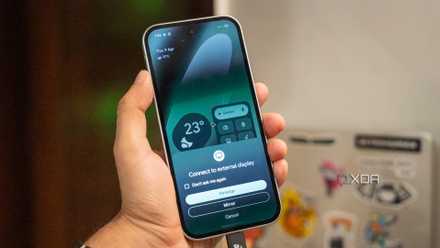
I stopped carrying a laptop after trying Android's desktop mode
Discover how Android's desktop mode transforms your smartphone into a powerful, portable computing device.
Plus, if you have a USB-C monitor, it probably has USB ports of its own for a mouse and keyboard, so you can have a full setup ready to go with a single port. Likewise, you may be able to use a USB-C docking station to connect the monitor and all your peripherals in one go.
USB-C changes the game
These are just some of the different uses you can get out of your USB-C port, but there's potential for even more with this technology. For example, there some some phone cases with a built-in power bank that plug in via USB-C to give your phone extra charge. Or maybe you fancy something like the Clicks keyboard, which gives you a physical keyboard on a few supported devices. Either way, you can get a lot more out of your phone thanks to this port, and it's worth looking into your options.