
Summary
- 2.4GHz band is still essential for smart home devices due to its wide coverage and compatibility with most routers, despite its slow speeds.
- 5GHz and 6GHz bands offer higher bandwidth but 2.4GHz is preferred for widespread connectivity and compatibility with older devices.
- Congestion on the 2.4GHz band is a common issue due to the large number of devices connected, causing delays in communication between devices.
Wireless technologies have advanced considerably over recent decades but we still rely on the 2.4GHz band for many IoT and smart home devices. Even though this band has many drawbacks, which is why we now have 5GHz and 6GHz, it's still worth using in 2024. The primary reason the 2.4GHz band was largely replaced for general connectivity is its low bandwidth and heavy congestion.
What is 2.4GHz Wi-Fi?
1985 was the birth year of the 2.4GHz radio frequency out of the Federal Communications Commission (FCC) in the U.S. Being free, it was quickly used as the baseline for the first wireless protocol, 802.11. You’ve likely heard of 802.11 as marketing has used protocol SKUs to represent improvements to connectivity in hardware, such as laptops and phones. So, what is the 2.4GHz band? A band is a group of frequencies for radio waves to be transmitted. Bands are further divided into channels. 2.4GHz, 5GHz, and 6GHz refer to the bands approved by government bodies for transmitting wireless data. A single hertz (Hz) represents one repetition per second.
There are 1,000,000,000HZ in 1GHz. The higher the number, the more frequent wave patterns will be repeated for longer waves and range. The higher this number of repetitions and channels, the more bandwidth is available to the network. Consider each band like a pipe with liquid flowing through. The larger the pipe, the more liquid can flow through. Newer bands, such as 5GHz and 6GHz are not supported by older hardware. For instance, modern smartphones likely support all three for rapid data transfer and solid connectivity throughout the building.
2.4GHz is limited to specific speeds and is considerably slower than other available bands. Modern routers support 2.4GHz, 5GHz, and 6GHz, offering more headroom for getting tech online. While you're reading about bands, don't forget security with WPA2!
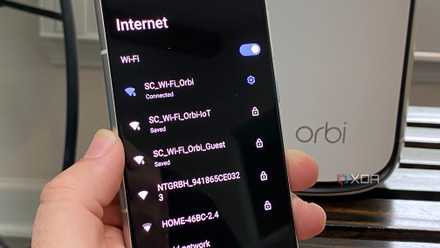
Do you need a separate network for your IoT devices?
Looking to keep your IoT devices off your local network? You'll need a separate IoT network.
How the 2.4GHz band became congested
As expected, throwing everything onto the same link was inevitably going to cause issues, especially as technology continued to improve and more bandwidth would be required. Everything was connected to the wireless network through 2.4GHz. Your phone, TV, computer, and smart devices all use the same band. Adding bulbs, plugs, and other smart home protocols, the 2.4GHz band is now one congested mess. Take a look at the list of clients connected to your router without cables and there’s a strong possibility it’s using 2.4GHz. Looking at my home LAN right now and everything aside from a select few devices is on the same 2.4GHz band.
Support for 2.4GHz keeps smart home hardware small, affordable, and compatible.
2.4GHz is still used to this day due to better coverage and the fact it’s available on most routers, including all of the models used by internet service providers (ISPs). This is particularly useful for devices that will be installed around (and outside) the home. That Ring doorbell situated next to your front door? Yep, 2.4GHz ensures a stable connection to see who’s knocking. It’s not fast but is rapid enough for everything we need to use it for. Because almost everything supports 2.4GHz, you’ll find the band congested, especially in a busy home or office. Even devices that support higher bands will fall back on 2.4GHz for better coverage.
It’s difficult to comprehend how congested a wireless network can become since everything is invisible to the naked eye. Imagine the wireless data waves were sound waves and your devices had to compete against one another for the router (or access point) to hear them clearly. With a few devices on the same band, this wouldn’t be a problem, but bump that number to 20 or more with smart home devices and you’ll encounter issues with too much noise. Have you ever wondered why the smart plug takes a few seconds to respond to your input? Network congestion could be the reason.
Best Wi-Fi routers in 2025
Upgrade your home Wi-Fi so your speeds are fast and consistent in every room of your house
Why 2.4GHz Wi-Fi is still vital in today's connected world
We're adding more smart tech to our homes. Central heating and air conditioning can be controlled through your phone. More people are buying electric vehicles, smart bulbs, smart plugs, and even laundry machines that can connect to your LAN without wires. It could be viewed as becoming too much, but others will find it incredibly convenient to get more done with less human intervention. The 2.4GHz wireless band facilitates this. 5GHz and 6GHz will help the network spread the load across various channels and this is important for smart homes but the 2.4GHz band shouldn't be overlooked.
Support for 2.4GHz keeps smart home hardware small, affordable, and compatible. It's something to consider when planning out network infrastructure and purchasing plenty of smart home accessories.