
Nvidia's RTX 50-series GPUs haven't been met with the best reception. Between low availability, disappointing generational performance boosts, and high pricing, it's been tough to justify spending for one of Nvidia's best graphics cards. The saving grace, at least if you're to believe Nvidia's marketing, is DLSS 4 — a software feature that promises to quadruple your frame rate in supported games.
It's hard to argue with a 4X increase in frame rate, but even with one of Nvidia's new graphics cards in my PC, I've barely touched the feature. Outside of toying around with DLSS Multi-Frame Generation (MFG) to see how the feature works, I've left it turned off in just about every game I've played. Here's why.

I think the arguments around DLSS are overblown
Upscaling technologies like DLSS are here to stay, no matter which company you get your GPU from. I've used all three (FSR, XeSS, and DLSS) since they came out, and while I agree they were sub-par to begin with, the year-on-year improvements have made it genuinely difficult to spot the difference between a native-rendered scene and one using DLSS or otherwise. While I wouldn't use it for competitive gaming, it's perfect for narrative-heavy single-player experiences like God of War Ragnarök. Does anyone else prefers to game with DLSS on, so they get higher frame rates than pure raster?
DLSS 4 has a narrow focus
What are you going to do with all of those extra frames?
The high-level concept of quadrupling your frame rate is attractive, but putting those numbers into context exposes some issues. I, like most PC gamers, have a monitor with a refresh rate of over 100Hz. For my display, it tops out at 138Hz, but you can substitute that out with the hundreds of gaming monitors with a 144Hz refresh rate and come away with the same conclusion. There are certainly displays with a higher refresh rate, but they're in the minority and generally targeted toward competitive players who play at 1080p.
In order to fully saturate a 144Hz display with DLSS 4, you need a base frame rate of at least 36 FPS in 4X mode and at least 48 FPS in 3X mode. That's great in the few games where I'm sitting right around those frame rates, but in the vast majority of games, I'm not. In a game like Alan Wake 2, I'm barely able to muster 20 FPS, while in Marvel Rivals, I can soar into the triple digits without even thinking about it. By and large, games fall into one of those two camps, and I'd have to endlessly fiddle with graphics settings to get them in the sweet spot for MFG.
As I'll dig into next, MFG calls for a high base frame rate to work properly — at least 60 FPS, based on my experience. Anything lower will produce a lot of visual artifacts, particularly in the 4X mode. I need to resort to other performance-boosting measures in a game like Alan Wake 2 to even benefit from MFG — at which point I don't even need all the extra frames — and I don't need extra frames for the sake of them in Marvel Rivals.
I'm using these games as touchstones, but you can apply the same concept elsewhere. Black Myth: Wukong is too demanding to benefit from MFG alone, and Deep Rock Galactic is light enough that I don't need any frame generation. The same dynamic is true in Silent Hill 2 and The Finals, or Star Wars Outlaws and Diablo 4. You get the idea.
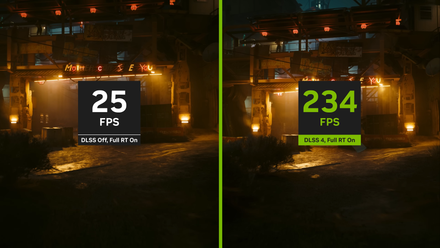
Nvidia's DLSS 4 multi frame generation works best when it doesn't make sense to use it
If you want to use Nvidia's new multi frame generation, keep in mind that there are very specific times where it can actually make a difference.
The feature is largely targeted toward a couple of specific use cases. You're playing a game at 60 FPS, and you have a 240Hz monitor. Or, you're playing a game at 90 FPS, and you have a 360Hz monitor. In those situations, MFG is great as a motion-smoothing tool that allows you to enjoy the full refresh rate of your display. The situations where it's actually useful are just few and far between.
For me, not only do I have a monitor with a (relatively) low refresh rate, but I also don't boot up a ton of games that neatly fall into the performance targets where MFG is useful. In every game I've played since upgrading, I've been able to achieve the performance I want natively or through a combination of DLSS Super Resolution and 2X Frame Generation.
It falls apart when you need it most
Not the performance boost you need
DLSS 4 has a narrow window where it works best, and that comes down to how it works. Just like Frame Generation in DLSS 3, MFG in DLSS 4 uses frame interpolation. Two frames are rendered and compared, and then the frame generation algorithm uses that comparison to estimate the frame (or frames) that should go in between. The more of a difference there is between those two frames, the harder the frame generation algorithm has to work, and that's the core of the issue with MFG.
When you're playing a game at a low frame rate, there's a lot of motion between two frames. The frame generation algorithm works its best when there's only a small difference between two frames, as it doesn't need to dream up details that might not be present in the two rendered frames. That's where MFG shows the most issues. You can see in Cyberpunk 2077 below an example of what I'm talking about. With the quick motion of a fight, MFG devolves into a mess of visual artifacts as it tries to keep up with the low base frame rate.
This isn't some revelation — we've known the limitations of frame generation for a while — but it's an illustration of how MFG can fall apart outside its narrow intended use. You'd want a 4X increase in frame rate the most when you're starting from a low base frame rate, which just so happens to be the situation where MFG is at its worst.
If you have DLSS 3, you don't need DLSS 4
Doubling your frame rate is good enough
DLSS 4 is great when it comes to Super Resolution and single Frame Generation, but the application of MFG is extremely narrow. If you have too low of a base frame rate, it falls apart into a mess of visual artifacts. And if you already have a high base frame rate, you don't need to quadruple your frame rate unless you're on the bleeding edge of display technology. In the vast majority of situations, MFG simply doesn't make sense.
Nvidia's DLSS Frame Generation is fantastic, and I have used it liberally in recent, demanding games like Avowed, Indiana Jones and the Great Circle, and Monster Hunter Wilds. I've just never felt like I needed to generate three or four frames instead of two. The window of usefulness for 2X frame generation is much higher than the window for 4X frame generation, and in the vast majority of games I play, that's where I find myself landing.
Useful as an extra
As a feature, DLSS MFG isn't inherently problematic. Although its applications are narrow, there's a legitimate argument for using the feature when you're running a game at 60 FPS on a 240Hz display. As an extra goodie that you can occasionally toggle on, MFG is a great feature to have around. It's just not a reason to go out and buy a new graphics card on its own, and given what we've seen out of Nvidia's RTX 50-series GPUs, that's the main thing Blackwell cards bring to the table.
Unlike DLSS 3 and its single Frame Generation capabilities, DLSS 4 and MFG aren't a reason to upgrade. I've barely touched the feature since upgrading my GPU, and I don't see that changing any time soon.