
Microsoft designed the Windows 11 operating system to fill many shoes. Besides perhaps macOS and Ubuntu, it is the only OS that's equally at home in a data center environment as it would be on your personal laptop. A lot goes into creating such versatile software, but the immediate trade-off is its inherent unsuitability for a super-specific use case right off the bat. The OS merely provides the foundation on which I must add software that tailors the computer to my specific needs. I'd need a word processor and voice typing utilities, while a CGI artist might need Blender and a render engine.
This takes its toll on my favorite aspect of operating systems — UI customization. While functional customization is boundless with application software, Microsoft's options for visual tweaks on Windows 11 seem like an afterthought at best. To go all the way, I've long depended on Rainmeter for widgets, Wallpaper Engine for live wallpapers, and an assortment of third-party software to round things off. I recently gave Windhawk an optimistic shot since it consolidates and replaces several mods I was running through individual programs, like Translucent Taskbar. Sadly for me, the trial run culminated in a corrupted Windows install on my primary computer, suspicions of a dying GPU, and a long weekend of restoring normalcy. Here's what went wrong.
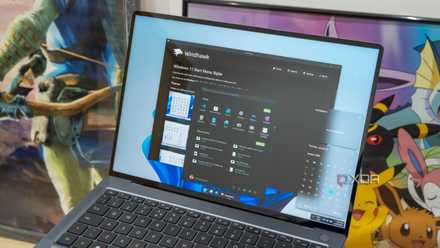
8 best Windhawk mods to make your Windows 11 PC more interesting
Improve your Windows 11 experience
The weak Windows 11 customization game
Windhawk plays an important role consolidating efforts
Microsoft already treats Windows 11 like a complete and mature operating system that needs little besides security patches, or at least nothing new in the customization department. It's been my longstanding complaint about this OS, because, unlike several customization-focused Linux distros, Windows 11 hasn't even made efforts to remedy launch-day lapses. For that reason alone, free software like Rainmeter and Windhawk have my utmost respect for facilitating what Microsoft engineers deemed unviable.
While Rainmeter adds a widget overlay to your desktop (or any other screen), Windhawk is a way more comprehensive, yet free and open-source utility capable of customizing various OS elements. It is something like a Steam webstore, but for community-curated mods that tweak UI elements to your liking. These mods fundamentally differ from Rainmeter in that they alter the OS-level configuration and registry files instead of adding an overlay or customization layer on top. Moreover, Windhawk has cemented its reputation as the go-to marketplace for system-level UI mods on Windows 10 and 11. Going into this experiment, I presumed that said mods wouldn't sip on system resources in the background, like Wallpaper Engine. While that assumption proved true, Windhawk took its toll on my PC differently, and I might be at least partially to blame as well.
Wreaking havoc with my display
I even suspected a GPU of dying on me
Once I installed Windhawk on my desktop, I began to fiddle around with it, installing some of the popular mods like the Windows 11 Taskbar Styler to replace TranslucentTB I'd installed months ago from the Microsoft Store. I also installed several others, like Windows 11 Start Menu Styler to revert to a pre-2025 style, Classic context menu in Windows 11 to save me a click every time, and Alt + Tab per monitor. The first item installed on this list may have forced File Explorer to crash and automatically restart a few times, but that wasn't something new to me because TranslucentTB behaved similarly. The straw that broke the camel's back seems to be the Windows 11 File Explorer Styler.
Upon running a translucency effect using this mod, I ran into several issues, like failed translucency in some Windows programs, and dangerous artefacting like low-contrast text in dialog boxes on one half of the screen separated by a diagonal line from perfectly normal rendering on the other half. This low-contrast text even showed up in dialog boxes with no transparency/Mica effects applied. This spooked me, so I double-checked to ensure my Windhawk mods weren't accidentally conflicting with each other, with more than one modification trying to control a specific system component, like the taskbar. It all came crumbling down when, one fine morning, my PC simply refused to wake from a hibernated state. Initially, I blamed a faulty power switch that seemed to get stuck and cause boot looping, but the issue didn't go away until I uninstalled Windhawk entirely after booting into Safe Mode.
At its worst, the display issues got me suspecting really expensive components like my aging Nvidia GTX 1660Ti GPU, the five-year-old screen that hasn't let me down yet, and a rather long DisplayPort cable potentially under strain from my new sit-stand desk. However, it was clear the underlying issue was with the software I was running, because automating System restore point creation saved me the hassle of a fresh Windows installation, and Windhawk was the only software I'd installed between the two latest restore points. Eventually, the fix boiled down to removing the program and letting Windows diagnostics and repair tools in the startup menu undo all the changes it made to system files.
Customization takes a toll
While undoing all the Windhawk mods and cleaning up the Windows Registry where changes were made for customizing the UI, it certainly pins the blame on the program. I may have inadvertently created the circumstances for its failure. However, it's worth noting that Windows typically doesn't take kindly to any meddling with system files, and most Windhawk mods are coded in by the community, so there's always room for error. I only urge that anyone hoping to tweak Windows implement a robust backup/system revival process, and think twice before diving headfirst into altering system files for UI changes.

Windows 25 is a mod for Windows 11 that makes everything so much better
If you want to see Windows's potential future, try the Windows 25 mod today.