
Summary
- Windows 8's redesign of the Start menu was a flop - ditching the button and implementing a screen full of tiles aggravated users.
- Windows 8.1 made fixes by bringing the Start button back, but the Start screen was still a far cry from the beloved menu interface.
- Windows 11's Start menu caused controversy with unnecessary elements like a Recommended section and ads.
Windows may be almost 39 years old now, but many of the features available in Windows 11 have their roots in the past versions of Microsoft’s flagship OS. Take the iconic Start menu, for instance. First implemented in Windows 95, it has become a stable UI element of the Windows ecosystem.
But just like the different versions of Windows, not all Start menus were built the same. While certain menus are universally adored by the Windows community, there are just as many versions of the Start menu that attracted a lot of criticism from the crowd. So, in this article, we’ll rank the Start menus included in every major version of the Windows lineup of operating systems.
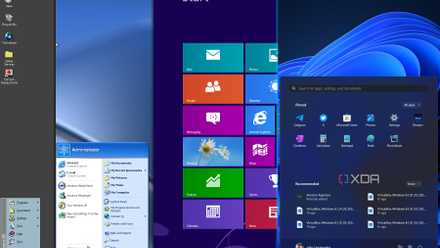
Evolution of the Windows Start menu: How we got to where we are today
The Start menu has been a staple of Windows for nearly 30 years. Here's how it's evolved in that time.
9 Windows 8
The black sheep of the Windows family
Innovation is always a plus in technology, but sometimes, companies tend to disregard the old adage “if it ain't broke, don't fix it” when implementing new functionalities to a well-loved product. Microsoft learned this lesson the hard way when the Washington-based firm released Windows 8.
If I were to talk about everything that was wrong with the OS, we’d be here all day. In short, Microsoft, in its pursuit of catering to both PC and tablet crowds, redesigned the Start menu from the ground up, and the final product was a Start screen rather than a menu. Ditching the Start button was a bad idea on its own, but Microsoft decided to shoot itself in the foot by implementing a tile-based menu that covered the whole screen. In the end, Windows 8 went down as one of the most reviled operating systems ever released by Microsoft (which was quite the achievement, given Windows ME’s reputation).
8 Windows 8.1
A step in the right direction, but the damage was already done
After receiving relentless criticism for Windows 8, Microsoft decided to address some of the backlash with the release of Windows 8.1. The updated version of the highly detested OS brought the Start button back to the Taskbar. Although the Start screen still wasn’t replaced with the beloved menu-like interface, it was a lot more bearable than before.
For starters, Microsoft added the Power button at the top of the screen, right next to a Search button. Besides slashing the number of tiles available on the Start screen, Windows 8.1 also added an arrow under the tiles. Clicking on it made the applications and software installed on your system visible, making it similar to the All Apps/Program options on older operating systems. Despite the improvements, the Start screen of Windows 8.1 was far from perfect, causing Microsoft to ditch the redesigned Start UI in subsequent versions.
7 Windows 11
Weird changes that nobody asked for
Being an avid lover of Windows 10, I may be biased when placing the Start menu of Windows 11 this low on the list. I’ll admit, I’m not very fond of the tiles introduced in Windows 8, and Microsoft doing away with them in Windows 11 was definitely a positive in my book. But for some reason, Microsoft decided to switch the default position of the Start button to the middle instead of the bottom left part of the screen. Luckily, you can switch its position back to where it was in Windows 10, though Windows 11 doesn’t let you move the rest of the Taskbar along with the button.
And that’s all you can do on the customization front. There’s no way to resize the Start bar without resorting to third-party apps like Start11. The new additions, like the Recommended section, are rather redundant. Rather than displaying your often-used apps, it shows your recently accessed apps and files. Plus, there’s no way to make it permanently disappear, as Windows continues showing a tiny Recommended bar at the bottom of the Start menu even after you disable it with the help of certain tweaks. Then there’s the three-lettered blight Microsoft added to the Start menu last year: ads.
6 Windows 8.1 RT
Or maybe I should say, Windows 10: Lite
Windows RT devices are one of the many products resting in Microsoft’s graveyard. But one thing’s for sure: the Start menu added in the Windows 8.1 RT update was a breath of fresh air. Sharing several design cues with the Start menu featured Windows 10, the one featured in the 8.1 RT update discarded the Start screen for the menu-like layout we know and love.
That said, it still had some differences that set it apart from its Windows 10 cousin. For example, the Power button was pushed to the top of the Start menu instead of the lower left corner of the screen. The Settings and Documents buttons weren’t as accessible either, though it was nothing like the trainwreck of the Start screen that we saw in Windows 8.
5 Windows 95/NT 4.0/2000
A solid, compact Start menu
The fifth rank for the best Windows Start menu is a tie between Windows 95, NT 4.0, and 2000. Microsoft exposed the world to the greatness of the Start menu in the Chicago build of Windows 95. The fact that the earliest version of the Start menu sits at the middle of the list should speak volumes of how impressive it was back in the day.
Despite its limited number of buttons and icons, the Start menu on Windows 95 provided easy access to every service or application you may require on your PC. The Programs option was the precursor to the All Apps button we have on present-day Windows operating systems, and the rest of the options, including Find, Run, Help, Run, and Settings were useful in their own rights.
And yes, while Windows NT and 2000 were released years after Windows 95, their Start menus were identical to the one included in the latter. Besides featuring a banner with its name, Windows NT 4.0 got rid of the Suspend button, while Windows 2000 included a similar banner and added the Set Program Access and Defaults option to the menu.
4 Windows 98/ME
Better support for multi-user systems

The successor to Windows 95 may not have redesigned the Start menu, but it brought some helpful little additions to the interface. The inclusion of a Log-Off button was quite useful for users who had to share their Windows machines. Similarly, the Windows Update option provided an easy way to check for any pending updates to your PC, while the Favorites folder displayed your most-used apps.
Some might call the extra options "bloatware," but they were pretty useful additions to the Start menu. The Windows ME OS, for all its faults, didn’t falter when it came to the Start menu, either. And that’s because it didn’t attempt to reinvent the wheel (or menu, in this case), unlike a certain OS ranked dead last on this list.
3 Windows XP
An improvement over its predecessors in every way
Windows XP brought several changes to the typical Windows UI and totally redesigned the Start menu for the better. Instead of featuring the old-school menu included in its predecessors, the Start menu was split into panels, a trend that continued all the way until Windows 10. The Windows 95/98/Millennium/2000/NT 4.0 banner was scrapped, with the left pane including your frequently-used apps alongside any software you pinned for easy access.
Meanwhile, the right pane housed the Documents, Control Panel, Search, and Find and Run utilities, akin to the tools included in older Windows operating systems. The only difference was that the Programs option was turned into the All Programs button and placed under the left pane, with the Log-Off and Shut Down buttons placed underneath.
While some might label Windows XP as too colorful and criticize Microsoft for cramming too many options in the Start menu, it was a landmark OS that single-handedly modernized the Windows lineup.
2 Windows 10
A culmination of the best design aspects, mixed with a certain toxin
When Windows 8 crashed and burned, Microsoft received a second chance to set everything right with Windows 10… and that’s more-or-less what the company did. The Start screen was dismantled, and the Start menu was brought back to the table Windows.
The left side of the ol’ dual-pane setup now features your recently installed apps, alongside a comprehensive list of the software on your PC and a certain unwanted component that I’ll get to in a bit. The Power, Settings, Account, and other buttons were moved to the extreme left, while the right pane now featured live tiles that you could customize and group together.
While I’m not the biggest fan of the tiles, I still would have granted the top spot to the sleek and good-looking Start menu of Windows 10, if not for a terrible addition: advertisements. Windows 11 may have gathered a lot of flak for ads in the Start menu, but it was Windows 10 where Microsoft began deploying advertisements via the Suggested section.
1 Windows Vista/7
The best iterations of the Start menu to date
Love it or hate it, Microsoft nailed the Start menu in Windows Vista. While the changes were mostly on the appearance side, the translucent Start menu looked far better than what we had on Windows XP. The Start wording was also ditched in favor of a compact Windows button.
Functionality-wise, it was largely similar to its predecessor, but with a few quality-of-life improvements. The Search button was removed, with a Search Bar occupying the spot right above the taskbar. The right pane also had more options, including one to quickly open the Games folder, while the Power and Log-Off wordings were dropped from their respective buttons.
Windows 7 featured more-or-less the same layout, though the Log-Off button was quietly moved to a drop-down menu. All-in-all, Windows Vista and Windows 7 packed the best versions of the Start menu. The reason? The Start menus were neither overly complicated nor bloated with useless features or ads.
How will the Start menu evolve from here on?
Besides the TPM requirements, the Start menu was another aspect where Windows 11 disappointed its long-term users. Heck, the very fact that a Microsoft employee agreed that the menu isn’t good enough proves that Windows 11 dropped the ball when it comes to designing a useful and practical Start menu.
But the real question is, what’s next? When Microsoft inevitably releases Windows 12, perhaps the company will introduce a new Start menu similar to the one from the Windows Vista/7 era. Or maybe, the tech giant will double down on advertisements and AI integrations nobody asked for. The answer to these questions is anybody’s guess, but I just hope that whatever Microsoft cooks up doesn’t turn out like Windows 8.

Windows 12 will fail if Microsoft uses excessive AI
I'm all excited to see what new Windows 12 features Microsoft has in store for us. But the possible infusion of AI into the OS has me worried.