
Windows 11 is nearly two years old at this point, and it's still one of the best releases in the company's history. If you read our Windows 11 review, you'll know that we're mostly happy with the direction Microsoft is going with this operating system. It's beautiful, it feels great to use, and Microsoft has been making steady improvements with newer updates like version 23H2. But there's been a lot that led to where we are now. After all, Windows is nearly 40 years old.
I will admit off the bat that I haven't lived through all the major releases of Windows. My first experience with a computer had Windows XP, and I only truly started paying attention to new Windows releases around the Windows 8.1 release. That's why it's always been interesting to me to look back at where things started. So let's do that.
1 Windows 1.0

While we know Windows as its own operating system today, it actually started as more of a GUI built on top of Microsoft's Disk Operating System, or MS-DOS. The initial release of Windows was — believe it or not — Windows 1.0, released in November 1985, and it gave users more than a text-based interface to interact with their PCs. You could open apps in windows, although the concept of overlapping windows wasn't implemented right away. Instead, apps were tiled and could only be displayed next to each other.
Windows 1.0 also included a few apps that gave users ways to be more productive. There was Calculator, Calendar, Clipboard Viewer, Clock, Notepad, Paint, Cardfile, Terminal, and Write. You could also play a few rounds of Reversi if you wanted some entertainment.
2 Windows 2.x

Windows 2.0 was released in December 1987 as a successor to Windows 1.0, and it was still based on MS-DOS, but it brought some big improvements to the table. It had better performance overall, but likely the biggest change you'd notice is the addition of support for overlapping windows. Windows 2.0 was also released in two versions designed for different types of processors, and Windows/386 — the more modern release — had features like preemptive multitasking.
Many of the included apps in Windows 2.0 were the same as in Windows 1.0, but 2.0 got more application support later on. Microsoft itself made the first versions of Word and Excel for Windows in 1989, which was a big deal. Windows 2.1 was launched just six months later, and it was the first version of Windows to require a hard disk drive.
3 Windows 3.0

The next step in Windows version history was Windows 3.0, launched in May 1990, and it featured a significant redesign of the user interface. While it still worked similarly in most ways, it looked very different, replacing the flat look with more of a 3D feel to the UI elements. But it also included some big new features. For example, the MS-DOS Executive, the file manager used until that point, was replaced with the Program Manager, File Manager, and Task List. Other big updates included scientific calculator support in the Calculator app, Paint becoming the improved Paintbrush app, and the addition of the all-time classic game Solitaire. Under the hood, Windows 3.0 also had improved memory management for newer processors.
Windows 3.0 received a couple of big updates, but the most notable one was likely Multimedia Extensions, which added support for recording and playing audio. It also included a new alarm clock app. Windows 3.0 was the first big success in Microsoft's Windows family.
4 Windows 3.1
Two years after Windows 3.0, Windows 3.1 was released, which was also significant. It included the TrueType font system for the first type, making for fonts that were easier to read and scalable. Iconic fonts we still know today, such as Times New Roman and Arial, were introduced at this time, too. A lot of icons were improved, and Windows 3.1 added support for dragging and dropping items, so you could drag a file into an app icon or windows to open that file with said app. Meanwhile, Reversi was replaced with Minesweeper, which became a staple of Windows releases going forward.
Windows 3.1 also included some big changes under the hood, and you needed an Intel 80286 processor and 1MB of RAM at minimum to run the OS. This allowed Microsoft to address some stability issues users had with Windows 3.0.
Windows NT 3.x

Microsoft had been building MS-DOS-based versions of Windows for a while at this point, but in 1993, it finally shipped the first version of Windows with the Windows NT kernel, which is still powering new Windows releases to this very day. Windows NT 3.1 was a 32-bit operating system that could run on Intel x86 processors, as well as DEC Alpha and MIPS processors. It had much higher system requirements than Windows 3.1, though, including 12MB of RAM and a VGA graphics card.
Microsoft had been building MS-DOS-based versions of Windows for a while at this point, but in 1993, it finally shipped the first version of Windows with the Windows NT kernel.
While it had the same features as Windows 3.1, this version also included some exclusive features like the Performance Monitor, Disk Administrator, Event Viewer, and a Backup application.
Windows NT 3.5 and 3.51 were also released over the next couple of years, adding some features like Winsock support, FTP, and other important features for businesses. These releases also featured improved performance. Windows NT 3.51 also added support for IBM's Power PC processors.
5 Windows 95 and Windows NT 4.0

Microsoft kept releasing MS-DOS-based and Windows NT-based versions of Windows for a few more years, with Windows 95 and Windows NT 4.0 being the next major releases for each version. These releases introduced big new concepts, such as the taskbar and Start menu, which are still fundamental in Windows versions released today. The taskbar was where currently running applications were displayed — the paradigm we know today — and the desktop was repurposed to hold shortcut icons for applications. And, of course, the Start menu was a new way to launch apps and open files.
The File Manager app was replaced with Windows Explorer, and it also included the Recycle Bin for the first time. User folders like Documents were also added. AutoRun was a new feature that allowed the computer to take specific actions automatically when a CD drive was connected to the PC. That's still a major feature today, but it's known as AutoPlay now, and it works with all kinds of drives. Other new features include Plug and Play support for external devices and support for file names up to 255 characters. While it wasn't included with Windows 95 initially, Internet Explorer was added as a feature later on.
Windows NT 4.0 mostly brought the changes from Windows 95 to Windows NT, but also included some features that weren't available in the default Windows 95 package, like Space Cadet, one of the most iconic pinball games ever.
6 Windows 98

Windows 98 was the successor to Windows 95, and it mostly focused on improving some aspects of the previous release. It features more web-based elements than previous releases, not only shipping with Internet Explorer but also with apps like Outlook Express, FrontPage Express, and Microsoft Chat. There were also general improvements to the interface, including the ability to minimize windows by clicking them on the taskbar, plus the new Quick Launch toolbar, which let you pin certain shortcuts for faster access straight from the taskbar. Windows Explorer also got some improvements, like back and forward buttons and an address bar.
A notable addition here was Active Desktop, which made it possible to add web content directly to the desktop with information that would be continually updated to stay relevant.
There were also improvements under the hood, like the introduction of the Windows Driver Model (WDM) to help with hardware support. Albeit with major updates, WDM is still used in Windows today. This release didn't come with a Windows NT equivalent, however.
7 Windows Me and Windows 2000

Coming back to dual releases one last time, Windows Me and Windows 2000 are equivalent releases based on MS-DOS and Windows NT, respectively. Windows 2000 was released first in early 2000, and it brought a lot of the Windows 98 features to Windows NT, including many accessibility features that hadn't been ported over yet, as well as new ones like the On-screen keyboard and Narrator. It also introduced support for multiple languages aside from English. Windows 2000 also introduced the Computer Management console, including tools like Disk Management, Device Manager, and a disk defragmenter.
In the end, Windows Me went down in history as an unstable release, and it's not a popular Windows version.
The Windows Shell also got some big improvements with this release, with support for effects like transparency and shadows, and the taskbar added support for balloon notifications that could be used to get users' attention. The Windows Explorer got customizable toolbars, plus autocomplete support. There was also support for NTFS 3.0, the new file system for Windows NT with new capabilities, as well as file system encryption.
Windows Me included the same improvements to the shell as Windows 2000, plus many new features over previous releases, including the addition of Windows Movie Maker, a video editor, as well as updated versions of Windows Media Player and Windows DVD Player. New system tools like System Restore and automatic updates were also added with this release, and the on-screen keyboard also made its way over from Windows 2000. Windows Me also had improved hardware support. However, in the end, Windows Me went down in history as an unstable release, and it's not a popular Windows version. And that's also thanks to what we'll discuss next.
8 Windows XP
Arguably one of the most iconic Windows versions of all time, Windows XP was first released in 2001, and it was the first time Microsoft did away with MS-DOS-based operating systems entirely. Windows XP was solely based on Windows NT, and it was geared towards consumers and business users, unlike previous Windows NT releases that focused more on the latter. Windows XP featured a heavily redesigned UI, known as Luna, with a much more colorful look (and the iconic Bliss wallpaper). Windows XP also added new features like task grouping, so multiple instances of the same app were grouped together in the taskbar.
Of course, a ton of features and built-in apps were added or significantly updated in Windows XP, so we couldn't possibly cover all of them, and many more were added later with Service Packs, of which Windows XP received three. Overall, Windows XP featured much better performance and stability than its predecessors. Because of that, it gained massive traction with consumers, becoming one of the most successful Windows versions in history. It was supported for far longer than Microsoft's lifecycle policies dictated due to its sheer popularity, receiving security updates all the way up until 2014. Part of what made it hard for users to leave Windows XP behind was its direct follow-up, however.
9 Windows Vista

Released in 2006, Windows Vista is another of Microsoft's infamous releases for all the wrong reasons. Even I recall the heavy backlash against the OS at the time, and I remember really wanting to switch to Windows 7 on my home desktop computer when that was available a few years later. Windows Vista once again brought a major redesign to the operating system, with a new interface called Windows Aero. This new UI used new transparency effects, animations, and overall felt far more lively and prettier than previous releases, but that took a big toll on performance. RAM requirements, for instance, were eight times higher than with Windows XP, and even then, performance wasn't great on lower-end hardware.
Another criticism that plagued Windows Vista for a while was the implementation of User Account Control, which were considered to bring up too many security prompts when trying to do anything on the system. This was addressed later on, but Windows Vista's reputation was quickly tainted and future updates didn't do enough to alleviate that, making it one of the least appreciated Windows versions in the history of the OS.
Still, it laid the foundation for the next major Windows release, and it introduced a few major improvements to system apps, too. These include Windows Media Player 11, Internet Explorer 7, Windows Search, Windows Mail, and much more.
10
Windows 7👁 Screenshot of Windows 7 displaying the About Windows window and the Start menu
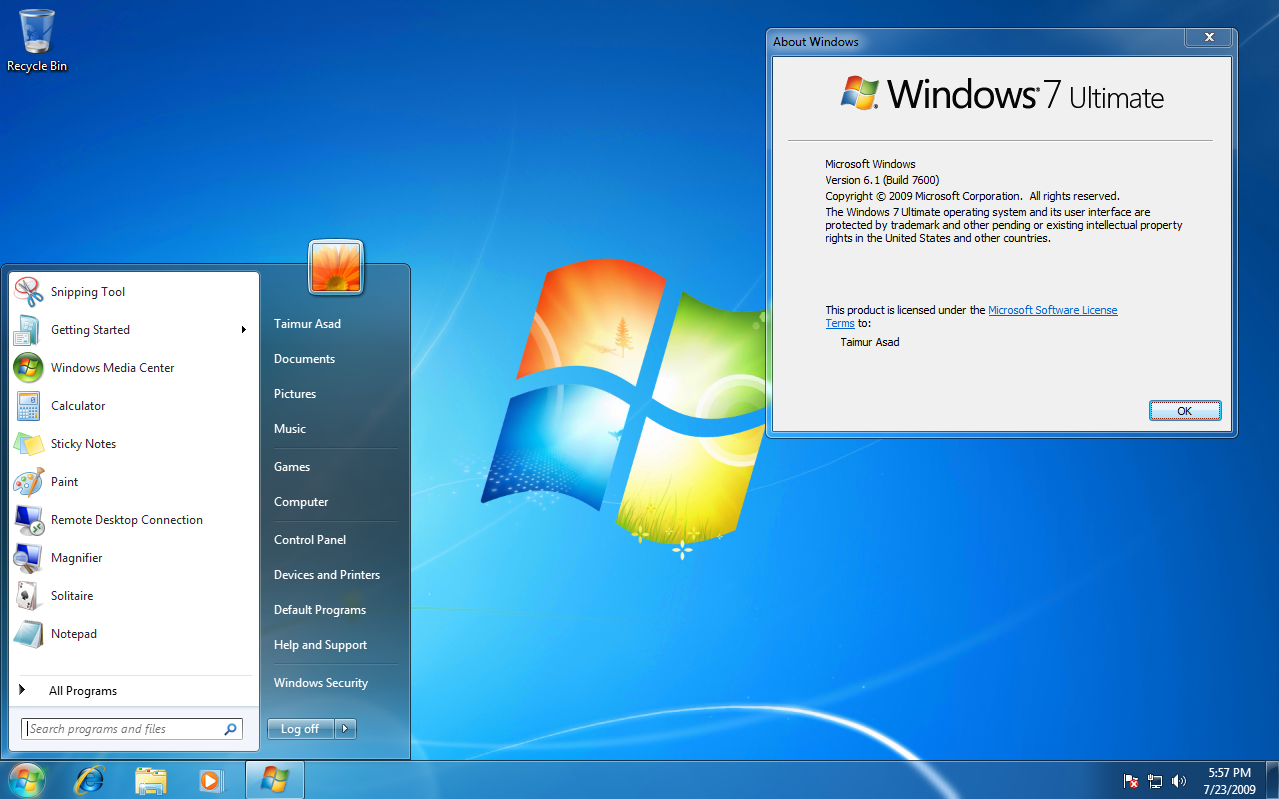
Microsoft took lessons from the criticism made to Windows Vista and created another major success with Windows 7 in 2009. Looks-wise, Windows 7 definitely didn't stray too far from Vista. It updated the Windows Aero design with additional transparency and visual effects that made it just as pretty, if not more so, than Vista. However, some big updates were done to aspects like the taskbar, which replaced the Quick Launch toolbar with pinnable apps on the taskbar, as well as the fact that apps are represented by just their icon on the taskbar instead of adding the app's name next to the icon (though this could be changed).
Again, a whole lot of new features and improved ones are included, including the last major release of Windows Media Player, version 12. The Calculator app got multiline support and unit conversion, Windows PowerShell was bundled in for the first time, and more.
While system requirements went up again, the increase wasn't as significant compared to Vistas's changes from Windows XP. Overall, Windows 7 was much more highly regarded for its significantly improved performance and stability, and just like Windows XP, it became one of the most successful Windows versions in history, with many users holding on to it during the life of its successor(s).