
Having started my descent into the Home Assistant ecosystem with a Raspberry Pi, the single-board computer used to be my primary choice for DIY projects involving sensor modules and automation chains. But considering the insane price hikes affecting the mainline Raspberry Pi SBCs, grabbing a new RPi board just to build smart gadgets is no longer feasible from a monetary standpoint.
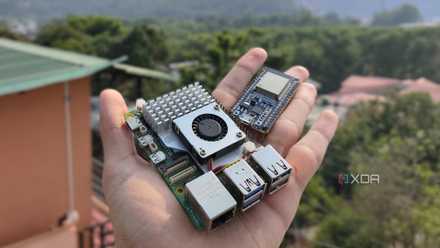
That said, you can replace a Raspberry Pi SBC with a microcontroller, and still get solid results in your smart home experiments. On paper, they’re entirely separate devices, as the non-Pico Raspberry Pi boards are general-purpose systems that can even run GUI Linux flavors, while microcontrollers are meant for direct-level hardware access and ship with vastly inferior specs than even the cheapest SBC. But if you’re looking to work with smart home gizmos or automation chains, I’d argue that microcontrollers are actually better than a typical Raspberry Pi.
5 projects you can do for much cheaper with an ESP32 than a Raspberry Pi
Why spend extra on a Raspberry Pi when you can build these cool projects with an ESP32?
The ESP32 family is a cost-effective alternative for Home Assistant projects
You can build dozens of ESP32 smart gadgets for the same price as a base Raspberry Pi
Between its solid connectivity options, easy-to-configure nature, and massive support from the tinkering community, the ESP32 lineup is versatile enough to fit in any Home Assistant setup. Cost-wise, the base ESP32 is often priced around $5-$10, and you can even knock a dollar or two off by picking a bundle of these boards. Plus, it’s a lot faster than comparable Arduino and Raspberry Pi modules, on top of supporting both Bluetooth and Wi-Fi functionality. And you’ve got the uber-powerful ESPHome app that not only ditches full-on programming languages for simple YAML-based syntax, but it also integrates well into Home Assistant.
As for the projects, you’ll find dozens of Raspberry Pi-powered smart gizmos that can be built for a fraction of the price with an ESP32. Want to run a weather station capable of tracking the pressure, temperature, and humidity values? A Raspberry Pi can definitely get the job done, but so can an ESP32 – all while sipping far less energy than a dedicated SBC. The same applies to Bluetooth proxies, where a Raspberry Pi would be far too overkill for a simple project. Likewise, simple automation pipelines involving vibration-detection modules, presence-sensing devices, or practically any sensor are better off with an ESP32.
These tiny MCUs can pair with e-ink displays and LED matrix panels, and with a little bit of YAML wizardry, they can accommodate entire Home Assistant dashboards. Heck, you can even turn an ESP32 into a cheap network monitor that keeps a weather eye on your home lab services. And that’s just the base ESP32 MCU…
The ESP32-CAM and ESP32-C6 boards have their own utility for tinkerers
They’re fairly cheap, too
I’ve been experimenting with different ESP32 microcontrollers as of late, and they’re terrific for specialized projects. For example, the ESP32-CAM board can serve as a cheap (yet still fully-functional) surveillance camera once you pair it with Frigate. But you can also use ESPHome to program it as a timelapse camera – one that costs a lot less than even a Raspberry Pi Zero + camera module combo. Sure, it won’t be able to beat some of the more expensive timelapse photography/security camera setups you can create with mainline RPi boards, but it’s surprisingly decent considering its cheap price tag.
Then there’s the ESP32-C6 MCU that, despite being tinier than an ESP32, supports Zigbee and Thread connectivity, making it useful for smart home setups that rely on these protocols. For example, if you don’t have a Thread border router, you can grab an ESP32-C6 unit and use it as a bridge to connect typical Thread/Matter devices with your Home Assistant hub. But you can also turn it into a Radio Co-Processor that relies on the MCU for its 802.15.4 radio capabilities, with your Home Assistant hub providing the horsepower required for the OpenThread IP stack. Or, you can convert it into a Thread extender to connect the devices that are too far from your Thread border router.

4 Raspberry Pi alternatives that actually make sense in 2026
Not every DIY project needs a Raspberry Pi
That said, you can’t run Home Assistant on a microcontroller
But at that point, x86 systems provide more bang for your buck
Before you bring up the elephant in the room, yes, there are certain smart home projects where the ESP32 becomes ineffective due to its lack of processing capabilities. A Home Assistant node, for example, needs a general-purpose system like a Raspberry Pi SBC, so you can’t replace every HASS project with an ESP32. The same applies to Frigate, and newer Raspberry Pi boards can even host it on top of Home Assistant.
But here’s the thing: an x86 mini-PC – preferably one that uses an N100 or a comparable processor – will crush the Raspberry Pi when it comes to building a Home Assistant hub. Sure, you can get solid performance out of an RPi SBC, but considering its massively inflated price tags, an old x86 thin client will always be a better investment than a Raspberry Pi. Unless, of course, your specific smart home project needs the low-energy consumption of ARM boards. But even in this case, I’d recommend picking an RPi Zero board over its mainline brethren, as they’re the only Raspberry Pi systems that don’t cost an arm and a leg.
- Brand
- AITRIP
- Connectivity Features
- UART, USB