OpenAI buried the most interesting part of the GPT-5.6 Sol launch under the news about the government gate. Alongside the new model family, OpenAI shipped two new reasoning controls: a “max” reasoning effort that gives Sol the most time to think, and an “ultra” mode that, in OpenAI’s words, “goes beyond a single agent by leveraging subagents to accelerate complex work.” That second one is a real shift in how a single model call behaves.
First, the access reality. GPT-5.6 Sol is in a limited preview through the OpenAI API and Codex only. It is not in ChatGPT yet, and it is restricted to roughly 20 partners whose names were individually approved by the US government. So you cannot turn on ultra mode today unless you are one of them. This article is for builders who want to understand what subagents inside one model call change about agent design, latency, and cost, so you can decide whether it is worth waiting for. OpenAI says general availability in ChatGPT, Codex, and the API is coming in the coming weeks.
TL;DR
- “max” reasoning effort is a deeper version of an existing dial: more thinking time, one agent, one chain of work.
- “ultra” mode is new in kind: the model spawns its own subagents to split up complex work, per OpenAI.
- You cannot use either yet. GPT-5.6 is a government-gated preview, API and Codex only, not in ChatGPT.
- Sol output is priced at $30 per 1M tokens, so ultra mode that fans out into subagents is not cheap. Reserve it for hard, parallelizable work.
- This is the same multi-agent-orchestrator idea other labs are shipping, now folded inside one model call. To test the orchestration pattern today, you have to use a model you can access.
What “max” reasoning effort does
OpenAI already let you tune how hard a reasoning model works through a reasoning effort setting. GPT-5.6 adds a new top rung called “max.” Set it, and Sol gets the most time to reason deeply before it answers.
Think of max as turning a knob you already know. The model still runs as a single agent and still produces one chain of reasoning. You are paying for more of that reasoning, in tokens and wall-clock time, to squeeze out the last bit of accuracy on a hard problem. The tradeoff is familiar: deeper thinking costs more and takes longer, and most prompts do not need it. Max is the right setting when a single tough question rewards extra deliberation, like a subtle refactor or a math-heavy plan. It does not change the shape of the work. It changes how long the one worker spends on it.
What “ultra” mode changes
Ultra is a different animal. Per OpenAI, ultra mode “goes beyond a single agent by leveraging subagents to accelerate complex work.” Instead of one model grinding through a problem in a single chain, the model orchestrates several subagents that tackle pieces of the task, then pulls their work back together.
If you have built agent systems by hand, you have already done this the hard way. You write an orchestrator. It decomposes a task into subtasks, fans those out to separate model calls, then collects the results and produces a final answer. You manage the prompts, the state, the retries, and the glue code between every step.
Ultra mode pulls that pattern inside the model call. You ask once. The model decides how to split the work, runs the subagents, and returns a result. The orchestration you used to own now happens behind one API call. That is the genuinely novel part. For the broader family context, the GPT-5.6 Sol overview covers the tiers, the naming, and why the whole thing is locked behind a government preview.
What it changes for agent design
Move orchestration into the model and three things change for the way you build.
Less glue code. The decompose, fan-out, and merge logic that used to live in your application can shrink. You describe the goal and let the model handle the breakdown. That is less surface area to maintain and fewer places for your orchestration to drift out of sync with the model’s behavior.
Less control. The flip side is that you give up visibility. When you own the orchestrator, you see every subtask, intermediate result, and retry, and you can log them or intervene. With subagents inside one call, that machinery is opaque. You see the input and the final output, not the branching in between. For workflows that need an audit trail, a hand-built orchestrator still wins.
Different failure modes. A single agent fails in ways you can usually trace. A model running internal subagents fails in ways that are harder to attribute. Did one subagent go off the rails? Did the merge step drop something? You will not always be able to tell from the outside, which matters when you are debugging a production agent.
This is the same tension that runs through every multi-agent system, relocated. To see how dedicated orchestrators frame it, Fugu Ultra versus Fable 5 versus Mythos walks through a model built explicitly as a multi-agent orchestrator, a useful contrast to OpenAI folding the idea inside one model.
Latency and cost: why ultra is not free
Subagents work in parallel, so for the right task ultra can finish faster than one agent plodding through every step in sequence. That is the “accelerate complex work” pitch.
The cost side is where you need to be honest. Sol is the flagship tier, and its output is priced at $30 per 1M tokens, with input at $5 per 1M (Terra and Luna are cheaper tiers in the same family). Now picture ultra spawning several subagents, each generating its own reasoning and output tokens. Those tokens add up across every subagent, so a single ultra call can burn far more than a single max call on the same prompt. Ultra trades tokens for speed and depth on hard, parallelizable work. If your task does not decompose into independent pieces, you are paying for subagents that wait on each other or duplicate effort. That is the overkill case.
Prompt caching softens the bill. GPT-5.6 supports explicit cache breakpoints with a 30-minute minimum cache life. Cache writes are billed at 1.25x the uncached input rate, and cache reads get the 90% cached-input discount. If your subagents share a large common context, like a big system prompt or a fixed codebase, caching it once and reading it cheaply across calls takes real money off the top. It does not change the output-token cost, which is where ultra spends the most.
Where ultra helps, and where it is overkill
Use ultra when the task splits into independent chunks that benefit from parallel work and where accuracy justifies the spend. Think a large codebase change touching many files at once, a research task that fans across several sources, or a complex agentic job with parallel branches. These are the jobs OpenAI is positioning Sol for, including coding and science work.
Skip ultra when the task is sequential, small, or latency-sensitive on a budget: a short answer, a single-file edit, a quick classification. For those, ultra spins up subagents that have nothing to parallelize, and max reasoning effort or even default effort is the honest choice.
Here is a blunt way to decide. If you could not split the task across several human contractors working at the same time, the model probably cannot get much value from subagents either. Sequential work stays sequential no matter how many agents you throw at it.
How this fits the broader multi-agent trend
OpenAI is not first to the idea that several coordinated agents beat one. Other labs have shipped models and frameworks where a controller delegates to specialists and stitches the results together. What is new is the packaging: OpenAI offers that pattern as a mode on a single model rather than a separate system you assemble.
That is a bet about where agent building goes. If in-model orchestration gets good enough, a lot of hand-rolled orchestration layers become redundant for common cases. If it stays opaque and hard to debug, teams that need control will keep building their own. Both can be true at once, with ultra handling the easy cases and custom orchestration owning the ones that need an audit trail. The GPT-5.6 Sol benchmark breakdown gets into whether the numbers back the orchestration claims, framed around the only decision you can make right now: wait or move on.
What you can do today
You cannot run ultra mode, so the practical move is to build and test the orchestration pattern on a model you can call. The frontier models available right now, like Claude Mythos 5, Claude Fable 5, GPT-5.5, Gemini 3.5 Pro, GLM-5.2, and Fugu Ultra, all expose OpenAI-compatible or standard chat endpoints you can wire up today.
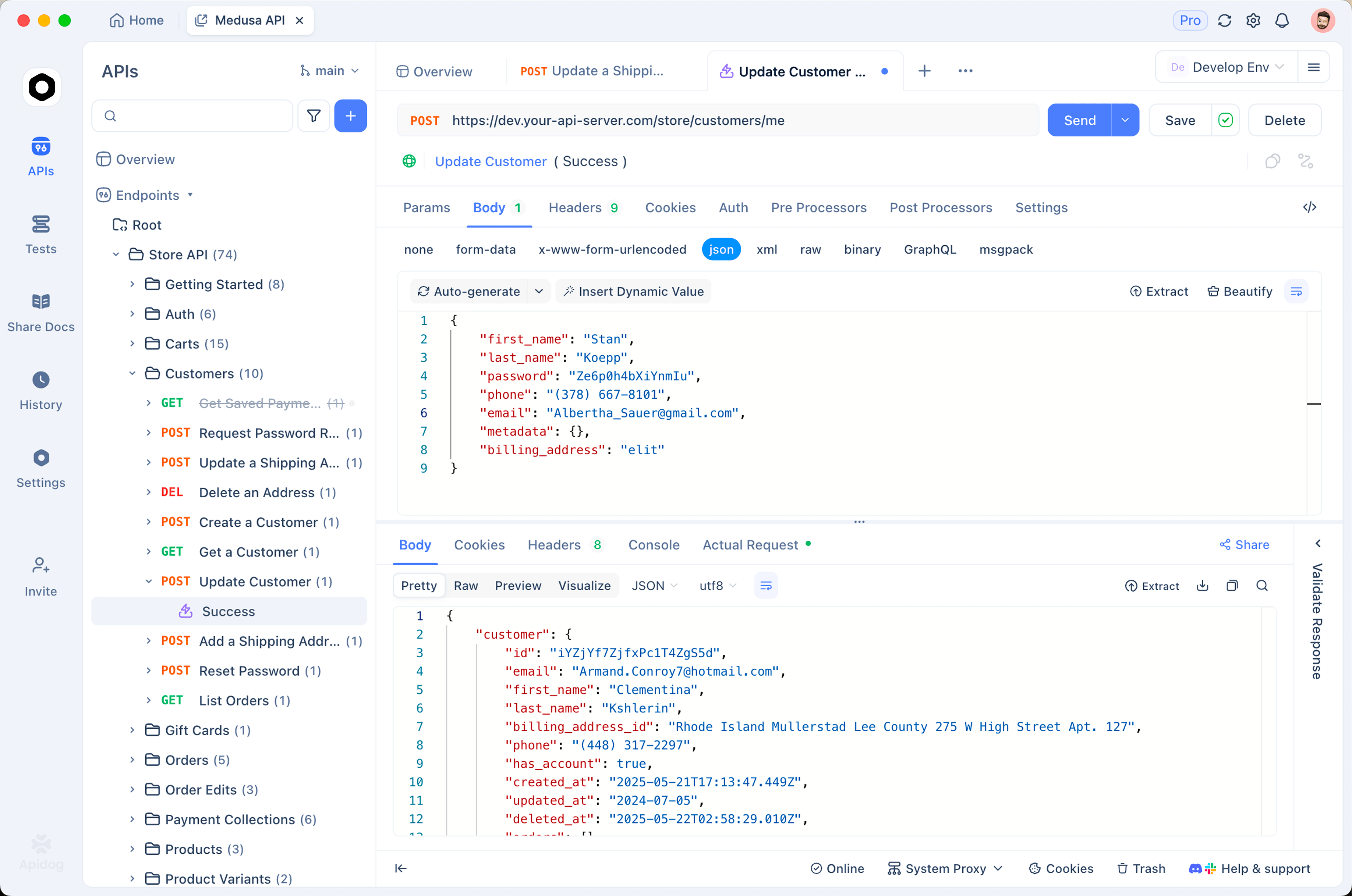
That is where Apidog fits. You can send requests to any of these model APIs, set parameters like reasoning effort where the model supports it, assert on the responses, and save the calls as reusable test scenarios. When your GPT-5.6 preview access lands, the same setup is ready: swap the endpoint and model identifier, and you are testing Sol the day you get in. You are not testing Sol today, because nobody outside the approved partners can. You are getting your test harness ready so day one is not a scramble.
Conclusion
Ultra mode is the most forward-looking piece of the GPT-5.6 launch: orchestration that used to live in your code, moved inside a single model call. It is also one you cannot touch yet, and when you can, it will not be cheap, so the discipline is matching the dial to the work. Use max when one worker needs to think harder. Reach for ultra only when the task truly splits into parallel parts worth the token bill.
Want your test harness ready for the day Sol opens up? Download Apidog and start testing the frontier model APIs you can call today.