Pricing
Pay per usage
Website Screenshot Generator
Create a screenshot of a website based on a specified URL. The screenshot is stored as the output in a key-value store. It can be used to monitor web changes regularly after setting up the scheduler.
Pricing
Pay per usage
Rating
3.9
(16)
Developer

Actor stats
168
Bookmarked
5.7K
Total users
683
Monthly active users
64 days
Issues response
5 months ago
Last modified
Categories
Share
What can Website Screenshot Generator do?
Website Screenshot Generator takes a screenshot of a specified web page.
- Take a screenshot of any website, to your specifications
- Schedule screenshots to track changes to a site over time
- Website Screenshot Generator is free to use
- Store and export screenshots with structured metadata in JSON, CSV, Excel, or HTML
- Export via SDKs (Python & Node.js), use API endpoints, webhooks, or integrate with workflows
The Website Screenshot Generator is a simple Actor that serves primarily as an example Actor. It can be used for many websites and use cases but for more advanced use cases, prefer using Website Content Crawler which can also generate screenshots and supports:
- Sophisticated crawling options
- Adaptive anti-scraping and rendering strategies
- Automatic closing of cookie banners
- Extensive customization options
How to use Website Screenshot Generator
Website Screenshot Generator is designed with users in mind, even those who have never extracted data from the web before. Using it takes just a few steps.
- Create a free Apify account using your email
- Open Website Screenshot Generator
- Add one or more web URLs
- Click the “Start” button and wait for the data to be extracted
- Download your data in JSON, XML, CSV, Excel, or HTML
Input
The input for Website Screenshot Generator should be one or more web URLs of the pages you want to screenshot.
👁 Website Screenshot Generator input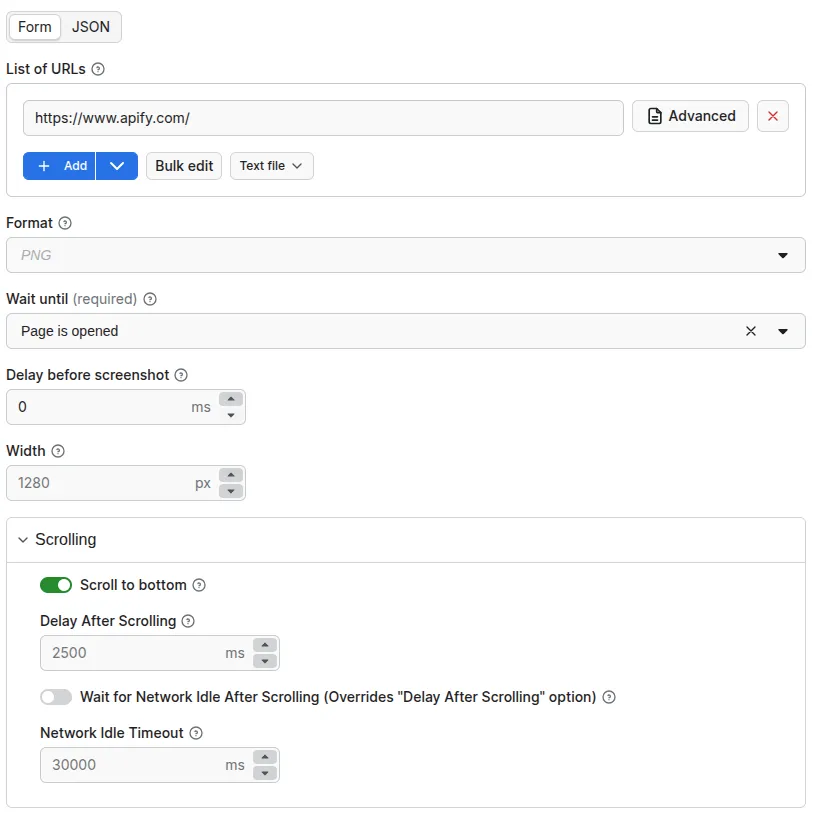
Note that you can also decide whether the scraper should scroll to the bottom of the page or not, and you can set the delay before the screenshot is taken. You can also set other input parameters; read the input tab for more on this.
Output
Screenshot files are stored in Key-Value Store. Links to these files are pushed to a dataset that contains metadata about each page.
👁 Website Screenshot Generator output
Here’s what it looks like in JSON:
How much will using Website Screenshot Generator cost you?
Using the Website Screenshot Generator is free; you’re only charged for using the Apify platform. These costs vary per payment plan. Check out the Apify pricing page for details.
Frequently asked questions
Can I use integrations with Website Screenshot Generator?
You can integrate Website Screenshot Generator with almost any cloud service or web app. We offer integrations with Make, Zapier, Slack, Airbyte, GitHub, Google Sheets, Google Drive, and plenty more.
Alternatively, you could use webhooks to carry out an action whenever an event occurs, such as getting a notification whenever Website Screenshot Generator successfully finishes a run.
Can I use Website Screenshot Generator with the Apify API?
The Apify API gives you programmatic access to the Apify platform. The API is organized around RESTful HTTP endpoints that enable you to manage, schedule, and run Apify Actors. The API also lets you access any datasets, monitor Actor performance, fetch results, create and update versions, and more.
To access the API using Node.js, use the apify-client NPM package. To access the API using Python, use the apify-client PyPI package. Check out the Apify API reference docs for all the details.
Can I use Website Screenshot Generator through an MCP Server?
With Apify API, you can use almost any Actor in conjunction with an MCP server. You can connect to the MCP server using clients like ClaudeDesktop and LibreChat, or even build your own. Read all about how you can set up Apify Actors with MCP.
For Website Screenshot Generator, go to the MCP tab and then go through the following steps:
- Start a Server-Sent Events (SSE) session to receive a
sessionId - Send API messages using that
sessionIdto trigger the scraper - The message starts the Website Screenshot Generator with the provided input
- The response should be:
Accepted
Is it legal to take website screenshots?
Website Screenshot Generator does not extract any private user data, such as email addresses, gender, or location. They only extract what is shared publicly on a website.
That said, you should be careful not to scrape personal data, which is protected by the GDPR in the European Union and by other regulations around the world. You should not scrape personal data unless you have a legitimate reason to do so. If you're unsure whether your reason is legitimate, consult your lawyers. You can also read our blog post on the legality of web scraping.
Your feedback
We’re always working on improving the performance of our Actors. If you have any technical feedback for Website Screenshot Generator or found a bug, please create an issue in the Issues tab.